
Appearance
Account Registration
Create your CaptiFi account and get started in minutes.
Sign Up
- Visit captifi.io/trial
- Enter your details:
- First and last name
- Email address
- Business name and country
- A password
- Choose your plan and click Start Free Trial
- Add a payment method via our secure Stripe checkout
For a single venue you can choose Lite. It works on your own WiFi (UniFi, Omada, Meraki or another supported controller) or with the CaptiFi device and its refundable deposit: see The Lite plan.
Your 30-day free trial starts immediately. You won't be charged until the trial ends, and you can cancel any time during the 30 days at no cost.
First Login
- Check your email for a welcome message from CaptiFi
- Click the login link or visit my.captifi.io
- Enter your email and password
- You'll be taken straight to the set-up wizard on my.captifi.io
You can also click Continue with Google, Continue with Microsoft or Continue with Apple if that account uses the same email address as your CaptiFi account (for Microsoft, the account's sign-in name). On this first sign-in CaptiFi still asks for your CaptiFi password once to link the provider; from then on the button signs you straight in. See Sign in with Google, Microsoft or Apple.
TIP
If you don't receive the welcome email, check your spam/junk folder. If it's not there, contact us at hello@captifi.io.
What Happens Next?
After logging in for the first time, you'll be guided through the set-up wizard:
- Choose how guests connect: a CaptiFi device, or your own controller such as UniFi or Omada
- Connect your controller or order your device, and set up your venue
- Design your splash page, your WiFi login screen
The entire process takes about 5-10 minutes.
If We Set Your Account Up For You
Sometimes our team (or your reseller) creates your account for you, for example after a demo or a phone call. When that happens you receive an email titled "Your CaptiFi account is ready" with a link to choose a password.
- Open the email and click Set your password and finish setup. The link is valid for 60 minutes; if it expires, use Forgot password on the sign-in page and you will land in the same place.
- Choose a password and sign in.
- You land on the Complete your setup page. It shows the plan we agreed, your trial end date, and the plans you can switch to.
- Pick Monthly or Annual at the top. Annual gives you two months free.
- Choose your plan. The plan we set up for you is selected already, and you can pick a different one here.
- Enter your card details and click Start my trial.
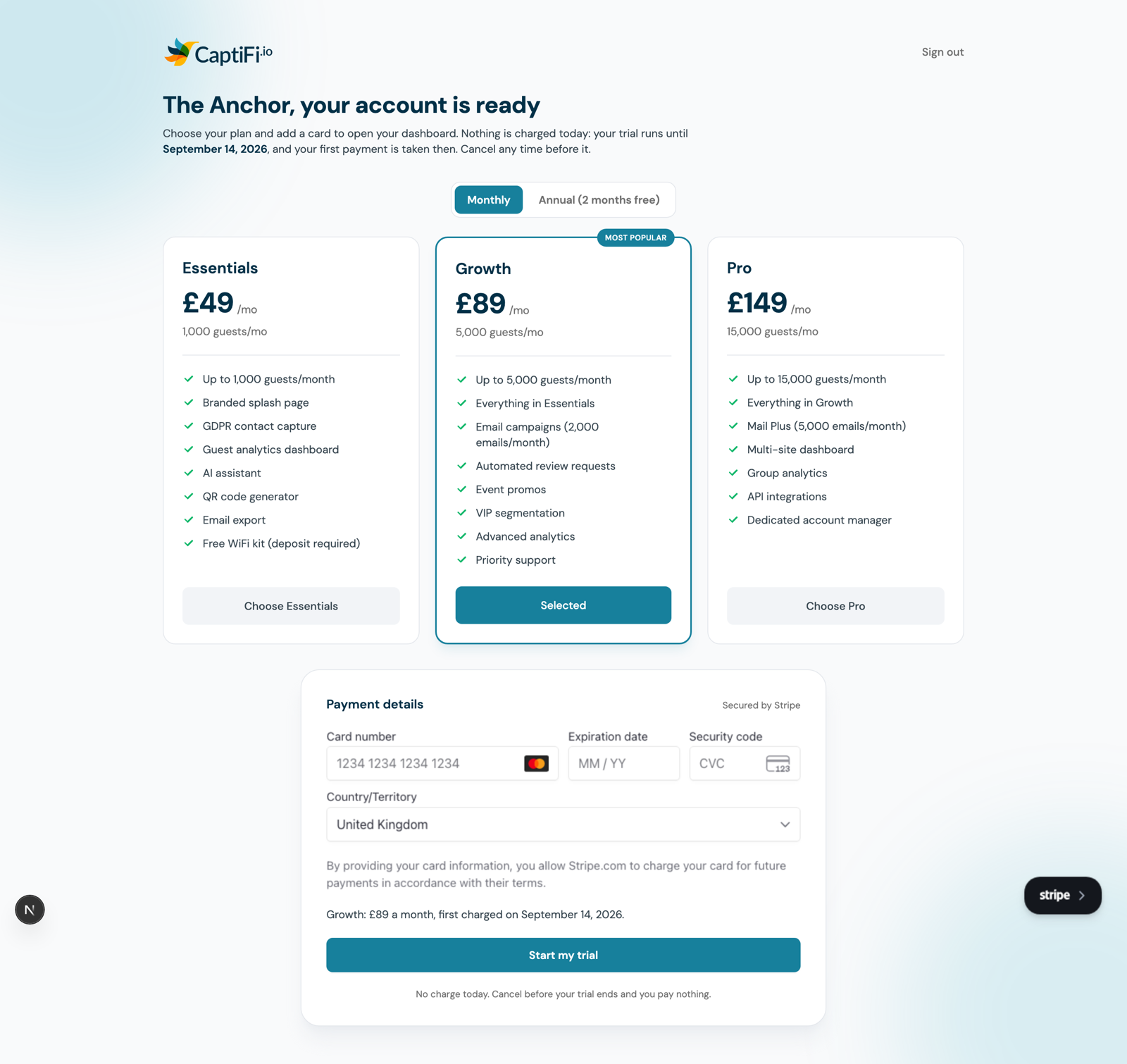
Nothing is charged when you add your card. Your first payment is taken on the trial end date shown on the page, and you can cancel before then at no cost. When it goes through, your receipt prints on screen with the plan, the card you used and the date of that first payment.
If your trial happens to end while you are on this page, nothing is taken. The page updates to say your trial has finished, shows the amount due today, and waits for you to confirm again. You are never charged an amount the page did not show you first.
Prices on this page are in your own billing currency, and that is the currency your subscription is created in. If your country is not on your account yet, add it before you finish setup: see Plans and Pricing for the prices in each currency.
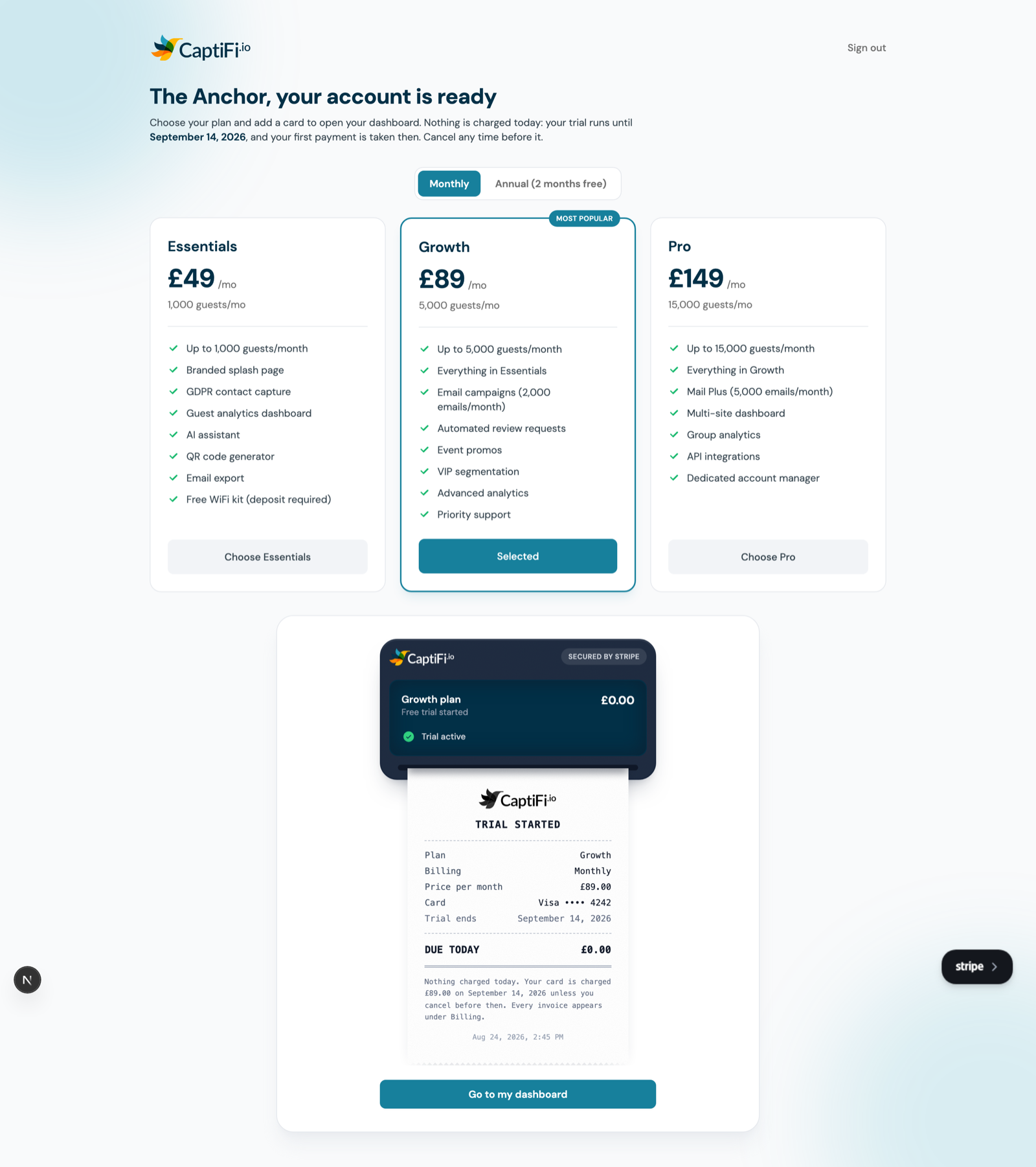
Your dashboard opens as soon as setup is done, and the same page is waiting for you at any time until then at my.captifi.io.
TIP
Team members cannot complete this step. Only the account owner can add the card, so if you are on someone else's account the page tells you who to ask.
If You Were Told You Do Not Need To Pay
Some accounts are set up with billing handled another way: a pilot, an account billed by a reseller, or an arrangement invoiced outside the dashboard. In that case there is no card step at all. You set your password, sign in, and your dashboard is open, with your plan already active. Everything on your plan works exactly as it would on a card subscription.