
Appearance
Integrations
Location: my.captifi.io → Integrations in the sidebar
The Integrations page is where you send your captured guest data wherever it works hardest - and where you switch on dashboard features like vouchers and Paid WiFi. Connect a provider once, then enable it per venue.
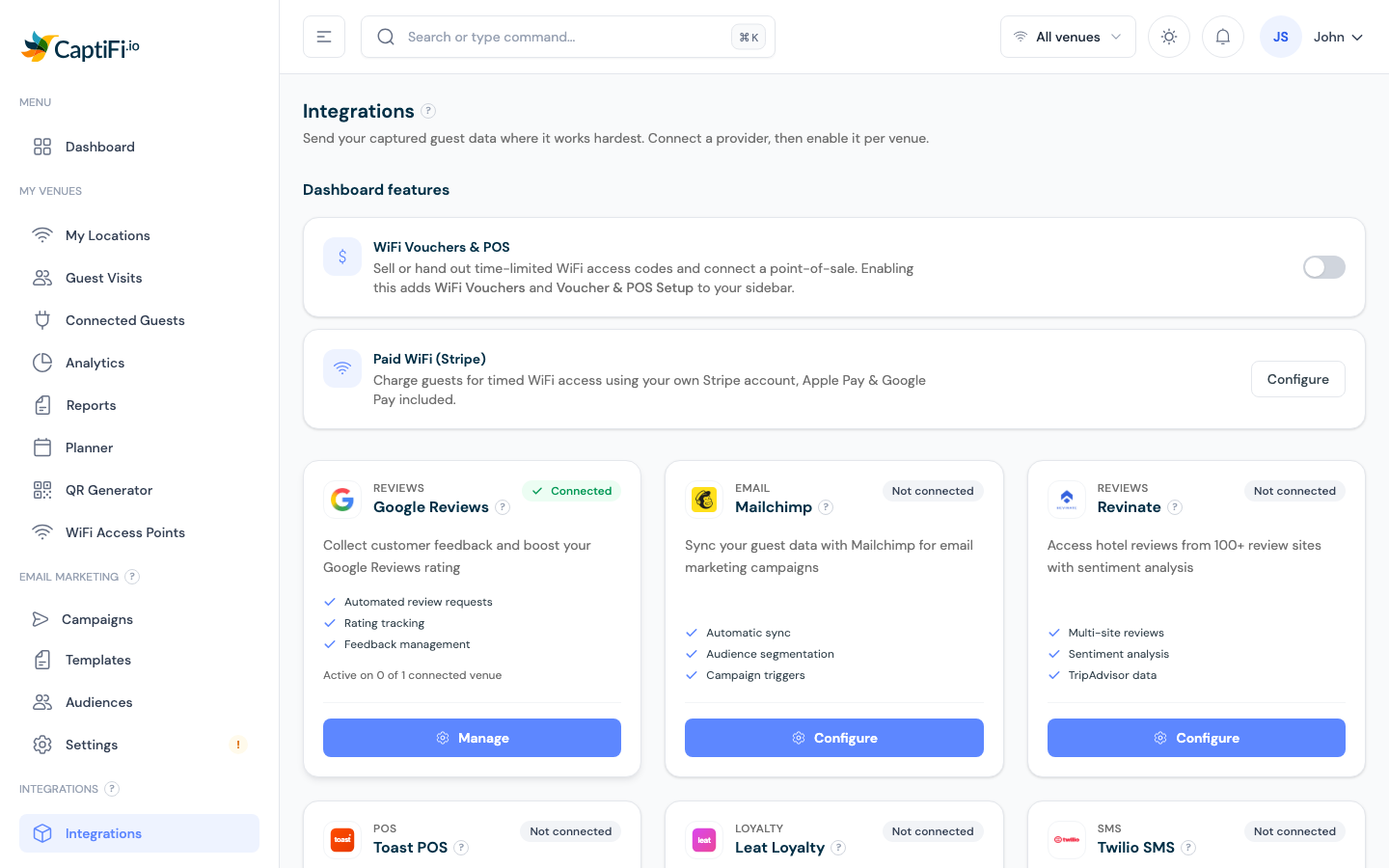
Dashboard Features
At the top of the page, the feature cards each carry a Show in sidebar toggle. Switch a feature on to add its pages to your sidebar; switch it off to hide them again (your settings and data are kept either way):
- WiFi Vouchers & POS - adds WiFi Vouchers and Voucher & POS Setup to your sidebar. → WiFi Vouchers
- Paid WiFi (Stripe) - adds Paid WiFi to your sidebar, where you connect Stripe and set your pricing plans. → Paid WiFi
- Reservations - adds Reservations to your sidebar, where you import OpenTable exports or add bookings manually and see who actually turned up. Off by default; included on Growth and above. → Reservation Check-in
- Rewards & Offers - adds a Rewards group to your sidebar: your programme, offers, members, the staff redeem screen, the redemption log, terminals and reports. Off by default, switched on by the account owner; included on Growth and above. → Rewards & Offers
- Events and tickets - adds an Events group to your sidebar, where you create events, sell paid tickets or take free RSVPs on a CaptiFi-hosted page and check guests in at the door. Off by default; included on Growth and above; only the account holder can switch it. → Events and tickets
- Table bookings - adds a Bookings group to your sidebar: the diary, the bookings list, enquiries, reports and each venue's booking settings. Guests book a table on a CaptiFi-hosted page from live availability, staff run the day from the diary, and bookers who connect to your WiFi are marked arrived. Off by default; included on Growth and above; only the account owner can switch it. → Table bookings
Integration Cards
Each provider card shows a status pill - Connected (green) or Not connected - plus how many of your venues it's active on. The button reads Configure (not yet set up), Manage (already connected), Coming soon, or an upgrade prompt if the integration isn't on your plan.
Under that button, every card has a Setup guide button that opens the step-by-step walkthrough for that integration in a new tab, so you can follow the guide alongside the settings. It is there on locked and coming-soon cards too, so you can read what an integration does before you switch plans.
| Integration | What it does |
|---|---|
| Google Reviews | Asks WiFi guests to rate their visit by email or text; ratings at or above your minimum stars go to Google or Tripadvisor, lower ones open a private feedback form that still shows your public links. → Full guide |
| Mailchimp | Syncs opted-in guests to your Mailchimp audience automatically. → Setup guide |
| Revinate | Exports guest data to Revinate for hospitality CRM. → Setup guide |
| Toast | Connects your Toast point-of-sale so you can see guest WiFi visits alongside till spend (adds a Toast Spend entry under Dashboard in your sidebar, and a spend card with their recent orders and most-ordered items on each guest's profile) |
| Square | Adds opted-in WiFi guests to your Square Customer Directory and matches Square spend back to guests (adds a Square Spend entry under Dashboard in your sidebar). → Setup guide |
| Klaviyo | Adds opted-in guests to Klaviyo as profiles, with optional list subscription. → Setup guide |
| Leat (formerly Piggy) | Loyalty platform sync for opted-in guests |
| Twilio | Sends a welcome SMS to WiFi guests automatically, opt-in only with 24-hour de-duplication. → SMS guide |
| Airship | CRM/engagement platform sync |
| Zapier | Connects CaptiFi to 7,000+ apps with automated workflows |
| Slack | Posts a message to your team channel each time a guest connects. → Setup guide |
| HubSpot | Creates HubSpot Contacts from guests who accept marketing, matched by email. → Setup guide |
Configuring an Integration
- Click Configure (or Manage) on the card
- The configuration opens with a row per venue - each venue connects independently
- Enter the provider's credentials for that venue (API keys are stored write-only: once saved, only a preview is shown)
- Click Test connection to verify, then Save
- Use the Enabled/Disabled toggle per venue to pause without losing the setup, or Disconnect to remove the credentials entirely
Coming Soon
Cards marked Coming soon are in development - currently Facebook, Gmail / Google Workspace, and ChatGPT. They'll light up in your dashboard as they become available.
WiFi Platforms
The bottom of the page lists supported WiFi hardware platforms - UniFi, TP-Link Omada, Cisco Meraki, Cisco WLC (9800/AireOS), Aruba Instant On, Ruckus, Fortinet FortiAP, MikroTik, and DrayTek - each linking to its setup guide or to support for assisted setups. This is a reference grid; hardware is connected per venue under My Locations.
Plan Requirements
Integrations are available on the Growth plan and above. Essentials includes review requests (the Google Reviews, Tripadvisor and Yelp cards) and the Paid WiFi and WiFi Vouchers dashboard features. Every other integration needs Growth. Lite has no integrations and no Integrations page. The 30-day free trial runs on the plan you choose at signup, so choose Growth or above to try every integration during the trial (plans can be switched from the dashboard at any time). If a card shows "Available on the … plan", upgrading unlocks it. See Plans & Pricing or contact support@captifi.io.
Need Help?
Our support team is happy to help you connect your services: support@captifi.io, or Help & Support in the dashboard sidebar.