
Appearance
Dashboard Overview
Your CaptiFi dashboard at my.captifi.io is your command centre for managing guest WiFi, marketing, and analytics.
Classic dashboard
The classic dashboard at app.captifi.io remains available with the same features. This documentation describes the new dashboard at my.captifi.io.
The Home Screen
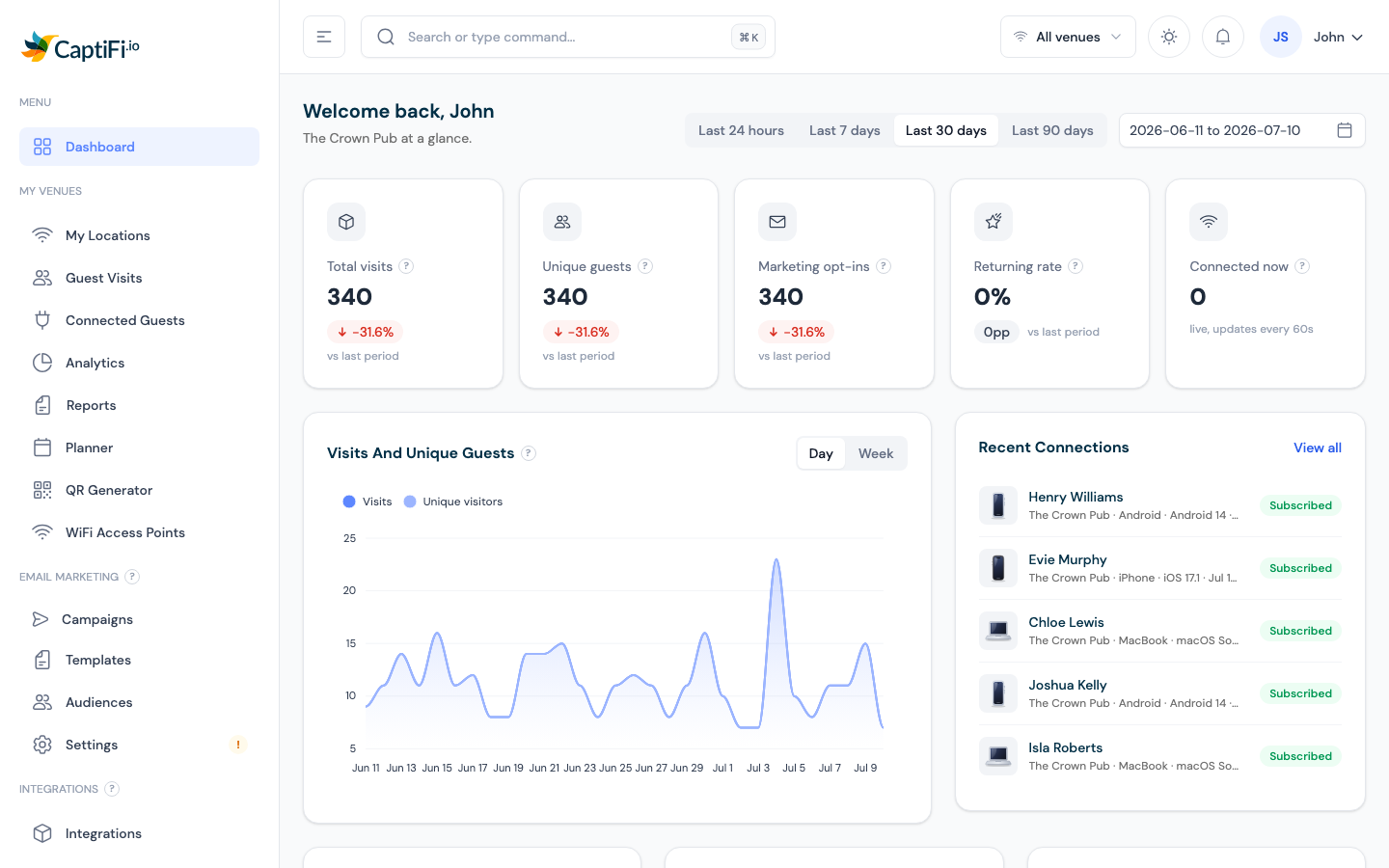
When you log in you land on Dashboard — "Welcome back" with your business at a glance:
- Date range picker (top right) — every card and chart follows the range you pick
- KPI cards — Total visits, Unique guests, Marketing opt-ins, Returning rate, and Connected now (live, updates every 60 seconds). Click any card to drill through to the detail page behind it
- Charts — Visits and unique guests over time (day/week toggle), recent connections, device mix, new vs returning, and the opt-in funnel
Sidebar Navigation
Menu
- Dashboard — the home screen above
My Venues
- My Locations — every venue: splash page editing, WiFi network name, session length, connection status, add/delete venues. → Multi-Venue Management
- Guest Visits — searchable log of every WiFi login, with CSV export and GDPR tools. → Guest Analytics
- Connected Guests — live view of who's on your WiFi right now, with signal bars and block/extend/disconnect actions. → Connected Guests
- Analytics — deeper analysis: busiest hours, device breakdowns, top venues, footfall heatmap. → Guest Analytics
- Reports — downloadable branded monthly PDF summaries
- Planner — a footfall-shaded calendar for planning marketing events, with scheduled WiFi automations (splash swaps, WiFi name changes, message strips). → Planner & WiFi Automations
- QR Generator — scan-to-connect QR codes per venue. → QR Generator
- WiFi Access Points — live status of every access point. → Access Points
- WiFi Vouchers and Voucher & POS Setup — appear once you enable vouchers on the Integrations page. → WiFi Vouchers
- Paid WiFi — appears once Paid WiFi is configured. → Paid WiFi
Email Marketing
Appears on plans with email marketing (Growth and above):
- Campaigns — create and track email campaigns. → Email Campaigns
- Templates — your reusable email template library
- Audiences — saved segments and automatic emails. → Automations
- Settings — sender identity and domain verification (a warning badge appears here until your sending domain is verified)
Reviews & Feedback
- Reviews: three tabs, Review requests (settings), Guest feedback (ratings and private feedback from your guests) and Inbox (your public Google and TripAdvisor reviews with reply drafts). Shown before setup on any plan that includes Google Reviews. → Reviews
Integrations
- Integrations — connect Google Reviews, Mailchimp, Revinate, Toast, Twilio and more; enable dashboard features like vouchers and Paid WiFi. → Integrations Hub
Account
- Profile — your personal details, business info, venue address, password, and two-factor authentication. → Account Settings
- Team — invite colleagues with role-based permissions. → Team Members
- Billing — plan, payment method, invoices, and usage. → Managing Your Subscription
Help & Support
- AI Assistant — ask questions about your venues and guest data in plain English. → AI Assistant
- Help & Support — raise a support ticket, follow setup guides, and browse FAQs
The Top Bar
- Search — a global command palette for jumping to any page
- Venue switcher — if you have several venues, switch between them; every page follows your selection. The "All venues" aggregate is part of the Pro plan, so on plans below Pro you pick one venue at a time
- Theme toggle — light or dark mode
- Notifications bell — recent events across your venues, campaigns, and reviews; "View all notifications" opens the full history
- Your avatar — profile, support, and sign out
Mobile Access
The dashboard is fully responsive. Access it from any device at my.captifi.io — the sidebar collapses into a menu on mobile.
Trial & Subscription
During your 30-day trial, a countdown is shown on your Profile and Billing pages with an Add payment method shortcut. If your trial ends without a subscription, the dashboard pauses (your guest WiFi keeps working for guests) until you add a payment method under Billing.