

Appearance
Ticket payments and booking fees
Paid tickets are charged to your venue's own Stripe account. Your venue is the merchant: its name is on the buyer's card statement, and Stripe pays the money out to your bank account on the schedule set in your Stripe dashboard. CaptiFi never holds ticket money. On each paid ticket CaptiFi takes a booking fee from the payment, with card processing included in that fee. Free tickets and RSVPs cost nothing and never touch Stripe.
Everything on this page is for the account holder. A team member can read it but cannot connect Stripe, change the currency or fee mode, accept the terms, refund an order, cancel an event, or see disputes and statements.
Connecting Stripe
Each venue that sells paid tickets needs a connected Stripe account. The Stripe card is on Settings then Events settings, one venue at a time.
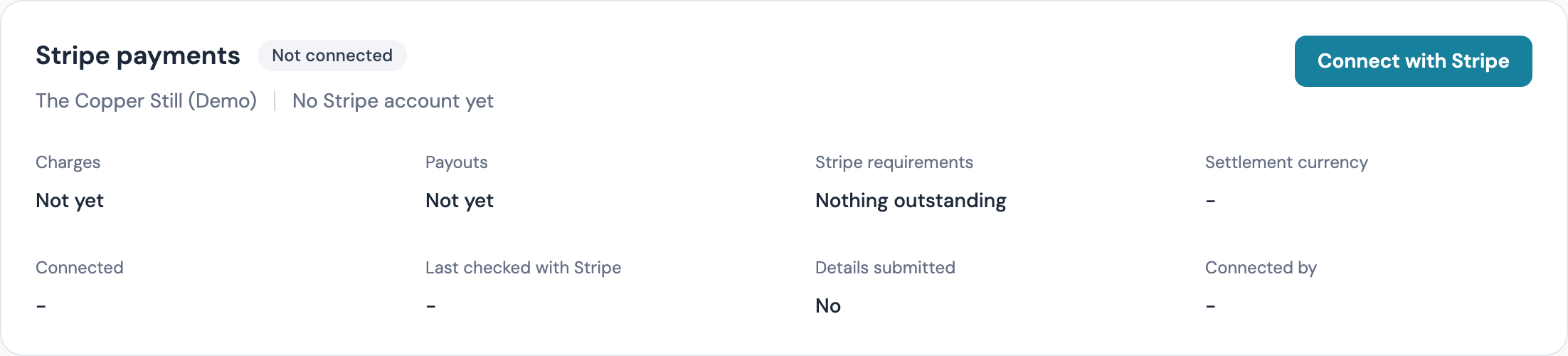
Stripe Connect needs the venue's country. If the venue has no country set, Connect with Stripe refuses; set the country under My Venues first.
- Pick the venue and click Connect with Stripe. CaptiFi creates a Stripe Express account for the venue and sends you to Stripe's own onboarding form.
- Fill in what Stripe asks for. Stripe decides the list from your country and business type; expect your business details, the details of the person responsible for the account, the bank account payouts go to, and identity checks on that person.
- When Stripe sends you back, the card shows the new status. Click Refresh status if it has not caught up yet.
The statuses you will see:
| Status | Meaning |
|---|---|
| Not connected | No Stripe account yet. Free tickets and RSVPs work without one. |
| Onboarding with Stripe | Stripe still needs details from you. Click Continue with Stripe to carry on where you left off. |
| Stripe is reviewing | Stripe is checking the account. Nothing to do unless the card shows Give Stripe the missing details; refresh to check. |
| Active | Card payments and payouts are on. Paid tickets can go on sale. |
| Restricted | Stripe has paused the account until you act. Click Give Stripe the missing details and Stripe shows only what it still needs. |
| Disconnected | The account was removed from this venue. Connect again to sell paid tickets. |
The card also shows how many items Stripe still needs, and whether any are overdue. Open Stripe dashboard takes you into your Stripe Express dashboard for balances, the payout schedule and your bank details.
If a Stripe link expires before you finish, the page says so; click Continue with Stripe for a fresh one.
The booking fee
The fee is charged per paid ticket. The whole ticket price is charged at the rate of the band it falls in, never below the minimum for the currency, and the figure is rounded to the nearest penny (or cent) per ticket. Card processing is included: there is no separate Stripe processing charge to you. A free ticket carries no fee at all.
| Currency | 7.5% up to | 6% up to | 4.5% above | Minimum fee per paid ticket | Lowest paid ticket price |
|---|---|---|---|---|---|
| GBP | £20.00 | £50.00 | £50.00 | £0.50 | £0.50 |
| USD | $25.00 | $65.00 | $65.00 | $0.75 | $0.75 |
| EUR | €25.00 | €60.00 | €60.00 | €0.60 | €0.60 |
| CAD | CA$35.00 | CA$85.00 | CA$85.00 | CA$0.75 | CA$0.75 |
| AUD | A$40.00 | A$100.00 | A$100.00 | A$0.75 | A$0.75 |
| NZD | NZ$40.00 | NZ$110.00 | NZ$110.00 | NZ$0.75 | NZ$0.75 |
A paid ticket cannot be priced below the lowest paid price in the last column; the ticket type form refuses it. Events settings shows the line for your venue's selling currency under Booking fee, for example "In USD: 7.5% up to $25.00, 6% up to $65.00, then 4.5%; minimum $0.75 per ticket. Paid tickets must be priced at least $0.75."
Worked figures in GBP: a £5.00 ticket carries the £0.50 minimum, £15.00 carries £1.13, £45.00 carries £2.70 and £100.00 carries £4.50. Up to £6.66 the £0.50 minimum applies; from £6.67 the band rate takes over. In USD: a $5.00 ticket carries the $0.75 minimum, $15.00 carries $1.13, $45.00 carries $2.70 and $100.00 carries $4.50. Up to $9.99 the $0.75 minimum applies. In EUR the €0.60 minimum applies up to €7.99, and in CAD, AUD and NZD the 75c minimum applies up to 9.99. The other rows of the table work the same way.
Who pays the fee
Each venue chooses one of two modes under Booking fee on Events settings. The fee is the same in both; the modes differ in who pays it.

Passed on to the buyer (the default): the buyer pays the ticket price plus the fee and sees a Booking fee line at checkout. For a £15.00 ticket the buyer pays £16.13 (£15.00 plus £1.13) and £15.00 settles to your Stripe account. Two of those tickets on one order come to £32.26, because the fee is worked out per ticket.
Absorbed by the venue: the buyer pays the ticket price and no fee line appears. For a £15.00 ticket the buyer pays £15.00 and £13.87 settles to your Stripe account after the £1.13 fee.
Each order keeps the mode it was bought under. Changing the mode affects new orders only. The other currencies work the same way with their own bands and minimums.
Accepting the fee terms
Before any venue on the account can put a paid ticket on sale, the account holder accepts the booking fee terms:
- Open Events settings and choose a venue
- Read the terms under Booking fee terms, in the Booking fee section
- Click Accept the booking fee terms
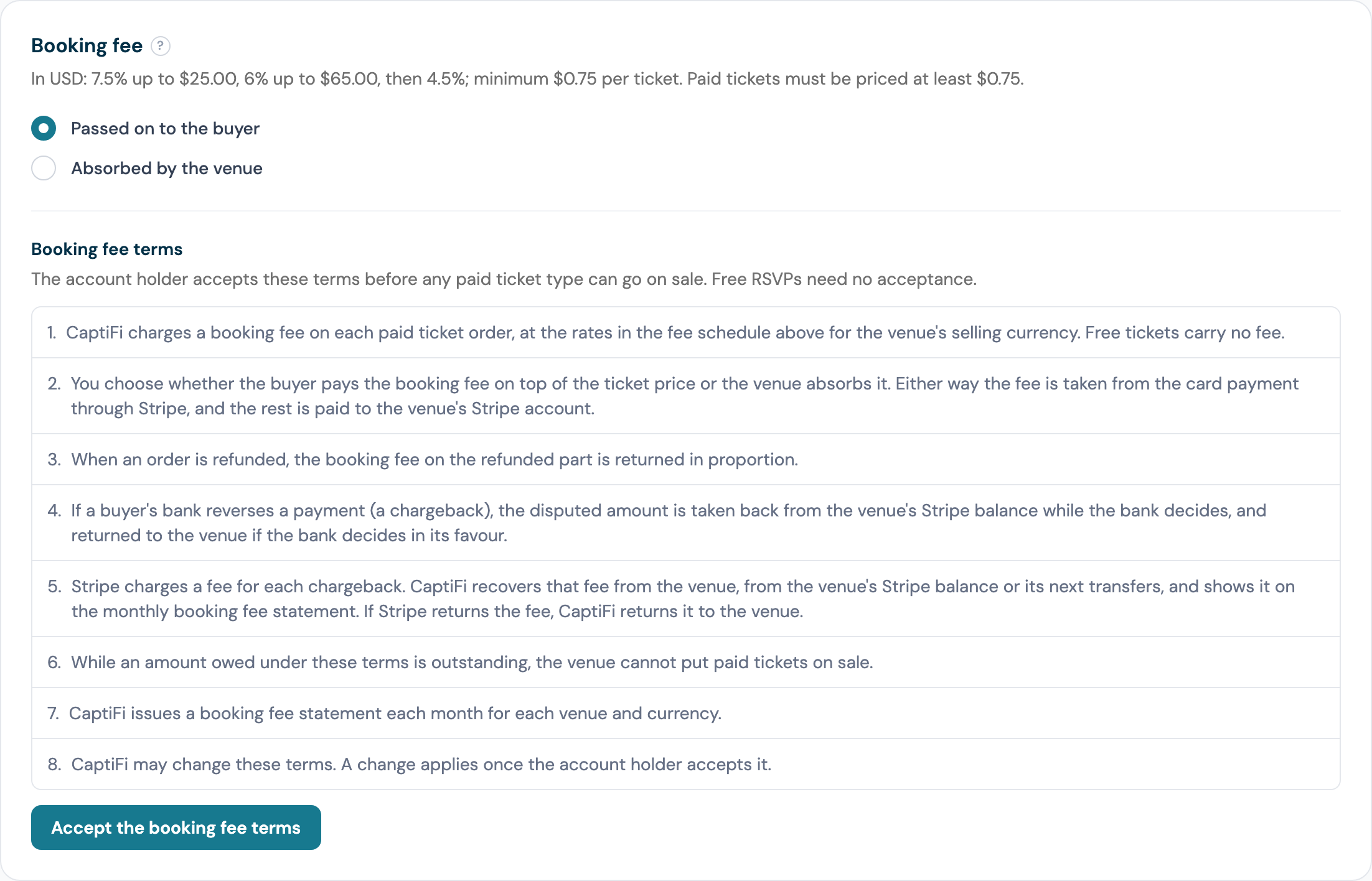
The page then shows the date you accepted. One acceptance covers every venue on the account. A team member sees the terms with the line "Only the account owner can accept them."
When the terms change, the card reads The booking fee terms have changed, shows the new text and offers Accept the new terms. Paid tickets keep selling under the terms you accepted before until you accept the new ones. The current terms are:
- CaptiFi charges a booking fee on each paid ticket order, at the rates in the fee schedule above for the venue's selling currency. Free tickets carry no fee.
- You choose whether the buyer pays the booking fee on top of the ticket price or the venue absorbs it. Either way the fee is taken from the card payment through Stripe, and the rest is paid to the venue's Stripe account.
- When an order is refunded, the booking fee on the refunded part is returned in proportion.
- If a buyer's bank reverses a payment (a chargeback), the disputed amount is taken back from the venue's Stripe balance while the bank decides, and returned to the venue if the bank decides in its favour.
- Stripe charges a fee for each chargeback. CaptiFi recovers that fee from the venue, from the venue's Stripe balance or its next transfers, and shows it on the monthly booking fee statement. If Stripe returns the fee, CaptiFi returns it to the venue.
- While an amount owed under these terms is outstanding, the venue cannot put paid tickets on sale.
- CaptiFi issues a booking fee statement each month for each venue and currency.
- CaptiFi may change these terms. A change applies once the account holder accepts it.
The selling currency
Each venue sells in one currency, chosen under Selling currency. It starts from your venue's country and billing currency and must match the currency the venue's Stripe account settles in; when the two differ, the card says so and paid tickets cannot go on sale until they match.
The currency is locked for good once the venue has taken a paid order, and the setting says so. While a buyer is part-way through a paid checkout, the card says how many minutes until the currency can change, because the tickets are held in the current currency until that hold ends.
Refunding an order
Only the account holder can refund. The money goes back to the card the buyer paid with, CaptiFi returns its booking fee in proportion in the same movement, and Stripe's processing cost is not returned to anyone. A refund can cover whole tickets, an amount, or both, on a paid order; on a free order the same action cancels the chosen tickets and moves no money.
Open Events then Ticket orders, open the order and click Refund (Cancel tickets on a free order). The dialog is headed Refund order CF-7F3K9Q (Cancel free tickets on CF-7F3K9Q for a free order) and its first line says how much is still on the order. An order staff took at the door in cash or on your till has no Refund button: no card payment went through Stripe, so give that money back to the buyer yourself.
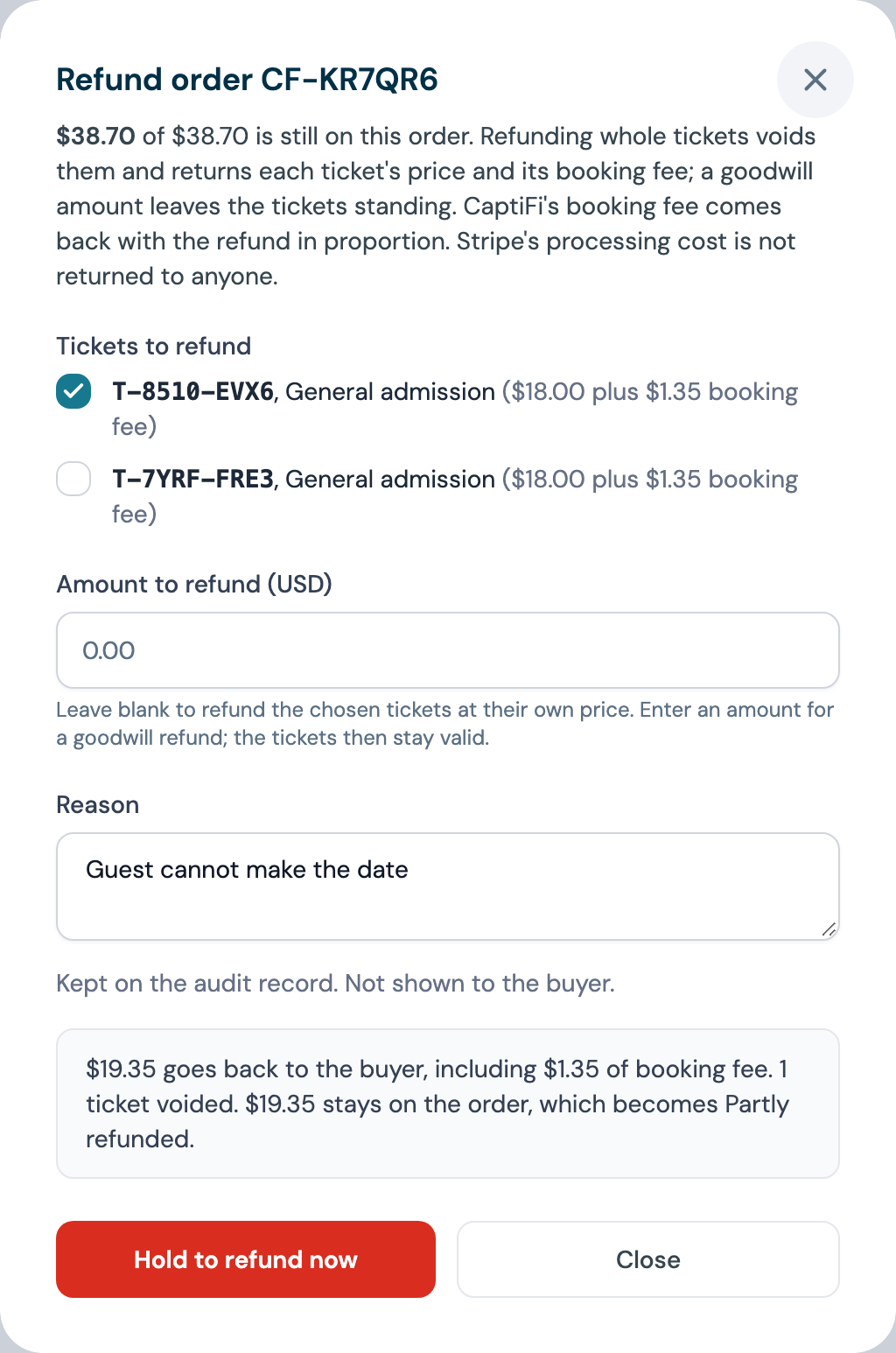
- Tickets to refund (Tickets to cancel on a free order): tick the tickets to refund at their own price. Each row shows the ticket number, its type and its price, with its fee where the buyer paid it. A ticket already checked in at the door is greyed out: it cannot be refunded as a ticket, so refund an amount instead.
- Amount to refund (GBP), in the order's currency: leave it blank to refund the chosen tickets at their own price, or enter an amount such as 5.00 for a goodwill refund, and the tickets stay valid. The amount cannot be more than what is left on the order, and the smallest is 0.01.
- Reason, 2 to 255 characters. It is kept on the audit record and never shown to the buyer.
- Read the figures. A preview appears under the form once you stop changing it: the amount going back to the buyer with the booking fee inside it, the tickets voided, what stays on the order and its status afterwards: for example "£16.13 goes back to the buyer, including £1.13 of booking fee. 1 ticket voided. £16.13 stays on the order, which becomes Partly refunded." The button stays disabled until the figures match your choice, and a choice CaptiFi refuses (a checked-in ticket, more than is left, a refund already in flight) is explained in the same place.
- Press and hold the Hold to refund now button (Hold to cancel tickets on a free order); a short click does nothing.
What the buyer gets back depends on your fee mode:
| Fee mode | A whole ticket | An amount |
|---|---|---|
| Passed on to the buyer | The face value plus the booking fee they paid on it: a £15.00 ticket bought at £16.13 sends £16.13 back | The amount you enter, with the booking fee returned in proportion |
| Absorbed by the venue | The face value: £15.00 back on a £15.00 ticket. The £1.13 fee CaptiFi took is returned to your Stripe balance in the same movement, so the refund costs you the face value and nothing more | The amount you enter, with the booking fee returned in proportion |
A refunded ticket stops admitting the moment the refund is made (the door answers "This ticket was refunded, so it no longer admits."), goes back on sale, and the buyer's reservation shrinks to the tickets that remain. The order shows Partly refunded, or Refunded when nothing is left on it, and the buyer gets an email headed Your refund for [event] saying the amount has been refunded to the card they paid with and can take a few days to show on their statement, which tickets no longer admit, and that their other tickets are unchanged. Their order page reads "Part of this order has been refunded. The tickets listed as refunded no longer admit." A cancelled free ticket sends Your tickets for [event] have been cancelled instead.
One refund runs at a time on an order. While one is in flight a second request is refused with "A refund is already being processed for this order. Try again in a moment." and a line such as "In flight: £16.13 for 1 ticket." When Stripe refuses a refund, for example because the venue's Stripe balance cannot fund it, nothing on the order changes and the message says why. When Stripe holds a refund as pending, the order page says the buyer has not been repaid yet and that you do not need to ask again. The refund shows Pending under Refunds and its tickets stop admitting at once: the door answers "A refund for this ticket is in progress, so it does not admit." A pending refund that takes the last money off the order holds every ticket on it. Nothing else on the order moves until Stripe completes the refund. Asking for the same refund again while Stripe holds it changes nothing, and a different refund on that order waits until this one has gone through or failed. If Stripe then fails it, the refund shows Failed with the reason, its tickets admit again, and you can ask for it again unless the buyer's card was the problem (see below). When a failed refund had already taken your share back from your Stripe balance, CaptiFi keeps that share and puts it towards the next refund on the order, so you never pay it twice. The refund's message says how much CaptiFi is holding and the account holder gets an alert. If you repay the buyer some other way instead, contact CaptiFi support to have it returned to you. Sometimes the buyer's card cannot take a refund at all, for example because it has been cancelled or reported lost. Stripe then refuses every later refund on that order to the same card, so the order page shows a note saying so, the Refund button goes, and the refund dialog explains why, with no option to try again. Pay the buyer back another way, for example in cash or by bank transfer. The order page shows how much of your money CaptiFi is holding from the failed attempt, under CaptiFi is holding money for you on this order, and CaptiFi returns it to you once you have repaid the buyer. If the buyer disputes the payment with their bank in the meantime, the note changes: do not repay them while the bank decides, and if the bank decides for the buyer they have been repaid and there is nothing left for you to pay.
A refund you make in your Stripe dashboard is mirrored onto the order, listed as asked for from the Stripe dashboard. An order under a card dispute cannot be refunded until the dispute closes; see Card disputes. When the dispute is decided in your favour, the order can be refunded again once the held amount is back in your Stripe balance. Until it arrives, the refund dialog says the money is still on its way.
Every refund is listed under Refunds on the order: when it was asked for and when the money moved, the amount, the Fee returned, who asked (a team member's name from the dashboard, Stripe dashboard, Event cancelled, Dispute, or CaptiFi acting on your behalf), the tickets voided, the reason, and its state (Pending, Succeeded, or Failed with Stripe's message). A refund also sends the ticket.order.refunded webhook.
Now and then a card issuer sends a refund back after it has gone through, for example because the card was cancelled. The refund keeps its place under Refunds with a note that it did not reach the buyer, and you get an alert in your notifications on my.captifi.io. The money is back with CaptiFi, which repays the buyer another way, so you do not need to refund the order again. Stripe will not send another refund on that order to the same card, so anything still to refund on it is paid back another way, as above.
Cancelling an event
Only the account holder can cancel an event, on any event that is not already cancelled. Open the event under Events and click Cancel event.
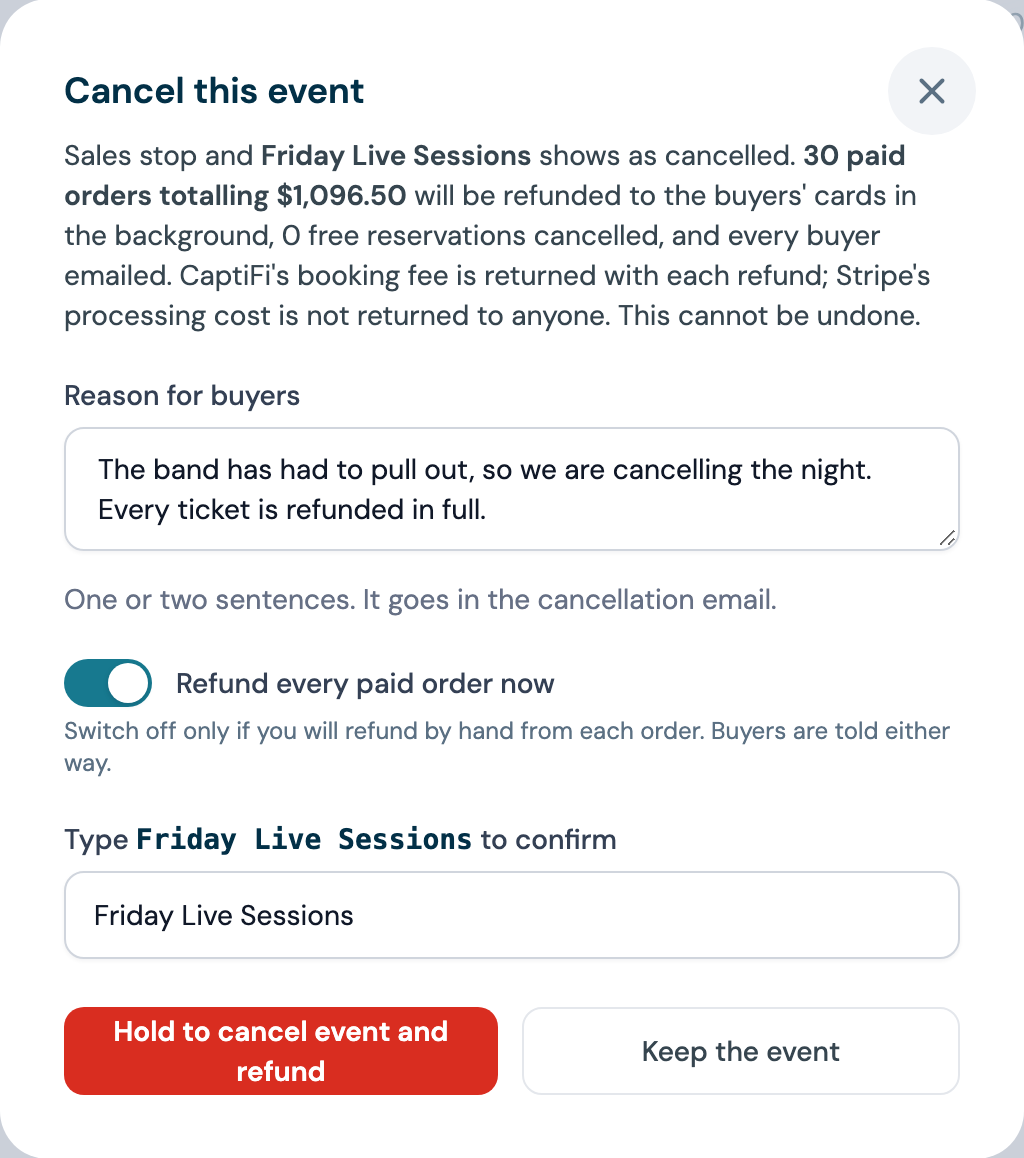
The dialog, headed Cancel this event, says what will happen, for an event called Friday Live: "Sales stop and Friday Live shows as cancelled. 1 paid order totalling £16.13 will be refunded to the buyers' cards in the background, 2 free reservations cancelled, and every buyer emailed. CaptiFi's booking fee is returned with each refund; Stripe's processing cost is not returned to anyone." An event that sold in two currencies is quoted as two figures, never one sum, and an event with nothing to refund reads "Sales stop and Friday Live shows as cancelled. No orders need a refund."
- Reason for buyers, up to 500 characters. One or two sentences; it goes in the cancellation email.
- Refund every paid order now, on by default and shown when the event has paid orders. Switch it off only if you will refund by hand from each order; buyers are told either way.
- Type the event's name to confirm. Capitals do not matter.
- Press and hold the Hold to cancel event and refund button (Hold to cancel event when there is nothing to refund).
Sales stop at once, the event shows as Cancelled, and its public page carries the cancellation notice. Checkouts still in progress are closed and their holds released, free reservations are cancelled, and paid orders are refunded in the background in batches of 25, with the fee returned on each. Every buyer is emailed once, headed [Event] has been cancelled: your reason as "The venue says: ...", then either the amount refunded to the card they paid with, or, with refunds switched off, that the venue will arrange the refund directly and to contact the venue if they have not heard within a few days. A free reservation is told no payment was taken, and every buyer that the tickets on their order no longer admit. Orders staff took at the door in cash or on your till were not paid through Stripe, so nothing here refunds them: the dialog and the event page count them apart from the card refunds, for example "1 door sale paid in cash or on your till is not refunded here. Give that money back yourself; those buyers are told you will.", and their buyers are emailed that the venue will arrange the refund. An order frozen by a chargeback when you cancel cannot be refunded while the bank decides; its buyer is emailed all the same, and if the dispute is decided in your favour the order is refunded like the others.
Progress is shown on the event. The event page carries a banner headed This event has been cancelled with the time, the reason you gave, a progress bar such as "3 of 5" that refreshes every ten seconds while refunds run, the free reservations cancelled, any order Stripe refused with Stripe's message and a link to refund it by hand from the order, and a "Finished" stamp when the run is done; with refunds switched off it reads, for example, "Refunds by hand: 2 paid orders of 2 still hold money."
A refund Stripe refuses is tried three times a few minutes apart, then listed for a hand refund from the order page, which picks the same refund back up, and its buyer is emailed that the venue will arrange the refund. An order on a card that cannot take a refund is not tried again: the Cancel event dialog counts those orders separately before you confirm, they are listed at once for you to repay the buyers another way, and each buyer is emailed that you will arrange it. The event's selling currency stays locked after a cancellation, because money moved in it.
Card disputes
A dispute is a buyer's bank questioning a ticket payment. Only the account holder can see disputes. They are under Events then Ticket payments, a sidebar entry only the account holder sees, in the Card disputes section with the filters All, Open, Closed and Not recovered. The table has the columns Opened, Order, Venue and event, Reason, Amount, Held from venue, Evidence due, Status and Recovery, and Details on a row opens the dispute's own page. A team member who opens the page reads "Only the account owner can see card disputes and booking fee statements."
A dispute arrives in one of two forms:
- An inquiry: the bank is asking about the payment before deciding whether to take it back. Nothing is held, the order stands and its tickets still admit; the row reads Inquiry and "Nothing held: an inquiry." The account holder is emailed and asked to respond by the Evidence due date, from Open Stripe dashboard on the venue's card. An inquiry the bank closes without going further leaves the order as it was.
- A chargeback: the bank takes the money back while it decides. The order is frozen and shows Disputed: no refund can be made, its tickets stop admitting at the door, the seats go back on sale and the buyer's reservation is cancelled. The disputed amount is held back from your Stripe balance, shown as Held from venue, and the status reads Needs response or Under review. The account holder is emailed when the chargeback opens and again when it closes.
The Reason column gives the bank's reason in plain words, for example "The cardholder says they did not make this payment" or "The cardholder says they did not receive what they paid for".
When the bank decides, the outcome is one of:
| Outcome | What happens |
|---|---|
| Won, or Prevented when the bank accepted your evidence before the dispute opened | The held amount is returned to your Stripe balance, the order goes back to paid and, when the event is still ahead and the seats are still free, its tickets admit again, even if you have since stopped selling that ticket type. The email that tells you the result says whether they do. The Recovery column reads "Returned to the venue.", or "£16.13 still to return to the venue." until the return has landed; CaptiFi retries that hourly |
| Lost | The order stays disputed and the held amount covers the chargeback. The column reads "Covered in full." |
| Charge refunded | You refunded the order while the dispute was open. The refund carried the money, so nothing further is held |
Not recovered is a lost chargeback whose amount could not be held back in full, because the venue's Stripe balance no longer held enough of that payment. The column then reads what is still due, for example "£16.13 still due", and the dispute counts under the Not recovered filter. While any lost dispute at a venue is short, publishing a paid event for that venue is refused with the reason, and so is adding a paid ticket type to a live event; free events publish as usual, and the notice on the event names the venue. CaptiFi retries the recovery from the venue's Stripe balance every hour. If you settle the shortfall outside Stripe, by paying an invoice or agreeing a deduction, CaptiFi records the amount against the dispute, shown as Settled by hand on the dispute's page beside Recoverable and Still due, and the publishing block lifts once the shortfall is covered.
Stripe's dispute fee
Stripe charges a fee for every chargeback. For a chargeback opened after the account holder accepted the current terms, CaptiFi recovers that fee from the venue's Stripe balance once the disputed amount has been held back. It is taken in one go when the balance covers it; until then it shows as owed and CaptiFi tries again every hour. When the venue's Stripe account is in another currency from the fee, it is converted at the rate Stripe used for that dispute, and the dispute's page shows both amounts and the rate. If Stripe returns the fee, CaptiFi pays it back to the venue's Stripe balance. Chargebacks opened before you accepted the terms carry no fee.
When the fee cannot be taken from the Stripe balance, for example because the venue's Stripe account is outside the UK and Europe, the dispute's page says why and CaptiFi settles it with you by invoice or deduction, shown as Settled by hand. An unpaid dispute fee blocks publishing paid events at that venue in the same way as a short chargeback, including after a dispute the venue won. The dispute's page shows what Stripe charged, what was recovered, anything returned and what is still owed.
A won dispute costs you nothing in the net to venue on the event's page, apart from Stripe's dispute fee under the current terms; see Where to see payouts and fees.
Booking fee statements
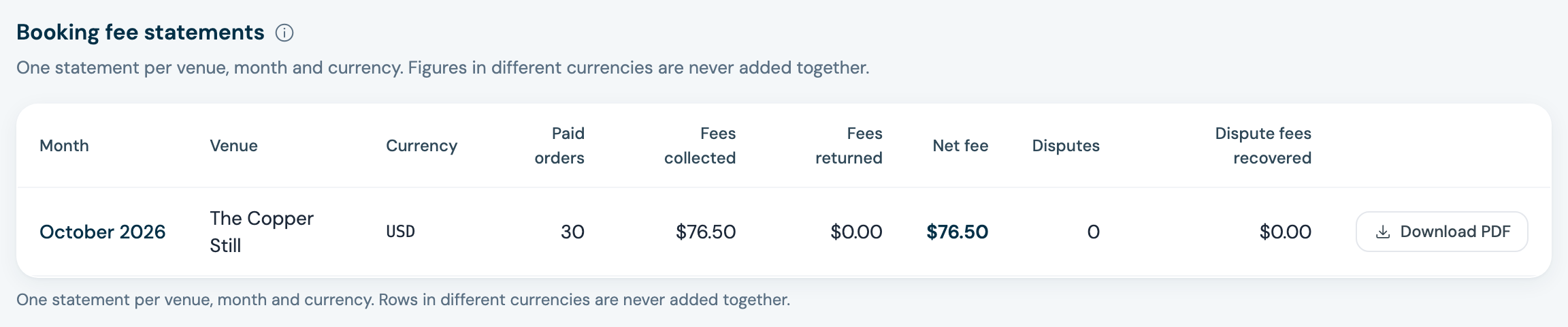
CaptiFi issues one booking fee statement per venue, per month and per currency, for the account holder. They are under Events then Ticket payments, in the Booking fee statements section. Each row shows the Month, Venue, Currency, Paid orders, Fees collected, Fees returned, Net fee, Disputes and Dispute fees recovered, with Download PDF. Figures in different currencies are never added together, so a venue that sold in two currencies has two rows for the month. Until a paid ticket has sold the section reads "No statements yet. The first appears once a paid ticket has sold." Team members cannot see or download the statements.
The PDF is headed Booking fee statement, issued by CaptiFi Ltd to your account for the venue and period. It lists the Booking fees collected, one line per order paid by card through Stripe with the date paid, the order number, the event, the face value, who paid the fee and the booking fee; the Fees returned on refunds, one line per refund with its source, the amount and the fee returned, a line for any fee Stripe kept from a refund that failed, and a note on refunds the card issuer sent back and refunds CaptiFi paid; the Disputes opened in the month, each with what was Held back from your transfers and what CaptiFi Recovered, which is nothing for a dispute decided in your favour; the Dispute fees, Stripe's fee on each chargeback with what was recovered from you and anything returned; and the Net booking fee, collected less returned. Fees fall in the month the order was paid, refunds in the month the money moved, and disputes in the month they opened. Door sales paid in cash or on your till are not on the statement, because no card payment went through Stripe to collect a fee from. The statement states no VAT figure: the tax treatment of the fee is a matter for your accountant.
Where to see payouts and fees
- Your bank details and your payout history are in Stripe; click Open Stripe dashboard on the venue's card.
- Each order under Ticket orders shows the face value, the Booking fee and whether the buyer paid it or the venue absorbed it, what the buyer paid, and under Refunds every refund with the fee returned.
- The sales row on an event's page shows Orders, Tickets sold, Revenue with the net to venue under it, Booking fee, Refunds and Disputed, which reads for example "1 chargeback, 2 inquiries". Net to venue is the face value less the booking fee you absorbed, less refunds after the fee returned on them, less what chargebacks took and did not give back; a dispute you won costs nothing, and the figure can read below zero, in red, after refunds or a lost dispute. Inquiries are counted beside chargebacks and never added to the money.
- Booking fee statements are the monthly record of the fee itself; see Booking fee statements.