
Appearance
CaptiFi API
Pull your guest data straight into your own systems: a booking platform, a CRM, a spreadsheet, or whatever you already use for reporting.
Plan
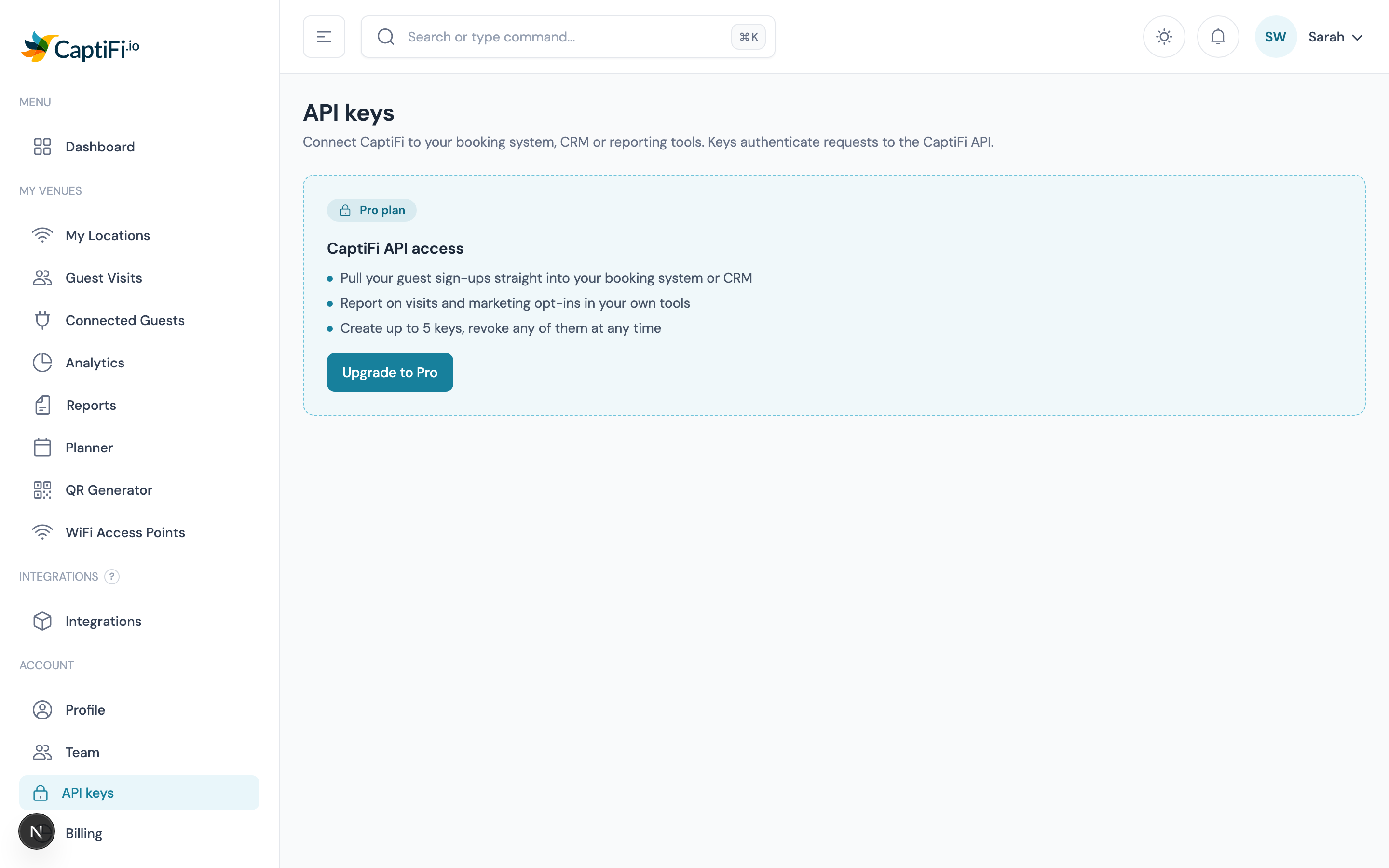
The API is included on the Growth plan and above. On Essentials the API keys page shows what it does and how to upgrade.
What you can do with it
| You want to | Endpoint |
|---|---|
| List your venues | GET /venues |
| Pull guest sign-ups, filtered and paginated | GET /guests |
| Get visit and opt-in totals for a period | GET /stats |
| Check which account a key belongs to | GET /me |
| Read your Rewards programme, members, rewards, redemptions and offers | GET /rewards/..., see Rewards |
The API is read-only. Nothing you do with a key can change your CaptiFi settings, your splash pages, your guest records or your Rewards programme, so it is safe to hand a key to a developer or an agency.
Step 1: create a key
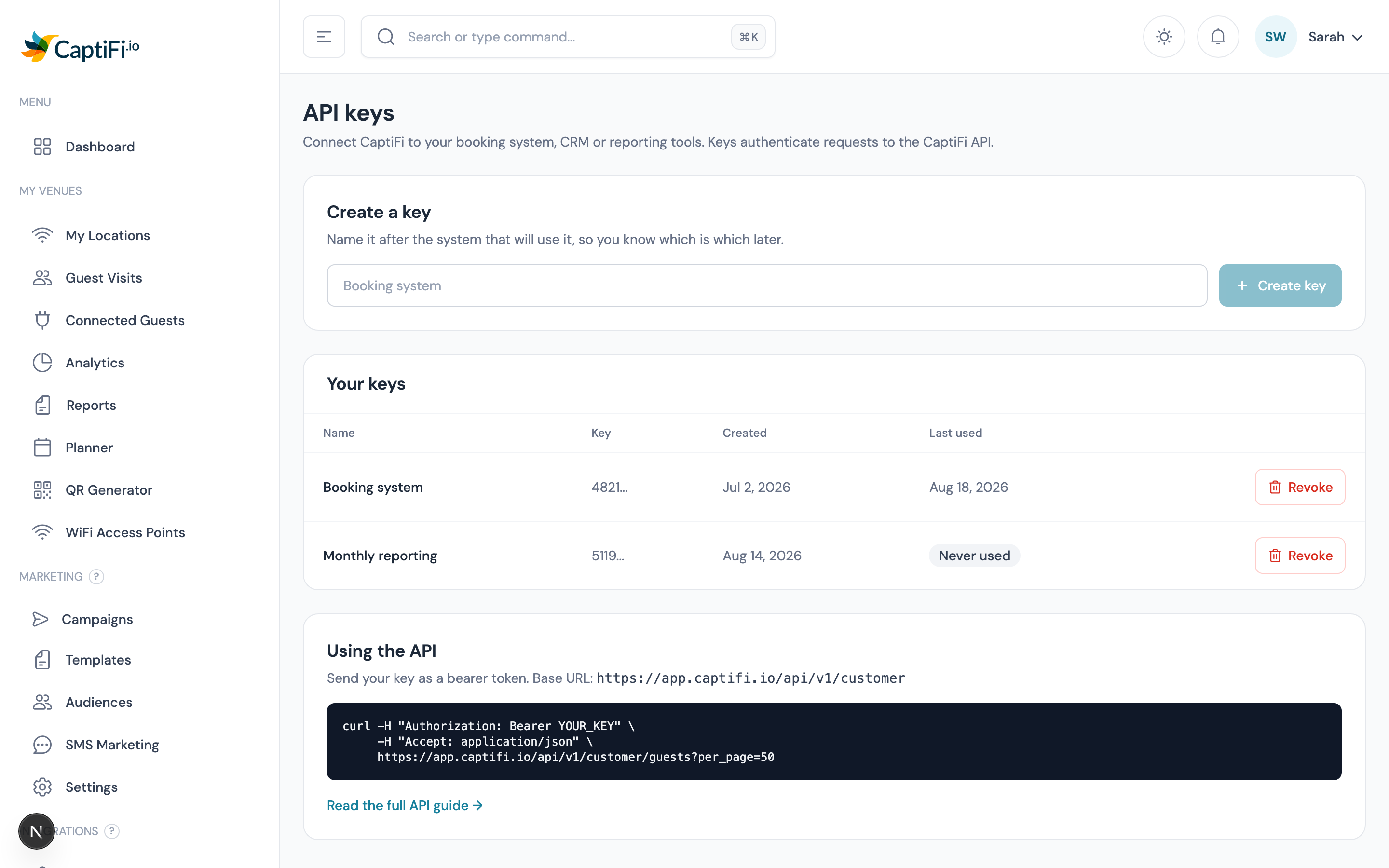
Go to API Keys in the sidebar and give your key a name. Name it after the system that will use it, so you can tell your keys apart later.
On Essentials the page explains what the API does and how to get it:
Your key appears once, immediately after you create it.
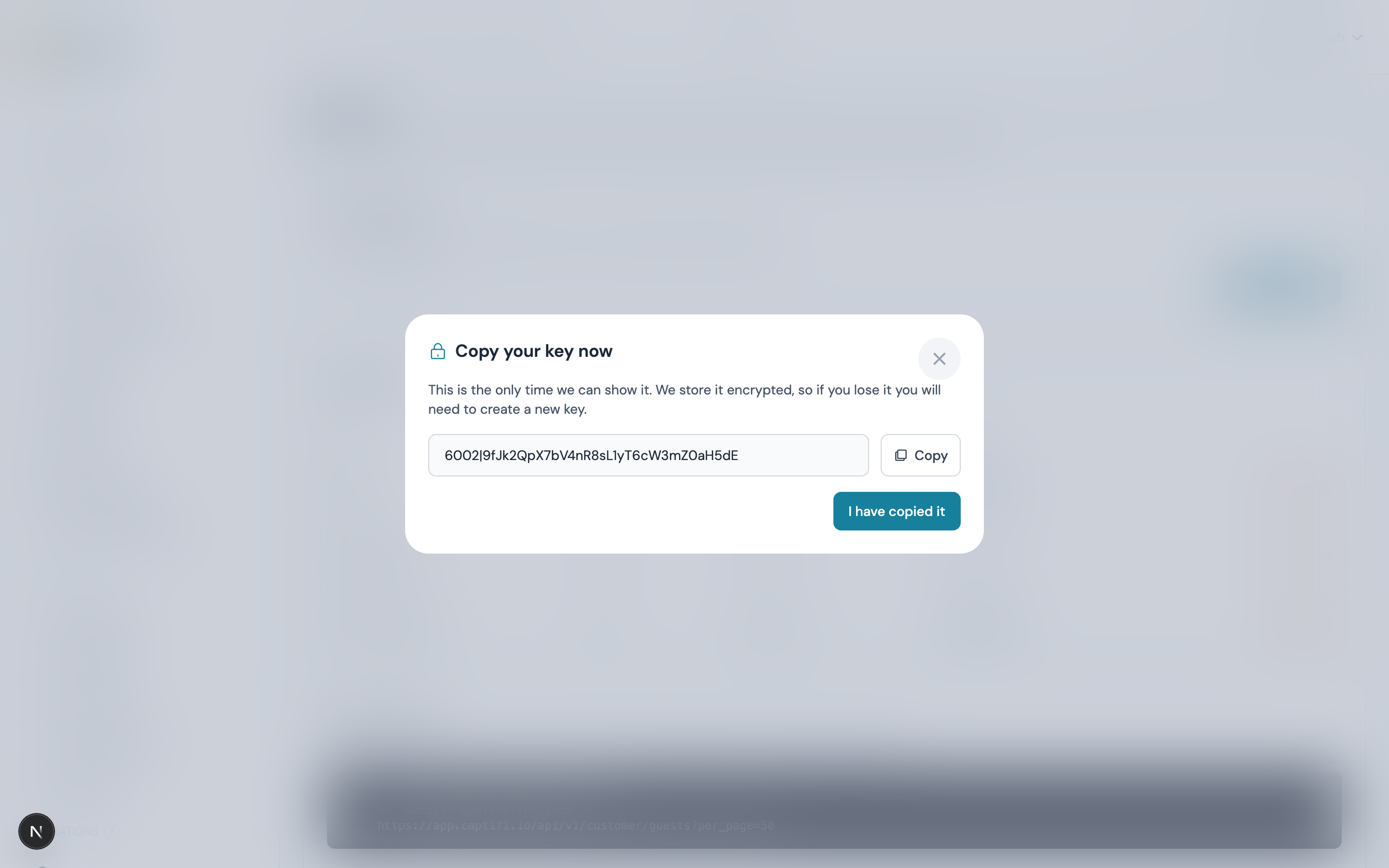
Copy it straight away
We store your key encrypted, exactly like a password, so we cannot show it to you again. If you lose it, revoke it and create a new one.
You can hold up to 5 keys at once. Use separate keys for separate systems: if one needs replacing you can revoke it without breaking the others.
Step 2: make a request
Send your key as a bearer token in the Authorization header. The base URL is:
https://app.captifi.io/api/v1/customerbash
curl -H "Authorization: Bearer YOUR_KEY" \
     -H "Accept: application/json" \
     "https://app.captifi.io/api/v1/customer/guests?per_page=50"
Every response is JSON in the same shape: your rows under data, and paging or totals under meta.
json
{
  "data": [
    {
      "id": 84213,
      "venue_id": 17110,
      "name": "Sam Fletcher",
      "first_name": "Sam",
      "last_name": "Fletcher",
      "email": "sam@example.com",
      "phone": "+447700900123",
      "marketing_consent": true,
      "is_return_visit": false,
      "visited_at": "2026-08-18T19:14:00+01:00"
    }
  ],
  "meta": { "current_page": 1, "last_page": 3, "per_page": 50, "total": 132 }
}
Endpoint reference
GET /me
Confirms which account a key belongs to. Useful as a connection test.
json
{ "data": { "account_id": 41404, "business_name": "Ecton House", "plan": "Pro", "venue_count": 7 } }GET /venues
Your venues, alphabetically.
| Field | Notes |
|---|---|
id | Use this as venue_id on the other endpoints |
name, city, country | As set on My Venues |
created_at | ISO 8601 |
GET /guests
Guest sign-ups, newest first. Only guests who actually arrived are returned, so contacts you imported yourself never appear here as footfall.
| Parameter | Values | Notes |
|---|---|---|
venue_id | a venue id | Defaults to every venue on your account |
from, to | YYYY-MM-DD | Inclusive |
marketing_consent | 1 or 0 | Filter to guests you may send marketing to (or may not) |
per_page | 1-200 | Defaults to 50 |
page | 1+ | Read meta.last_page to know when to stop |
marketing_consent says whether you may send the guest marketing now. It is false for a guest who unsubscribed, a guest you suppressed, and a guest whose address bounced or reported your email as spam, even if they ticked the marketing box when they signed in. The filter uses the same answer.
GET /stats
Totals for a period, matching the figures on your dashboard.
| Parameter | Values |
|---|---|
venue_id | a venue id (defaults to all) |
from, to | YYYY-MM-DD (defaults to the last 30 days) |
visits counts every arrival. unique_guests counts distinct people, matched on email, or on mobile number where the splash page collects a phone instead, so a guest who connected three times in the period counts once. marketing_opt_ins counts arrivals from guests who agreed to marketing and have not since unsubscribed, been suppressed, bounced or complained, on the same rule as marketing_consent.
json
{
  "data": { "from": "2026-07-20", "to": "2026-08-18", "visits": 412, "unique_guests": 388, "marketing_opt_ins": 305 },
  "meta": { "venue_ids": [17110] }
}
Rewards
Accounts on Growth and above with Rewards switched on can read their programme with the same keys. The ten endpoints below sit under /rewards, so a members call looks like this:
bash
curl -H "Authorization: Bearer YOUR_KEY" \
     -H "Accept: application/json" \
     "https://app.captifi.io/api/v1/customer/rewards/members?tier=gold&per_page=100"
They are read only, like the rest of the API. Every list comes newest first. The ids are the ones shown on the Rewards pages and carried in the webhook payloads, so a till or CRM can match a redemption to its reference or a member to their member_number.
Who can call them:
- Any key on the account reads the programme, rewards, redemptions and offers.
- The three member endpoints (
/rewards/members,/rewards/members/{id}and/rewards/members/{id}/ledger) need the person who created the key to hold the View guest data permission, or to be the account owner. A key created by a team member without it gets403 TEAM_PERMISSION_REQUIRED; granting the permission opens the reads on the next request with the same key. See Team permissions. - A key created by a team member who is restricted to some of your venues sees only those venues in
meta.venues, and only their redemptions by default.
There are no per-key scopes: a key grants the account's read access in full. That includes each reward's code and display_code, the code a guest shows at the till, on every rewards and redemptions read. Keep a key away from anyone you would not let use the Redeem screen. No token, PIN, key or reward link ever appears in a response, and terminals are not exposed.
An id or venue_id that is not on your account is a 404 with errorREWARD_NOT_FOUND, never a 403, so the API never confirms whether an id exists on another account. A member_id or offer_id filter that is not yours simply returns an empty page.
Paging
Every list takes per_page (1 to 200, default 50) and page (1 or more) and returns the same meta as /guests:
json
{ "current_page": 1, "last_page": 4, "per_page": 50, "total": 187 }A value outside its range is a 422 naming the parameter.
Time windows
since, until and updated_since take either a date (YYYY-MM-DD) or an ISO 8601 instant with an offset (2026-09-14T06:30:00-05:00).
- A bare date is a day in UK time (Europe/London), whatever time zone the venue is in.
since=2026-09-14starts at midnight in London. - A bare date on
untilmeans the end of that day, sosince=2026-09-01&until=2026-09-01is that whole day. - An instant with an offset is converted exactly:
until=2026-09-14T06:30:00-05:00anduntil=2026-09-14T11:30:00Zmean the same moment. sincelater thanuntilis a422onsince.
GET /rewards/programme
The programme as set up under Rewards → Setup: earn rates, bonuses, tiers, expiry and caps. data is null until you have created a programme. meta.venues lists the venues on the programme that the key may see.
| Field | Notes |
|---|---|
mode | points or stamps |
default_currency, point_values | ISO currency codes in upper case. point_values maps a currency to what a point costs you in it, as entered under Points, value and limits |
points_per_visit, points_per_currency_unit, signup_bonus_points, birthday_bonus_points | The earn rates and bonuses |
points_expire_after_months | null when left blank, which means 12 months |
signup_offer_id, birthday_offer_id | The offers given on joining and on birthdays, or null |
tiers | Each has key, name, min_points_12m, multiplier and colour |
membership_optin_mode | checkbox (the Join box on sign-in) or auto (connecting joins the guest) |
self_redeem_cap_minor, max_spend_per_earn_minor | The Use now cap and the max sale per earn, in minor units (pence or cents) |
daily_earn_cap_points | Or null for no cap |
service_hours | open and close as HH:MM, or null |
meta.venues[].currency, earn_multiplier, is_active, mirror_to_leat | As set on the venue row |
meta.venues[].timezone, timezone_is_default | The venue's time zone. timezone_is_default is true while the venue is still on the default (UTC), which the Setup page warns about |
json
{
  "data": {
    "id": 12,
    "name": "Harbour Rewards",
    "mode": "points",
    "default_currency": "GBP",
    "point_values": { "GBP": 1 },
    "points_per_visit": 10,
    "points_per_currency_unit": 1,
    "signup_bonus_points": 25,
    "birthday_bonus_points": 50,
    "points_expire_after_months": 12,
    "signup_offer_id": 42,
    "birthday_offer_id": null,
    "tiers": [
      { "key": "regular", "name": "Regular", "min_points_12m": 0, "multiplier": 1, "colour": null },
      { "key": "gold", "name": "Gold", "min_points_12m": 500, "multiplier": 1.5, "colour": "#d4a017" }
    ],
    "reward_label": "reward",
    "welcome_text": "Show this page at the bar to claim your reward",
    "terms_url": "https://example.com/rewards-terms",
    "brand": {
      "programme_name": "Harbour Rewards",
      "background_colour": "#0b3d91",
      "foreground_colour": "#ffffff",
      "logo_path": null,
      "strip_path": null
    },
    "membership_optin_mode": "checkbox",
    "deliver_by_sms": false,
    "self_redeem_cap_minor": 500,
    "max_spend_per_earn_minor": 50000,
    "daily_earn_cap_points": 200,
    "service_hours": { "open": "11:00", "close": "23:00" },
    "is_active": true,
    "activated_at": "2026-06-02T10:15:00+01:00",
    "created_at": "2026-06-01T09:00:00+01:00",
    "updated_at": "2026-09-10T16:42:11+01:00"
  },
  "meta": {
    "venues": [
      {
        "site_id": 17110,
        "site_name": "The Harbour Inn",
        "currency": "GBP",
        "earn_multiplier": 1,
        "is_active": true,
        "mirror_to_leat": false,
        "timezone": "Europe/London",
        "timezone_is_default": false
      },
      {
        "site_id": 17138,
        "site_name": "The Loop",
        "currency": "USD",
        "earn_multiplier": 1.5,
        "is_active": true,
        "mirror_to_leat": false,
        "timezone": "America/Chicago",
        "timezone_is_default": false
      }
    ]
  }
}
GET /rewards/members
Members of the programme, newest first. Without a status filter every member is returned, including those who have left.
| Parameter | Values | Notes |
|---|---|---|
email | an email address | Exact match, case-insensitive |
phone | a phone number | Exact match. A number with its country code, +447700900123, matches as it is. A national number such as 07700 900123 or (212) 555-1234 is read against the country of each venue on your programme and matches any reading, so one call covers a London venue and a Chicago one |
tier | a tier key | As in the programme's tiers |
status | active, left, anonymised | |
updated_since | date or instant | Members changed on or after it, see Time windows |
per_page, page | See Paging |
| Field | Notes |
|---|---|
member_number | The ten-character number on the member's card and in the webhooks |
email, phone_e164, first_name, last_name, date_of_birth | The member's details. date_of_birth is YYYY-MM-DD |
points_balance, lifetime_points, points_12m | The live balance, the points earned in all time, and the points earned in the last 12 months that decide the tier |
tier_key, tier_reached_at | null for an untiered member |
rewards_available | How many rewards the member can use right now: issued, not yet expired and with a use left. Counts rewards, not uses |
first_site_id, last_visit_site_id | The venue they joined at and the venue of their last visit |
joined_via | splash, import, staff or api |
membership_consent_at | When they agreed to join |
left_at, anonymised_at | Set when the member left the programme, or was erased under GDPR |
Contact details are masked for an account in limited access, and for members who joined at a venue the key holder has limited access to: email, phone_e164 and first_name are partly replaced with asterisks, and last_name and date_of_birth are null. Points, tier and visit fields are unaffected. This is the same rule /guests applies to a guest row.
json
{
  "data": [
    {
      "id": 917,
      "member_number": "M7K3Q9P2XA",
      "email": "sam@example.com",
      "phone_e164": "+447700900123",
      "first_name": "Sam",
      "last_name": "Fletcher",
      "date_of_birth": "1990-05-04",
      "points_balance": 543,
      "lifetime_points": 1210,
      "points_12m": 860,
      "tier_key": "gold",
      "tier_reached_at": "2026-07-14T20:02:11+01:00",
      "rewards_available": 2,
      "visits_count": 38,
      "last_visit_at": "2026-09-19T19:41:00+01:00",
      "last_visit_site_id": 17110,
      "first_site_id": 17110,
      "joined_via": "splash",
      "membership_consent_at": "2026-03-02T18:20:45+00:00",
      "left_at": null,
      "anonymised_at": null,
      "created_at": "2026-03-02T18:20:45+00:00"
    }
  ],
  "meta": { "current_page": 1, "last_page": 19, "per_page": 50, "total": 912 }
}
GET /rewards/members/{id}
One member, the same fields under data, with the same masking. There is no meta.
GET /rewards/members/{id}/ledger
The member's points ledger, newest first, with their live balances in meta beside the paging fields.
| Parameter | Values | Notes |
|---|---|---|
reason | earn_visit, earn_spend, earn_signup, earn_birthday, earn_bonus, earn_manual, redeem, expire, adjust, reverse | |
since, until | date or instant | On the entry time, see Time windows |
per_page, page | See Paging |
The reasons match the ledger on the member's page: Visit, Spend, Sign-up bonus, Birthday bonus, Bonus, Awarded by staff, Redeemed, Expired, Adjusted and Reversed. delta is the points moved, negative when points left the balance; balance_after is the balance once the line applied; spend_minor and currency are filled in when the earn came from an order or a till sale; reference ties the line to what caused it, such as spend:toast:70211 or redeem:3311.
json
{
  "data": [
    {
      "id": 88041,
      "member_id": 917,
      "site_id": 17110,
      "delta": 35,
      "balance_after": 543,
      "reason": "earn_spend",
      "reference": "spend:toast:70211",
      "spend_minor": 2380,
      "currency": "GBP",
      "note": null,
      "created_by_user_id": null,
      "terminal_id": null,
      "created_at": "2026-09-19T20:14:09+01:00"
    },
    {
      "id": 87990,
      "member_id": 917,
      "site_id": 17110,
      "delta": 10,
      "balance_after": 508,
      "reason": "earn_visit",
      "reference": "visit:17110:2026-09-19",
      "spend_minor": null,
      "currency": null,
      "note": null,
      "created_by_user_id": null,
      "terminal_id": null,
      "created_at": "2026-09-19T19:41:00+01:00"
    }
  ],
  "meta": {
    "current_page": 1,
    "last_page": 3,
    "per_page": 50,
    "total": 121,
    "points_balance": 543,
    "lifetime_points": 1210,
    "points_12m": 860,
    "tier_key": "gold",
    "tier_reached_at": "2026-07-14T20:02:11+01:00"
  }
}
GET /rewards/rewards
Issued rewards across the account, newest first.
| Parameter | Values | Notes |
|---|---|---|
status | issued, redeemed, expired, voided | Matches the stored status, see the note below |
offer_id | an offer id | |
member_id | a member id | |
venue_id | a venue id | The venue the reward was issued at. A reward issued programme-wide has no venue and is left out when you filter by one |
since, until | date or instant | On issued_at, see Time windows |
per_page, page | See Paging |
In the response, an issued reward whose expires_at has passed reads expired. The status filter matches the stored status, so such a reward is returned by status=issued and reads expired in the row.
| Field | Notes |
|---|---|
code, display_code | The eight-character code and its display form with a hyphen, 7F3K-9QPX. Visible to every key on the account |
kind, percent, amount_minor, currency, free_item_label, min_spend_minor, terms, site_ids | A snapshot of the offer when the reward was issued. kind is percent, fixed, free_item or custom; site_ids is null for a reward valid at every programme venue |
uses_remaining | 1 while unused, 0 once redeemed |
issued_via | connect, automation, campaign, sms, manual, bulk, points, api or import |
points_spent | The points a member paid to claim it from the catalogue, otherwise null |
is_locked, locked_until | Set for 60 minutes after five wrong PIN entries against the reward |
redeemed_at, redemption_id, redeemed_at_site, redeemed_via, reference, redeemed_by_initials | Filled in once the reward is redeemed, null before |
delivered_email_at, delivered_sms_at, viewed_at, view_count | When the reward was sent; viewed_at is the first open of the reward page and view_count counts every open |
json
{
  "data": [
    {
      "id": 5123,
      "offer_id": 42,
      "offer_name": "Welcome drink",
      "offer_headline": "A free house drink on us",
      "member_id": 917,
      "site_id": 17110,
      "site_name": "The Harbour Inn",
      "code": "7F3K9QPX",
      "display_code": "7F3K-9QPX",
      "kind": "free_item",
      "percent": null,
      "amount_minor": null,
      "currency": "GBP",
      "free_item_label": "A house drink",
      "min_spend_minor": null,
      "terms": "One per person. Not valid with other offers.",
      "site_ids": null,
      "status": "redeemed",
      "uses_remaining": 0,
      "issued_at": "2026-09-18T12:05:40+01:00",
      "expires_at": "2026-09-25T23:59:59+01:00",
      "issued_via": "connect",
      "points_spent": null,
      "is_locked": false,
      "locked_until": null,
      "redeemed_at": "2026-09-19T20:14:08+01:00",
      "redemption_id": 3311,
      "redeemed_at_site": "The Harbour Inn",
      "redeemed_via": "staff_scan",
      "reference": "RDM-7F3K9Q",
      "redeemed_by_initials": "RB",
      "delivered_email_at": "2026-09-18T12:05:42+01:00",
      "delivered_sms_at": null,
      "viewed_at": "2026-09-19T20:13:50+01:00",
      "view_count": 2
    }
  ],
  "meta": { "current_page": 1, "last_page": 12, "per_page": 50, "total": 587 }
}
GET /rewards/rewards/{id}
One reward, the same fields under data.
GET /rewards/redemptions
Every redemption at the venues the key may see, newest first. There is no default window: page through the history as you would for guests, or pass since.
| Parameter | Values | Notes |
|---|---|---|
venue_id | a venue id | |
since, until | date or instant | On the redemption time, see Time windows |
status | completed, voided | |
channel | staff_scan, staff_code, terminal_pin, pos_api, self_serve, manager_manual | |
per_page, page | See Paging |
| Field | Notes |
|---|---|
reference | RDM- and six characters, the reference on the guest's screen and in your log |
reward_code | The redeemed reward's display code |
channel | How it was redeemed |
redeemed_by_user_id, redeemed_by_name, staff_initials, terminal_id, terminal_name | Who honoured it: the staff login, the initials they typed, or the terminal |
face_value_minor, basket_total_minor, discount_applied_minor, currency | Money in minor units in the venue's currency |
points_spent, points_awarded | Points the member spent on the reward, and points the sale awarded |
reason | The reason or note staff recorded at redemption, or null |
status, voided_at, voided_by_user_id, void_reason, restored_at, restored_by_user_id | voided once a manager voids it; the restored fields are set if it was later restored |
json
{
  "data": [
    {
      "id": 3311,
      "reference": "RDM-7F3K9Q",
      "offer_id": 42,
      "offer_name": "Welcome drink",
      "member_reward_id": 5123,
      "reward_code": "7F3K-9QPX",
      "member_id": 917,
      "site_id": 17110,
      "site_name": "The Harbour Inn",
      "channel": "staff_scan",
      "redeemed_by_user_id": 41404,
      "redeemed_by_name": "Rosa Bright",
      "terminal_id": null,
      "terminal_name": null,
      "staff_initials": "RB",
      "face_value_minor": 450,
      "currency": "GBP",
      "basket_total_minor": 2380,
      "discount_applied_minor": 450,
      "points_spent": 0,
      "points_awarded": 35,
      "pos_reference": null,
      "reason": null,
      "status": "completed",
      "voided_at": null,
      "voided_by_user_id": null,
      "void_reason": null,
      "restored_at": null,
      "restored_by_user_id": null,
      "created_at": "2026-09-19T20:14:08+01:00"
    }
  ],
  "meta": { "current_page": 1, "last_page": 7, "per_page": 50, "total": 331 }
}
GET /rewards/redemptions/{id}
One redemption, the same fields under data.
GET /rewards/offers
Your offers, newest first. Archived offers are left out unless you ask for them with status=archived.
| Parameter | Values | Notes |
|---|---|---|
status | draft, active, paused, archived | |
per_page, page | See Paging |
| Field | Notes |
|---|---|
kind, percent, amount_minor, currency, free_item_label, min_spend_minor | What the offer gives. kind is percent, fixed, free_item or custom |
estimated_value_minor | What it costs you per reward, in minor units |
public_code | The shared discount code, such as SUMMER20, or null |
points_cost, show_in_catalogue | The catalogue price and whether members can claim it with points |
site_ids | The venues it is valid at, or null for every programme venue |
issue_on_connect, connect_frequency, connect_every_days | Issue on WiFi sign-in: once, per_visit or every_n_days |
valid_days_after_issue, starts_at, ends_at | Expiry after issue and the offer window |
max_issues, issued_count, max_redemptions_total, redemptions_count, claims_count, max_per_member, cooldown_days | Limits and running totals |
self_redeem, channels | Whether guests may tap Use now, and the ways staff may honour it |
json
{
  "data": [
    {
      "id": 42,
      "programme_id": 12,
      "name": "Welcome drink",
      "headline": "A free house drink on us",
      "description": "Claim a house drink on your first visit.",
      "terms": "One per person. Not valid with other offers.",
      "kind": "free_item",
      "percent": null,
      "amount_minor": null,
      "currency": "GBP",
      "estimated_value_minor": 450,
      "free_item_label": "A house drink",
      "min_spend_minor": null,
      "public_code": null,
      "points_cost": null,
      "show_in_catalogue": false,
      "site_ids": null,
      "issue_on_connect": true,
      "connect_frequency": "once",
      "connect_every_days": null,
      "valid_days_after_issue": 7,
      "starts_at": null,
      "ends_at": null,
      "max_issues": null,
      "issued_count": 587,
      "max_redemptions_total": null,
      "redemptions_count": 331,
      "claims_count": 0,
      "max_per_member": 1,
      "cooldown_days": null,
      "self_redeem": false,
      "channels": ["staff_scan", "staff_code", "terminal_pin", "pos_api"],
      "promotion_id": null,
      "sort_order": 0,
      "status": "active",
      "created_at": "2026-06-01T09:30:00+01:00",
      "updated_at": "2026-09-01T08:12:40+01:00"
    }
  ],
  "meta": { "current_page": 1, "last_page": 1, "per_page": 50, "total": 4 }
}
GET /rewards/offers/{id}
One offer, plus a stats block the list does not carry. An archived offer still answers here.
json
"stats": { "issued": 587, "outstanding": 118, "redeemed": 331, "voided": 4, "expired": 134, "claimed": 0 }outstanding counts issued rewards that have not yet expired, redeemed and voided count redemptions, expired counts rewards that ran out, and claimed counts rewards members bought with points.
Rate limits
120 requests per minute, per key. Every response also carries rate limit headers, but they report the wider per-address ceiling described below, not the per-key allowance:
| Header | Meaning |
|---|---|
X-RateLimit-Limit | The per-address ceiling, 600 for requests that carry a key |
X-RateLimit-Remaining | Calls left under that ceiling in the current minute, across every key calling from your address |
Retry-After | On a 429, the seconds to wait before retrying |
The per-key allowance of 120 is enforced but not shown in a header, so a client pacing itself from X-RateLimit-Remaining alone can still meet a per-key 429. Keep a single key under 120 calls a minute by design, and treat Retry-After as the signal when you go over.
If you go over, the API answers 429. Wait for the number of seconds in Retry-After before retrying, rather than retrying straight away: the window is a rolling minute, so a 429 can mean waiting up to 60 seconds.
The wider ceiling of 600 requests per minute per IP address is shared by every key calling from that address. It sits well above the per-key limit so that running several integrations from one office or server does not reach it, and you will only see it if something is looping. Calls that arrive with no Authorization header at all are limited far more tightly, so a misconfigured client that omits the header will start seeing 429 instead of 401 quickly: if that happens, fix the header rather than retrying.
The quota is counted per key, not per IP address, so one system going over never uses up another system's allowance. Pulling a large history is best done with per_page=200 and paging through, rather than many small requests.
Revoking a key
Click Revoke next to any key. It stops working immediately, and anything using it will start getting 401. This cannot be undone, so if you are replacing a key in a live system, create the new one first.
Common responses
| Status | Meaning | What to do |
|---|---|---|
200 | Success | - |
401 | The key is missing, wrong or revoked | Check the Authorization header |
403 | Your plan does not include the API, or the credential is not an API key | Upgrade to Growth, or create a proper API key |
403 | REWARDS_DISABLED: Rewards is switched off for your account | The account owner switches it on under Integrations, Dashboard features |
403 | TEAM_PERMISSION_REQUIRED: the key was created by a team member whose role lacks the permission the endpoint needs; meta.permission names it | Grant the permission on the Team page, or use a key the account owner created |
404 | The venue_id is not on your account | Check GET /venues |
404 | REWARD_NOT_FOUND: a Rewards id, or the venue_id on a Rewards endpoint, is not on your account | Check the id against the matching list endpoint |
422 | A parameter is invalid | The response names the parameter |
429 | Rate limited | Wait, then retry |
Every response is JSON, including errors, whether or not your client sends the Accept: application/json header.
An error body always carries a message you can show to a person. A 401 and a 403 additionally carry a short error code you can branch on, which is the pair worth handling in code because they mean "fix your credential":
json
{
  "message": "Unauthenticated.",
  "error": "unauthenticated"
}
The codes are unauthenticated (401), and plan_upgrade_required or customer_api_key_required (403). A plan_upgrade_required answer also carries meta.feature (customer_api, or rewards when the plan lacks Rewards) and meta.required_plan. On the Rewards endpoints a 403 can also be REWARDS_DISABLED or TEAM_PERMISSION_REQUIRED, and a 404 is REWARD_NOT_FOUND; those three are spelt in upper case, the others in lower case. A request to a path this API does not expose returns endpoint_not_found.
json
{
  "message": "Rewards is switched off for this account. Enable it from the Integrations page under Dashboard features.",
  "error": "REWARDS_DISABLED"
}
A 422 carries an errors object keyed by parameter name instead, in Laravel's standard validation shape. A 404 for an unknown venue_id on /guests or /stats, and a 429, carry message only, so branch on the status code for those.
Security
- Treat a key like a password: never put it in front-end code, a public repo, or a shared document.
- Keys are scoped to your account. A key can only ever read your own venues, your own guests and your own Rewards programme.
- A key reads reward codes. Anyone holding one can list every issued reward with the code a guest would show at the till, so keep keys away from anyone you would not let use the Redeem screen.
- A key cannot be used to sign in to the dashboard, and it cannot change anything.
- If a key may have leaked, revoke it. That is instant and cannot be undone.
Your responsibilities under GDPR
Guest and Rewards member records include personal data. Once you pull them into your own system you are the controller of that copy: your own retention rules, security and deletion requests apply to it. Deleting or anonymising a guest in CaptiFi does not delete the copy you exported. See GDPR & Data Protection.
See also
- Webhooks: have events pushed to you instead of polling
- Rewards & Offers: the programme the Rewards endpoints read
- Plans & Pricing: which plan includes what
- Guest Analytics: the same figures in the dashboard
- GDPR & Data Protection: your duties once data is in your systems