

Appearance
Partner Staff
Give your technicians and account managers their own CaptiFi logins instead of sharing one. Staff work across your whole partner account: your clients, demos and fleet, while the sensitive controls (managing staff, payout details) stay with the account owner.
This is different from the venue-level Team page under Account, which gives someone access to a single venue's dashboard. Staff here work across your whole partner account.
Where to Find It
- Log in to my.captifi.io
- Go to Partner → Staff in the sidebar. If you are inside a client, click All clients at the top of the sidebar first.
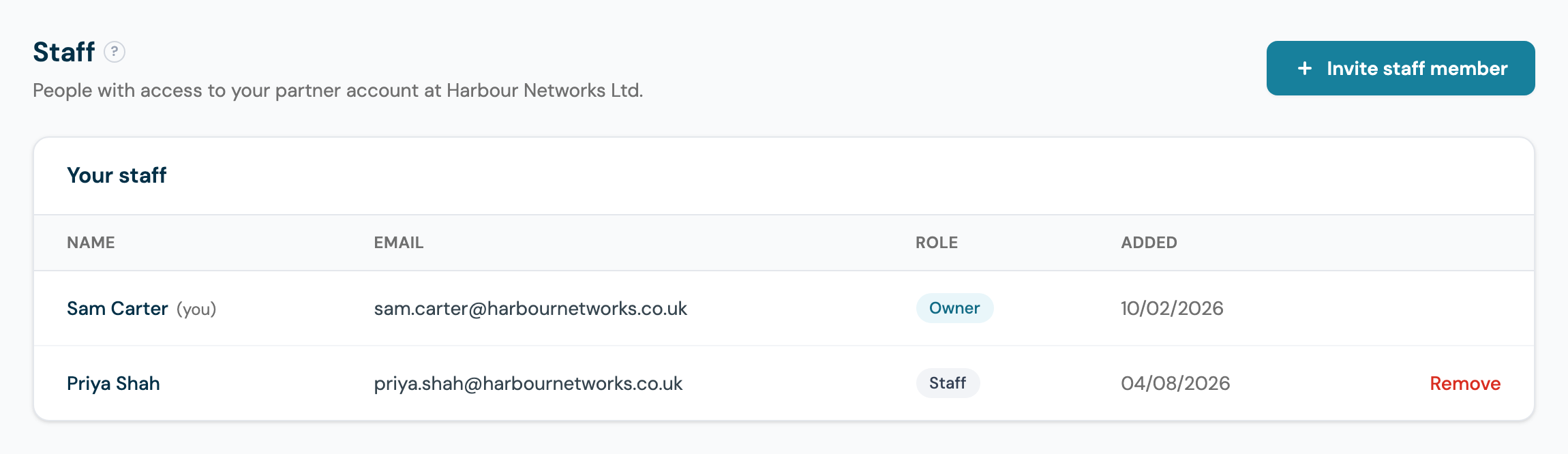
Managing Your Staff
- Invite a staff member with their name and email; they receive a set-password link and sign in with their own credentials.
- Remove a staff member to disable their access immediately. Re-inviting the same email restores it.
- Everyone you invite joins as Staff. There is exactly one Owner: the owner cannot be removed, and only the owner can manage staff.
The list shows each person's role and when they were added, as in the screenshot above: one owner, and a Remove action against each staff seat.
Owner vs Staff: Who Can Do What
| Capability | Owner | Staff |
|---|---|---|
| Fleet health and alerts | Yes | Yes |
| Partner home (reseller and white-label accounts): totals and each client with its venues | Yes | Yes |
| Clients (reseller and white-label accounts): add, edit, invite, suspend, remove | Yes | Yes |
| Manage and Open (reseller and white-label accounts): open a client's dashboard on one of its venues | Yes | Yes |
| Order devices for client venues (reseller and white-label accounts) | Yes | Yes |
| Demos: generate, send, and convert to a client or register as a referral | Yes | Yes |
| Referrals (referral accounts): view and register | Yes | Yes |
| Earnings: view statements and margins | Yes | Yes |
| Tickets: view client support requests | Yes | Yes |
| Activity: view the activity log | Every entry | Their own actions |
| Invite or remove staff | Yes | No |
| View or change payout details | Yes | No |
| Partner subscription and agreement with CaptiFi | Yes | No |
In short: staff can run the day-to-day partner business end to end, and everything about money leaving or entering your accounts stays with the owner. Payout details are invisible to staff logins, not just locked.
On reseller and white-label accounts, a staff login has the same plan and features as the owner's. Your staff start on the same partner home and work with the same venue tools you do, and the rows marked No in the table above stay with the owner. Inside a client they get what that client's plan includes, as you do: see Features follow the client's plan. Staff are covered by your partner agreement with CaptiFi and never see billing prompts of their own.
Good Habits
- Give every technician their own seat rather than sharing the owner login: removals then revoke one person's access, not everyone's password.
- If a staff member leaves, Remove them the same day: their login stops working immediately.
- Keep the owner seat on a role account you control (such as an owner or director mailbox), since it holds the payout details and the staff list.