
Appearance
Webhooks
Webhooks push events to you the moment they happen, instead of you asking the API for changes. A guest signs up on your WiFi, and your booking system knows about it a second later.
Plan
Webhooks are included on the Growth plan and above, alongside API access.
Webhooks or the API?
| Use webhooks when | Use the API when |
|---|---|
| You want to react to a guest as they arrive | You want to pull a list on your own schedule |
| Your system can accept an inbound HTTPS request | Your system can only make outbound requests |
| You are adding guests to a CRM or triggering an automation | You are building a report or a one-off export |
Plenty of setups use both: webhooks for live events, the API to backfill history.
Step 1: add an endpoint
Go to Webhooks in the sidebar, add the HTTPS URL that should receive events, and tick the events you want.
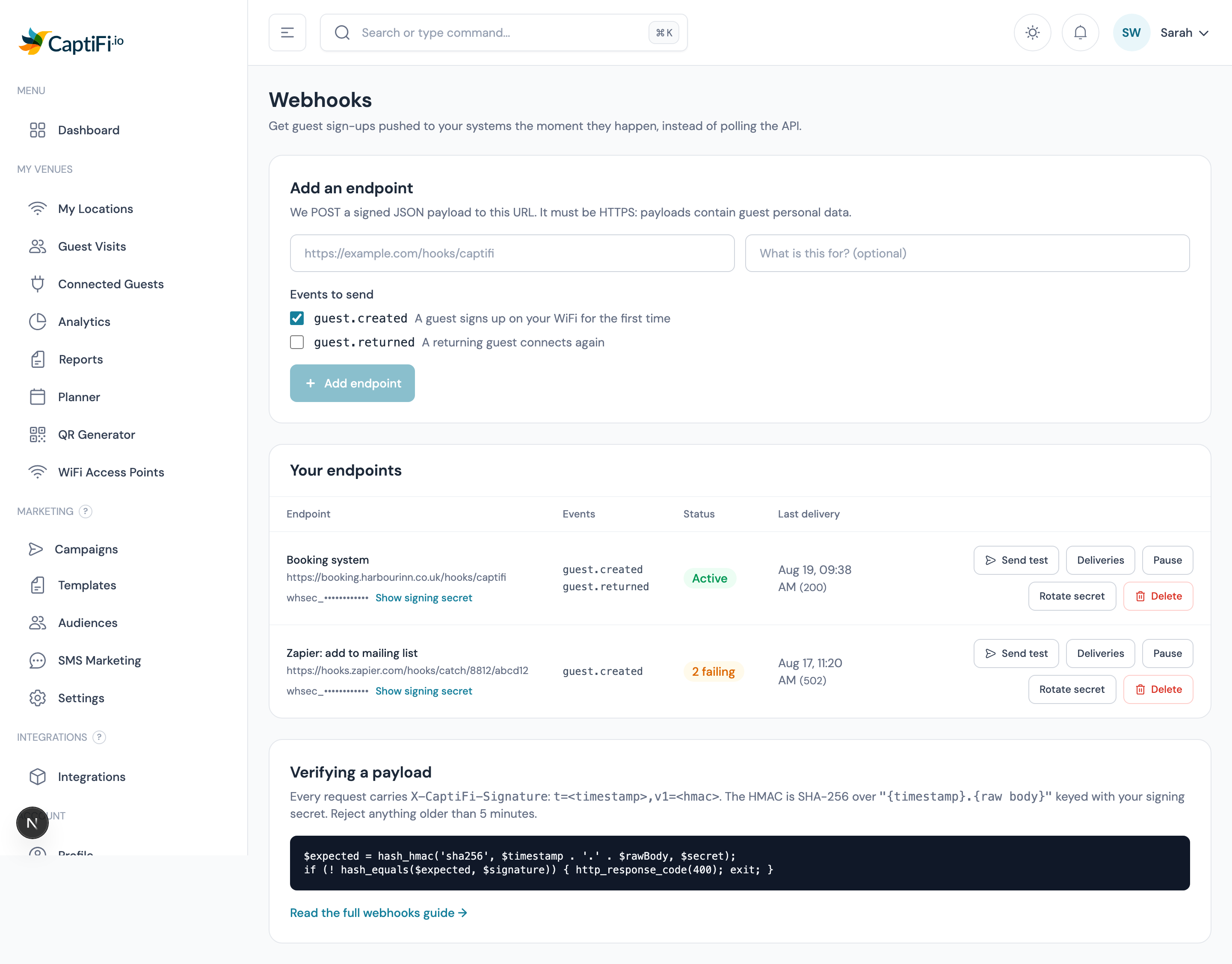
Your URL must be HTTPS. Webhook payloads contain guest personal data, so we will not send them over an unencrypted connection.
You can add up to 5 endpoints, which is handy for sending the same events to a live system and a staging one.
Step 2: verify the signature
Every request carries these headers:
| Header | Contents |
|---|---|
X-CaptiFi-Signature | t=<unix timestamp>,v1=<hmac sha256> |
X-CaptiFi-Event | The event name, e.g. guest.created |
X-CaptiFi-Delivery | The event id, for de-duplication |
The signature is an HMAC SHA-256 of "{timestamp}.{raw request body}", keyed with your endpoint's signing secret (shown on the Webhooks page, starting whsec_).
Always verify before you trust a payload. Anyone can POST to your URL; only CaptiFi can produce a valid signature.
php
// PHP
$payload = file_get_contents('php://input');
$header = $_SERVER['HTTP_X_CAPTIFI_SIGNATURE'] ?? '';

parse_str(str_replace(',', '&', $header), $parts);
$timestamp = (int) ($parts['t'] ?? 0);
$expected = hash_hmac('sha256', $timestamp . '.' . $payload, $secret);

// Reject anything older than 5 minutes, and compare in constant time.
$fresh = abs(time() - $timestamp) <= 300;
if (! $fresh || ! hash_equals($expected, $parts['v1'] ?? '')) {
    http_response_code(400);
    exit;
}
javascript
// Node.js (Express, with the raw body available)
const crypto = require('crypto');

function verify(rawBody, header, secret) {
  const parts = Object.fromEntries(header.split(',').map((p) => p.split('=')));
  const timestamp = Number(parts.t);
  if (!timestamp || Math.abs(Date.now() / 1000 - timestamp) > 300) return false;

  const expected = crypto
    .createHmac('sha256', secret)
    .update(`${timestamp}.${rawBody}`)
    .digest('hex');

  return crypto.timingSafeEqual(Buffer.from(expected), Buffer.from(parts.v1));
}
python
# Python
import hashlib, hmac, time

def verify(raw_body: bytes, header: str, secret: str) -> bool:
    parts = dict(p.split("=", 1) for p in header.split(","))
    timestamp = int(parts.get("t", 0))
    if not timestamp or abs(time.time() - timestamp) > 300:
        return False

    expected = hmac.new(
        secret.encode(), f"{timestamp}.".encode() + raw_body, hashlib.sha256
    ).hexdigest()

    return hmac.compare_digest(expected, parts.get("v1", ""))
Verify against the raw body, exactly as received. Parsing the JSON and re-encoding it changes the bytes and the signature will not match.
Step 3: send a test event
Use Send test on any endpoint. It delivers a sample payload with "test": true so you can confirm your handler works before a real guest arrives, and the delivery appears in the log with whatever your server answered.
Events
| Event | Fires when |
|---|---|
guest.created | A guest signs up on your WiFi for the first time |
guest.returned | A guest who has been before connects again |
reward.issued | A reward is issued to a guest, by any route |
reward.redeemed | A reward is redeemed at one of your venues |
reward.redemption_voided | A manager voids a redemption |
points.earned | A rewards member earns points |
ticket.order.paid | A ticket order is paid, or a free RSVP is confirmed |
ticket.checked_in | A ticket is admitted at the door |
ticket.order.refunded | A ticket payment is refunded |
reservation.attended | A booking or ticket order is marked attended |
workflow.action | A Send to your webhooks step runs inside one of your Workflows; the payload carries the fields named on that step |
booking.created | A table booking is confirmed |
booking.amended | A table booking is moved or its party changed |
booking.cancelled | A table booking is cancelled |
booking.attended | A table booking party arrives |
booking.no_show | A table booking party does not turn up |
The four Rewards events fire for accounts with Rewards switched on. Their payloads carry ids, the short code staff type, amounts in minor units (pence or cents) with their currency, and dates; never a reward link or a token. Send test has a sample for each.
The four ticket and booking events fire for accounts with Events and tickets switched on; reservation.attended also fires for table bookings under Reservation check-in. They go to the endpoints of the account that bills the venue, Send test has a sample for each, and their payloads are under Ticket and booking payloads. The automations, merge tags and segments that sit beside them are in Event messaging and automations.
The five booking.* events describe table bookings made through CaptiFi, one per change: booking.attended fires at most once per booking, and booking.no_show fires each time a booking is marked a no-show, so a booking reversed to arrived and marked a no-show again fires it twice. They go to the endpoints of the account that bills the venue, Send test carries a booking sample for whichever you pick, and their payload is under Table booking payloads.
Payload
json
{
  "id": "evt_9f2c1e64-2b71-4a2f-9f3f-6b0b8f2a91cc",
  "event": "guest.created",
  "created_at": "2026-08-19T09:41:02+01:00",
  "data": {
    "guest_id": 84213,
    "venue_id": 17110,
    "venue_name": "The Harbour Inn",
    "name": "Sam Fletcher",
    "first_name": "Sam",
    "last_name": "Fletcher",
    "email": "sam@example.com",
    "phone": "+447700900123",
    "marketing_consent": true,
    "is_return_visit": false,
    "visited_at": "2026-08-19T09:41:00+01:00"
  }
}
The guest fields match the API's guest shape, so one parser handles both.
marketing_consent on guest.created and guest.returned follows the API's rule: it is false for a guest who unsubscribed, a guest you suppressed, and a guest whose address bounced or reported your email as spam, even if they ticked the marketing box. Both events still fire for every arrival, so check the field before adding a guest to a marketing list.
Rewards payloads
reward.issued describes the reward: its id, the display code, the offer, the member (when the guest has joined the programme), the venue, the kind and value, how it was issued and its dates.
json
{
  "id": "evt_2c9d7a41-5e0b-4f0e-9a1c-3f7b2d8e6a10",
  "event": "reward.issued",
  "created_at": "2026-09-18T12:05:41+01:00",
  "data": {
    "reward_id": 5123,
    "code": "7F3K-9QPX",
    "status": "issued",
    "offer_id": 42,
    "offer_name": "Welcome drink",
    "offer_public_code": null,
    "member_id": 917,
    "member_number": "M7K3Q9P2XA",
    "member_tier": "gold",
    "venue_id": 17110,
    "kind": "free_item",
    "percent": null,
    "amount_minor": null,
    "currency": "GBP",
    "free_item_label": "A house drink",
    "min_spend_minor": null,
    "points_spent": null,
    "issued_via": "connect",
    "issued_at": "2026-09-18T12:05:40+01:00",
    "expires_at": "2026-09-25T23:59:59+01:00"
  }
}
reward.redeemed and reward.redemption_voided share one shape: the redemption's reference, the reward and offer it belongs to, the venue, the channel (staff_scan, staff_code, terminal_pin, pos_api, self_serve or manager_manual), the terminal where one was used, the money in the venue's currency and the points moved. pos_reference is the till's check or order number: the order_reference a till sends through the till API, or the Till check number staff typed on the Redeem screen, and null when there was none. A voided redemption carries status voided with voided_at and void_reason filled in.
json
{
  "id": "evt_8b1f0c62-7d3a-4b9e-8e2f-51c4a9d0e7b3",
  "event": "reward.redeemed",
  "created_at": "2026-09-19T20:14:09+01:00",
  "data": {
    "redemption_id": 3311,
    "reference": "RDM-7F3K9Q",
    "status": "completed",
    "reward_id": 5123,
    "code": "7F3K-9QPX",
    "offer_id": 42,
    "member_id": 917,
    "venue_id": 17110,
    "channel": "staff_scan",
    "terminal_id": null,
    "face_value_minor": 450,
    "currency": "GBP",
    "basket_total_minor": 2380,
    "discount_applied_minor": 450,
    "points_awarded": 23,
    "points_spent": 0,
    "pos_reference": null,
    "redeemed_at": "2026-09-19T20:14:08+01:00",
    "voided_at": null,
    "void_reason": null
  }
}
points.earned fires once for every earn on a member's ledger, with the reason (earn_visit, earn_spend, earn_signup, earn_birthday, earn_bonus, earn_manual, or adjust and reverse for a positive correction), the points and the balance after them, and the spend and currency when the earn came from an order or a till sale.
json
{
  "id": "evt_f31a6d9e-2b47-4c8d-a0e5-9d7c1b3f8a22",
  "event": "points.earned",
  "created_at": "2026-09-19T20:14:09+01:00",
  "data": {
    "ledger_entry_id": 88041,
    "member_id": 917,
    "member_number": "M7K3Q9P2XA",
    "member_tier": "gold",
    "points": 23,
    "balance_after": 543,
    "reason": "earn_spend",
    "reference": "spend:toast:70211",
    "venue_id": 17110,
    "spend_minor": 2380,
    "currency": "GBP",
    "earned_at": "2026-09-19T20:14:08+01:00"
  }
}
The member and venue ids match those on the Rewards pages, so a till or CRM can look a member up by member_number or match a redemption to its reference.
Ticket and booking payloads
ticket.order.paid describes the order once per settlement: its number and status (paid, or free for an RSVP), the venue, the event with its start and doors times in the venue's time zone, the money in minor units with the booking fee and fee_mode (pass_on when the buyer paid the fee, absorb when the venue did), the buyer, whether they ticked the marketing box, where the order came from (public, embed, splash, staff or import), the guest and reservation ids, and one entry per ticket. It never carries the order's manage link or a ticket token.
json
{
  "id": "evt_4d8a2b1f-6c3e-4f9a-b7d2-0e5c8a1f3b64",
  "event": "ticket.order.paid",
  "created_at": "2026-09-16T20:31:12+01:00",
  "data": {
    "order_id": 3182,
    "order_number": "CF-7F3K9Q",
    "status": "paid",
    "venue_id": 17110,
    "venue_name": "The Harbour Inn",
    "event_id": 412,
    "event_name": "Friday Live",
    "event_slug": "friday-live",
    "event_starts_at": "2026-09-25T19:30:00+01:00",
    "event_doors_at": "2026-09-25T18:30:00+01:00",
    "currency": "GBP",
    "subtotal_minor": 3000,
    "fee_minor": 226,
    "fee_mode": "pass_on",
    "total_minor": 3226,
    "ticket_count": 2,
    "buyer": {
      "first_name": "Sam",
      "last_name": "Fletcher",
      "email": "sam@example.com",
      "phone": "+447700900123"
    },
    "marketing_consent": true,
    "source": "public",
    "guest_id": 84213,
    "reservation_id": 9017,
    "paid_at": "2026-09-16T20:31:11+01:00",
    "tickets": [
      {
        "ticket_id": 6101,
        "ticket_number": "T-7F3K-9QPX",
        "ticket_type": "General admission",
        "attendee_name": "Sam Fletcher",
        "status": "valid"
      },
      {
        "ticket_id": 6102,
        "ticket_number": "T-7F3K-9QPY",
        "ticket_type": "General admission",
        "attendee_name": "Sam Fletcher",
        "status": "valid"
      }
    ]
  }
}
ticket.checked_in fires once per ticket admitted, with the ticket's id, number and status (checked_in), its type and attendee name, the order id and number, the event, the venue, the buyer's email, checked_in_at, the checkin_channel (scan for a QR scan, typed for a number typed in, manual for an admit from the door list) and the id of the team member who admitted it. A ticket undone and admitted again fires again.
ticket.order.refunded carries the order id, number and order_status, the venue and event, Stripe's refund id, the amount_minor returned to the card and fee_refunded_minor, the currency, the reason, the total refunded on the order so far, the buyer's email and refunded_at.
reservation.attended fires once per booking, whichever route marked it attended: the reservation id, the venue, the provider (captifi_tickets for a ticket order, otherwise manual, opentable or the booking platform), the external_id (the order number for a ticket order), the guest's name, email and phone, the party size, reserved_for and attended_at in the venue's time zone, the attended_source (wifi for a WiFi match, provider for a ticket admitted at the door or a booking platform's own status, manual for a status set by hand), and the guest, event and order ids with the order number, which are null for a plain table booking.
Table booking payloads
Every booking.* event carries the same booking object: the booking id and reference (in the form TB-7F3K9Q), the status, the venue, the party size, starts_at and ends_at as ISO 8601 with the venue's offset, the timezone, the area when one is named, the source (public, embed, splash, staff, walk_in or phone), the booker's name, email and phone, marketing_consent, the occasion, a deposit block (mode, amount, charged, refunded and currency, amounts in minor units), every lifecycle stamp on the venue's clock with how it was marked (wifi, manual or provider), and the guest and reservation ids. It never carries the guest's manage link or token, nor the guest's or your staff's notes, so a webhook cannot become a way into a booking. A booking whose guest has been erased carries the anonymised placeholders.
Receiving a webhook into a workflow
Webhooks run the other way too. A workflow whose trigger is Incoming webhook has a signed URL of its own at https://app.captifi.io/hooks/w/{public_id}, and a POST to it starts a run for the guest named in the body. The signature is the same recipe as above in reverse: you compute t=<unix timestamp>,v1=<hmac sha256 of "{timestamp}.{raw body}"> with the endpoint's secret and send it as X-CaptiFi-Signature. The secret is shown once, on the first publish, and only the account owner can rotate it. The full recipe, the matching rules and the responses are in The incoming webhook.
Responding, retries and failures
Answer with any 2xx status as soon as you have accepted the event. Do the slow work afterwards, in your own queue: we wait 10 seconds for a response.
| What happens | What we do |
|---|---|
| You answer 2xx | Delivered, logged as successful |
| You answer 5xx, or time out | Retried up to 3 more times: after 1 minute, 5 minutes, then 15 minutes |
| You answer 4xx (except 408 and 429) | No retry: a wrong URL or a rejected payload will not fix itself |
| Repeated failures | After 15 consecutive failures we switch the endpoint off and show why, so you are not left guessing |
Re-enable a switched-off endpoint with its Active toggle once you have fixed the problem. That clears the failure count.
De-duplicate on the event id
A network hiccup can mean you receive the same event twice. Treat repeats of the same id as one event: record ids you have processed and ignore ones you have seen.
The delivery log
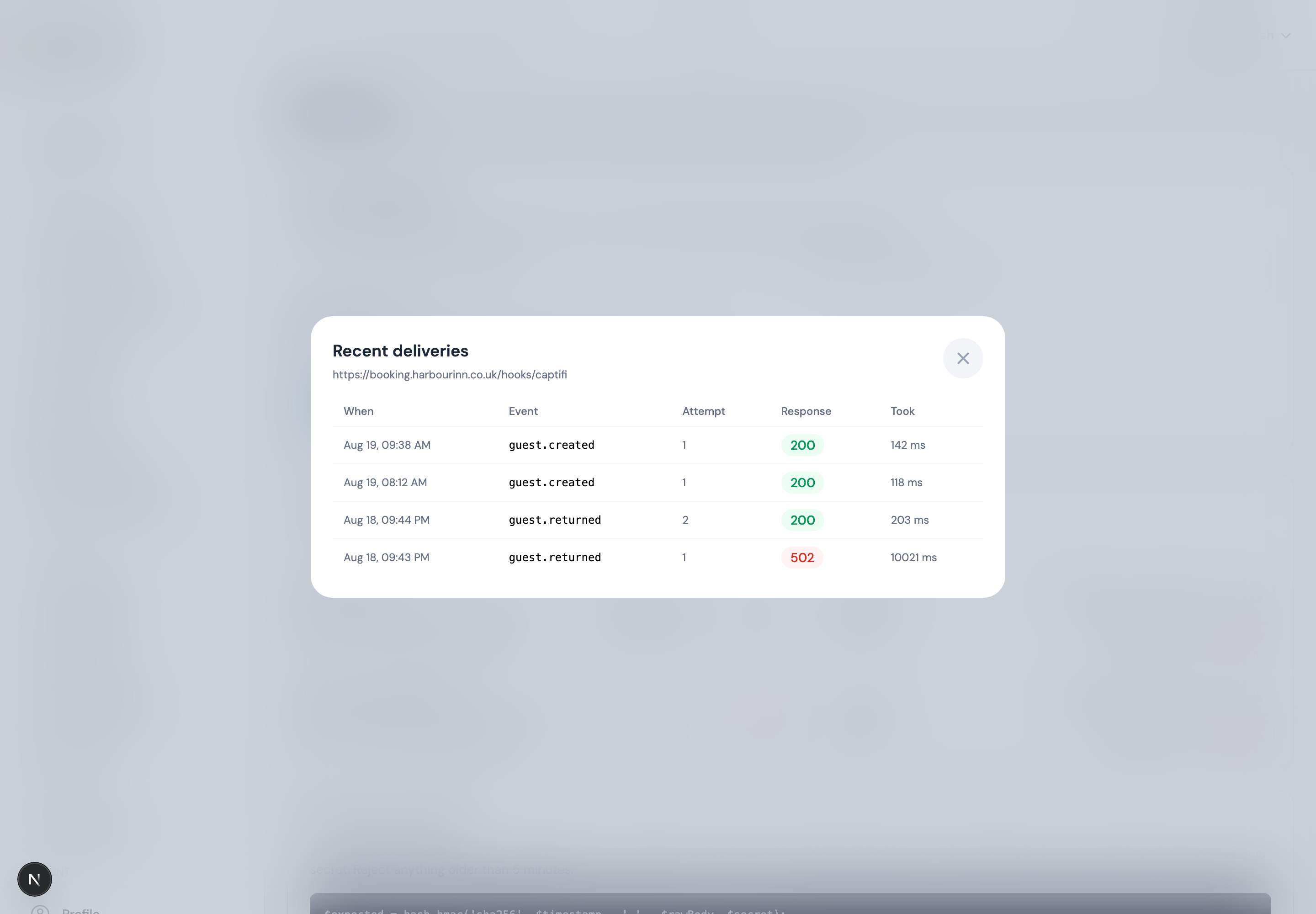
Every attempt is recorded with the response code, how long your server took, and any error. It is the fastest way to answer "did CaptiFi send it, or did my server reject it?". Attempts are kept for 30 days.
Rotating a secret
Rotate secret issues a new signing secret immediately. Anything still using the old one will start failing verification, so change it in your own system first, or rotate during a quiet period.
Common problems
| Symptom | Likely cause |
|---|---|
| Signature never matches | You are verifying re-encoded JSON instead of the raw body |
| Nothing arrives | The endpoint is switched off, the event is not ticked, or your firewall is blocking us |
| Deliveries stop after a while | 15 consecutive failures switched the endpoint off, see the log for the responses |
| Same guest arrives twice | Expected on a retry: de-duplicate on the event id |
| 403 on the Webhooks page | Webhooks need the Growth plan or above |
| No Rewards events arrive | Rewards is switched off for the account, or the event is not ticked on the endpoint |
| No ticket events arrive | Events and tickets is switched off, the event is not ticked on the endpoint, or the venue is billed to a different account from the endpoint's |
Your responsibilities under GDPR
Webhook payloads contain guest personal data. Once it reaches your systems you are the controller of that copy: your own retention, security and deletion obligations apply, and deleting a guest in CaptiFi does not delete your copy. See GDPR & Data Protection.
See also
- CaptiFi API: pull the same data on your own schedule
- Rewards in your messaging: what the Rewards events describe
- Event messaging and automations: what the ticket and booking events describe, and the automations beside them
- Plans & Pricing: what each plan includes
- Workflows: start a workflow from an incoming webhook, and send a workflow's moments to your endpoints