
Appearance
Guest referrals
Guest referrals let the members of your Rewards programme invite friends. Each member has an invite link on their rewards page. A friend who opens it leaves their email address or mobile number, and when they first sign in to your WiFi with it and join your programme, the member who invited them and the friend both get the reward you set: points, an offer or both. Your WiFi sign-in page does not change.
This page is about guests inviting guests. The programme that pays partners for bringing new businesses to CaptiFi is Partner Referrals.
Plans
Guest referrals are part of Rewards, on the Growth, Pro and Multi-Location plans. Rewards must be switched on and your programme set up first; see Switching Rewards on. Guest referrals appears in the Rewards group once referrals are switched on for your account.
How a referral works
- A member opens their rewards page and copies their invite link from Invite a friend
- They send it to a friend however they like, for example in a message
- The friend opens the link, types their email address or mobile number and taps Save my invitation
- Within the number of days you allow, the friend signs in to the WiFi at one of your venues with that email or number and joins your programme
- CaptiFi checks the referral against the rules below. If it passes, both sides get their reward; if it does not, neither does
Setting up referrals
Only the account owner can change the referral settings. Team members see them for reference.
- Go to Rewards → Guest referrals
- In Referral settings, switch Referrals are off to Referrals are on
- Under The member who invites, set Points, choose an Offer, or both. This is given when their friend joins
- Under The friend, set Points, choose an Offer, or both. This is given on the friend's first WiFi sign-in
- Set Friends who can join per member each month. The default is 10
- Set Days a friend has to sign in. The default is 30
- Click Save referral settings
The referral settings, switched on.
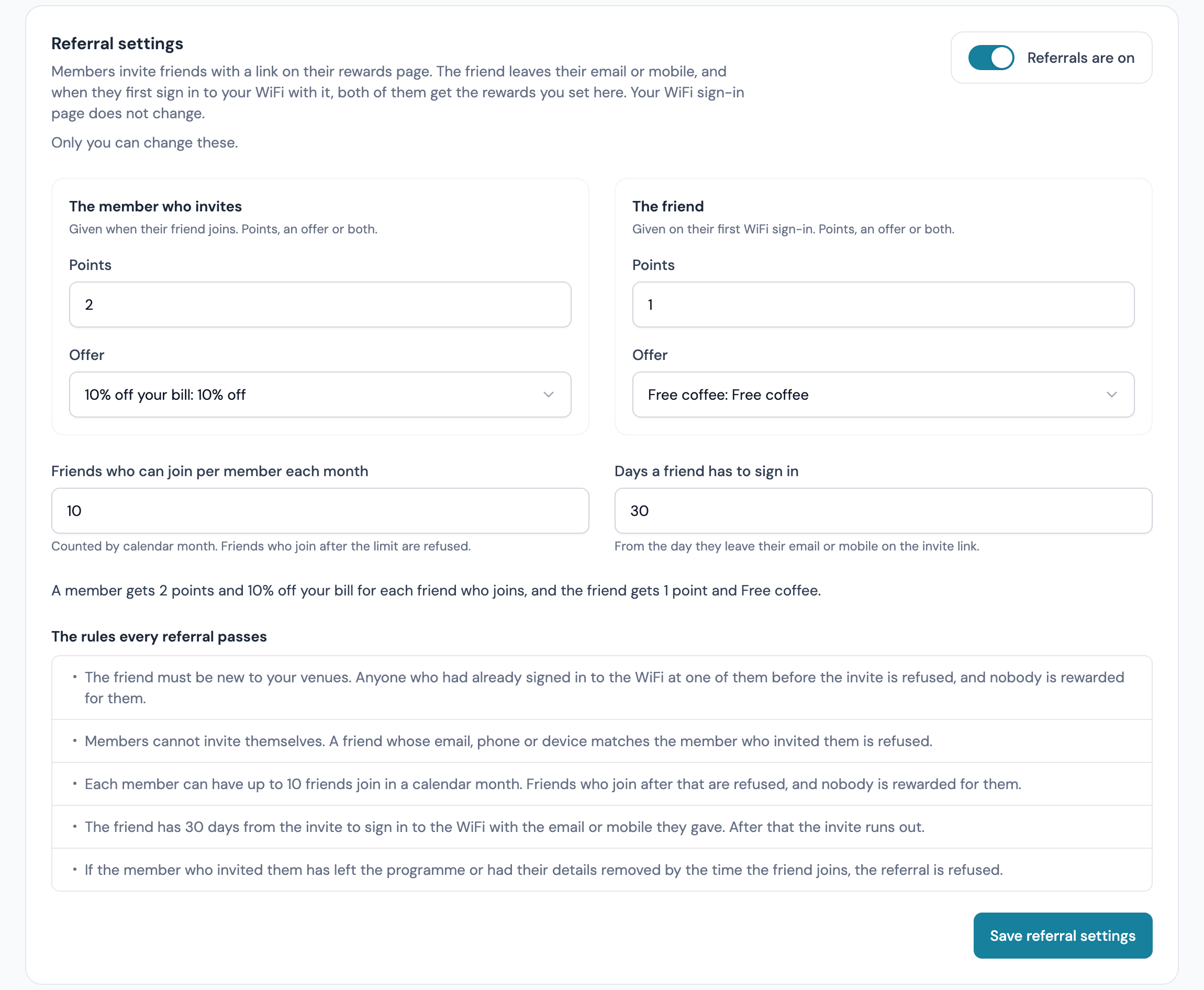
When both sides have a reward, a line under the settings sums them up, for example "A member gets 50 points for each friend who joins, and the friend gets Free coffee." The saved message reads "Referral settings saved. Members can invite friends from their rewards page."
| Setting | What it does |
|---|---|
| Points (each side) | Points added to the member's balance, up to 100,000. Blank or 0 means none. On a stamps programme guests see them as stamps. They show in the member's ledger as Referral bonus and do not count towards the daily earn cap |
| Offer (each side) | One of your offers, issued as a reward and sent by email, or by text for a phone-only member when Deliver rewards by text to phone-only members is on. No offer means none |
| Friends who can join per member each month | How many friends of one member can join in a calendar month, from 1 to 1,000. Friends who join after that are refused, and nobody is rewarded for them. Months follow your programme's time zone |
| Days a friend has to sign in | From 1 to 365, counted from when the friend leaves their email or mobile on the invite link. After that the invite runs out |
Each side needs points, an offer or both while referrals are on. Saving without one is refused with "Give the member who invites a reward: points, an offer or both." or the same for the friend.
Which offers can be a referral reward
The offer lists show your active offers. An offer that cannot be a referral reward reads "(not available)" and is listed under Offers that cannot be a referral reward with the reason. An offer qualifies when it:
- is active
- has not passed its end date
- is valid at every venue in your programme, because a friend can join at any of them
The offer's own limits still apply when it is issued. If an offer cannot be sent at that moment (its Max issued is reached, the member already holds it as many times as Per member allows, its Cooldown (days) has not passed, it is paused or outside its dates, or its stock is held for a game), that side's offer is not sent. The other side's reward and any points are still paid, and the list shows "Offer not sent: [reason]".
What members and friends see
The member's invite link
A member's rewards page has an Invite a friend card with a line saying what the friend gets and what the member gets, for example "Share your link. When a friend joins on the WiFi, they get Free coffee and you get 50 points." Under it is their invite link and how many friends joined this month.
The Invite a friend card on a member's rewards page.
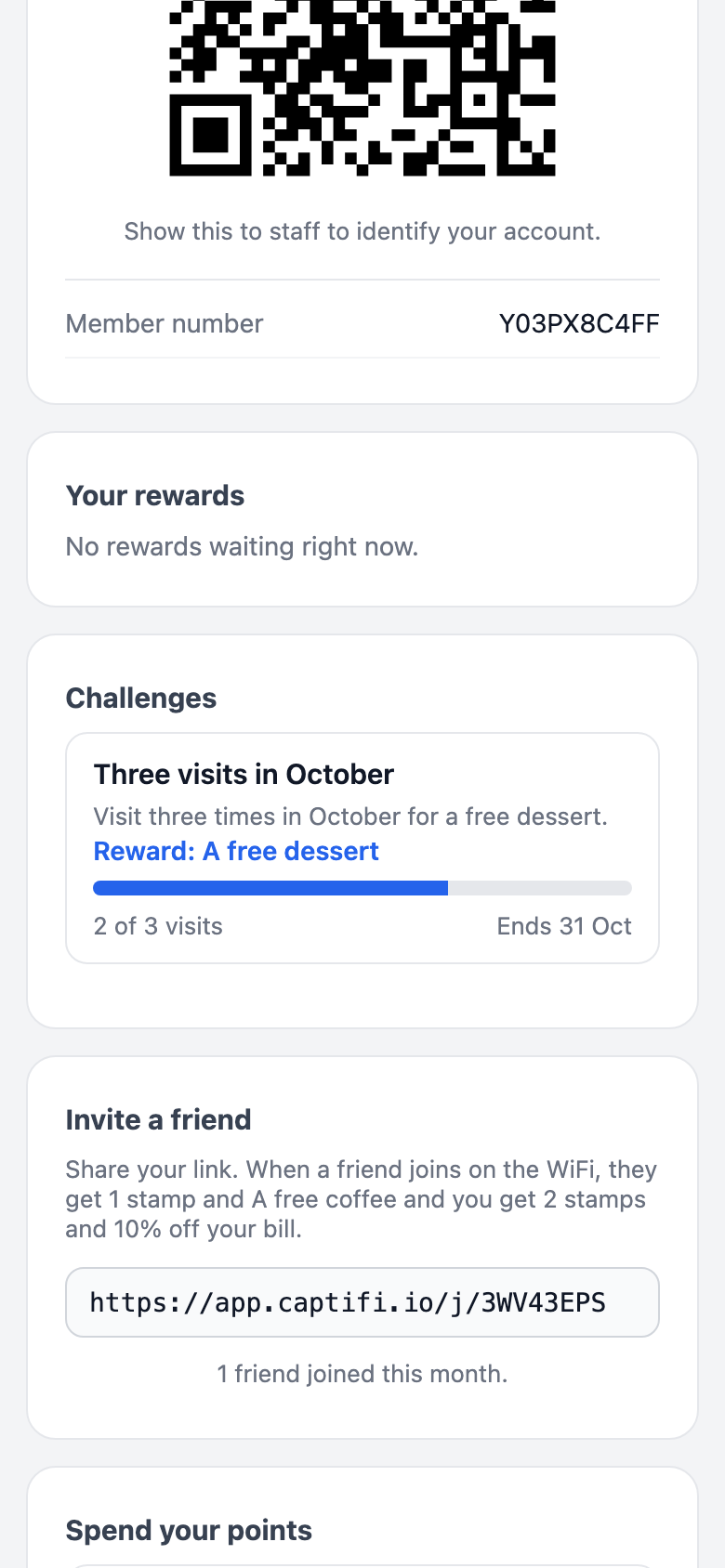
The link has the form app.captifi.io/j/ followed by the member's eight-character code. It appears on the rewards page only. The card is hidden while referrals are off.
The invite page
A friend who opens the link sees a page headed "Join [programme]" with "[first name] invited you to [programme].", using the inviting member's first name. When the friend side has a reward it adds "Join and get [reward]." The page asks for an Email or a Mobile number and says "Enter your email or your mobile number, then sign in to the WiFi at any [programme] venue with the same one."
The page a friend sees when they open an invite link.
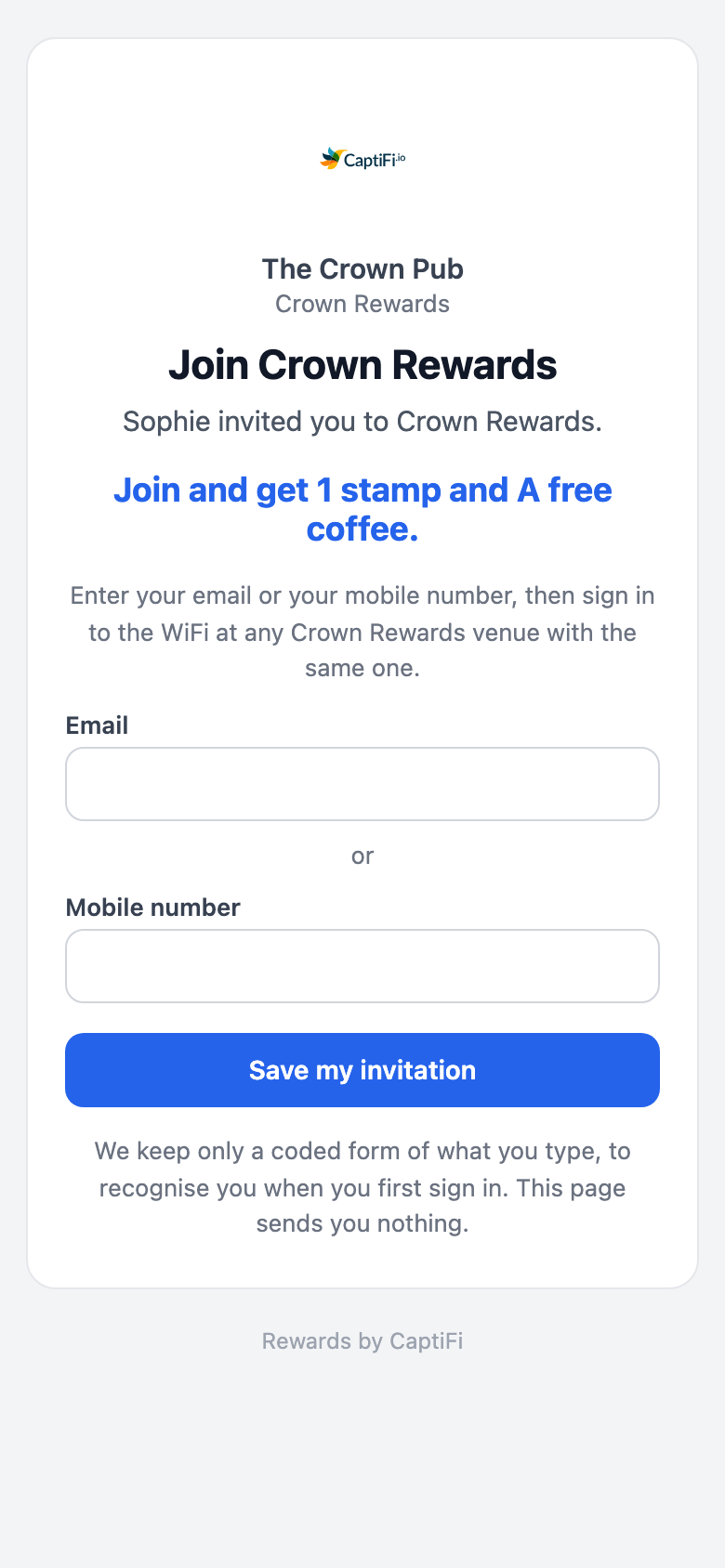
After Save my invitation the page says You are on the list and "Sign in to the WiFi at any [programme] venue within [days] days with this email or number to get [reward]." The page sends the friend nothing and never shows the member's code or page. It keeps only a coded form of what the friend types, so CaptiFi can recognise them when they first sign in.
- A throwaway email address is refused with "Please use an email address you keep, or your mobile number."
- A friend invited by two members stays with the first one
- A link whose member has left, or opened while referrals are off, shows a page that is not found
When a referral completes
A referral completes on the WiFi sign-in where the friend joins your programme with the email or mobile they gave: by ticking Join on the sign-in form, or by connecting when your programme is set to Connecting joins them. At that moment CaptiFi checks the rules and, if the referral passes, pays both sides. A sign-in by a friend who is already a member is not a join, so nothing is paid.
There is no separate referral email. Each side's offer goes out as a normal reward message; points are added without a message and show on the member's rewards page. The member's Invite a friend card counts the friends who joined this month.
Why a referral is refused
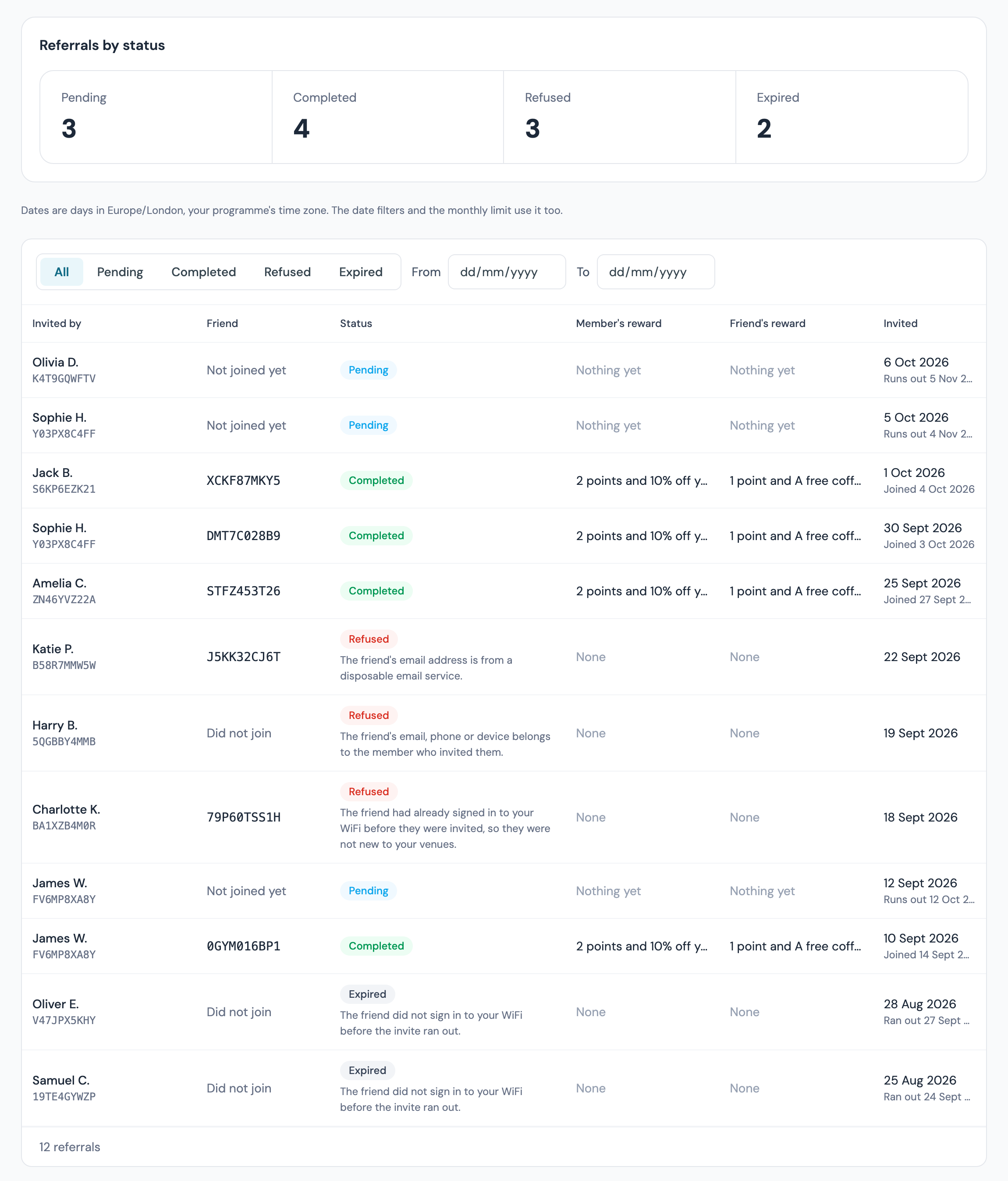
A refused referral pays neither side. The Status column shows Refused or Expired with the reason underneath:
| What the list says | What it means |
|---|---|
| The friend had already signed in to your WiFi before they were invited, so they were not new to your venues. | The friend's email, mobile number or device had signed in to the WiFi at one of your venues before they saved the invitation. Referrals reward new guests only |
| The friend's email, phone or device belongs to the member who invited them. | The member invited themselves, or the friend joined on a device or with details that are the member's |
| The member had already reached their limit of friends joining this month. | Friends who can join per member each month was already used up that calendar month |
| The member who sent the invite has left the programme or had their details removed. | The inviting member left or was erased before the friend joined |
| The friend did not sign in to your WiFi before the invite ran out. | The friend joined after the Days a friend has to sign in had passed, or never joined. These show as Expired |
| Disposable email. | The friend joined with a throwaway email address and no mobile number |
The referrals list
Rewards → Guest referrals lists every invitation a friend has saved. Across the top, Referrals by status counts Pending, Completed, Refused and Expired.
The referrals list with rows in every status.
| Column | What it shows |
|---|---|
| Invited by | The member's name, shortened such as "Rosa K.", with their member number |
| Friend | The friend's member number once they join, or "Not joined yet" or "Did not join" |
| Status | Pending, Completed, Refused or Expired, with the reason for a refusal |
| Member's reward and Friend's reward | What each side got, for example "50 points and Free coffee", or "Nothing yet" while pending |
| Invited | The day the friend saved the invitation, with the day they joined or the day the invite runs out |
Filter with the status tabs (All, Pending, Completed, Refused, Expired) and the From and To dates, which match the day of the invitation. Days are in your programme's time zone.
A member's page under Rewards → Members has a Referrals card with Friends invited, Friends who joined and Joined this month, and See their referrals opens the list filtered to that member.
Referrals in workflows and webhooks
- The Workflows trigger Referral completed runs for the member who invited, at the venue where the friend joined, each time a referral completes
- The webhook event
referral.completed("A friend a member invited joins and both are rewarded") carries the two member numbers and the time. It never carries a name or an address
Who can do what
| What | Who can do it |
|---|---|
| Switch referrals on or off and change the settings | Account owner only |
| See the referrals list and the settings | Every team member who can open Rewards |
| See a member's Referrals card | View guest data, as for the rest of a member's page |
Guest data and erasure
Until a friend joins, CaptiFi keeps only a coded form of the email or mobile they typed, and the list shows members by shortened name and member number. When you erase a guest with Delete (GDPR) or Anonymise (GDPR), that coded form is removed from every referral. When a member who invited friends is erased, their pending and expired invitations are deleted and their invite link stops working; completed and refused referrals stay in the counts with nothing personal in them.
Troubleshooting
| Issue | Possible cause | Solution |
|---|---|---|
| No Guest referrals item under Rewards | Referrals are not switched on for your account, or Rewards is off | Switch Rewards on under Integrations → Dashboard features. The page says when referrals are not available |
| The settings are greyed out | Only the account owner can change them | Ask the account owner |
| Members have no Invite a friend card | Referrals are off, or neither side has a reward that can be paid | Switch Referrals are on and give each side points or an active offer valid at every venue |
| A friend joined but nobody was rewarded | The referral was refused or had expired | Read the reason in the Status column |
| A friend signed in but the referral is still pending | They signed in without joining your programme, or they were already a member | Ask them to tick Join on the sign-in form with the same email or number. A friend who was already a member cannot be referred |
| Only one side got their offer | The offer's own limits or dates stopped it at that moment | Read "Offer not sent: [reason]" in the list. Points and the other side were still paid |
| The invite link shows a page that is not found | Referrals are off, or the member has left or been erased | Switch referrals on. A member who left has no working link |
Related features
- Rewards & Offers: the programme, points and the offers each side gets
- Challenges, stamp cards and badges: more ways to reward members who come back
- Games: spin the wheel, scratch cards and prize draws
- Partner Referrals: the separate programme for CaptiFi partners