
Appearance
Webhooks
Webhooks push events to you the moment they happen, instead of you asking the API for changes. A guest signs up on your WiFi, and your booking system knows about it a second later.
Plan
Webhooks are included on the Growth plan and above, alongside API access.
Webhooks or the API?
| Use webhooks when | Use the API when |
|---|---|
| You want to react to a guest as they arrive | You want to pull a list on your own schedule |
| Your system can accept an inbound HTTPS request | Your system can only make outbound requests |
| You are adding guests to a CRM or triggering an automation | You are building a report or a one-off export |
Plenty of setups use both: webhooks for live events, the API to backfill history.
Step 1: add an endpoint
Go to Webhooks in the sidebar, add the HTTPS URL that should receive events, and tick the events you want.
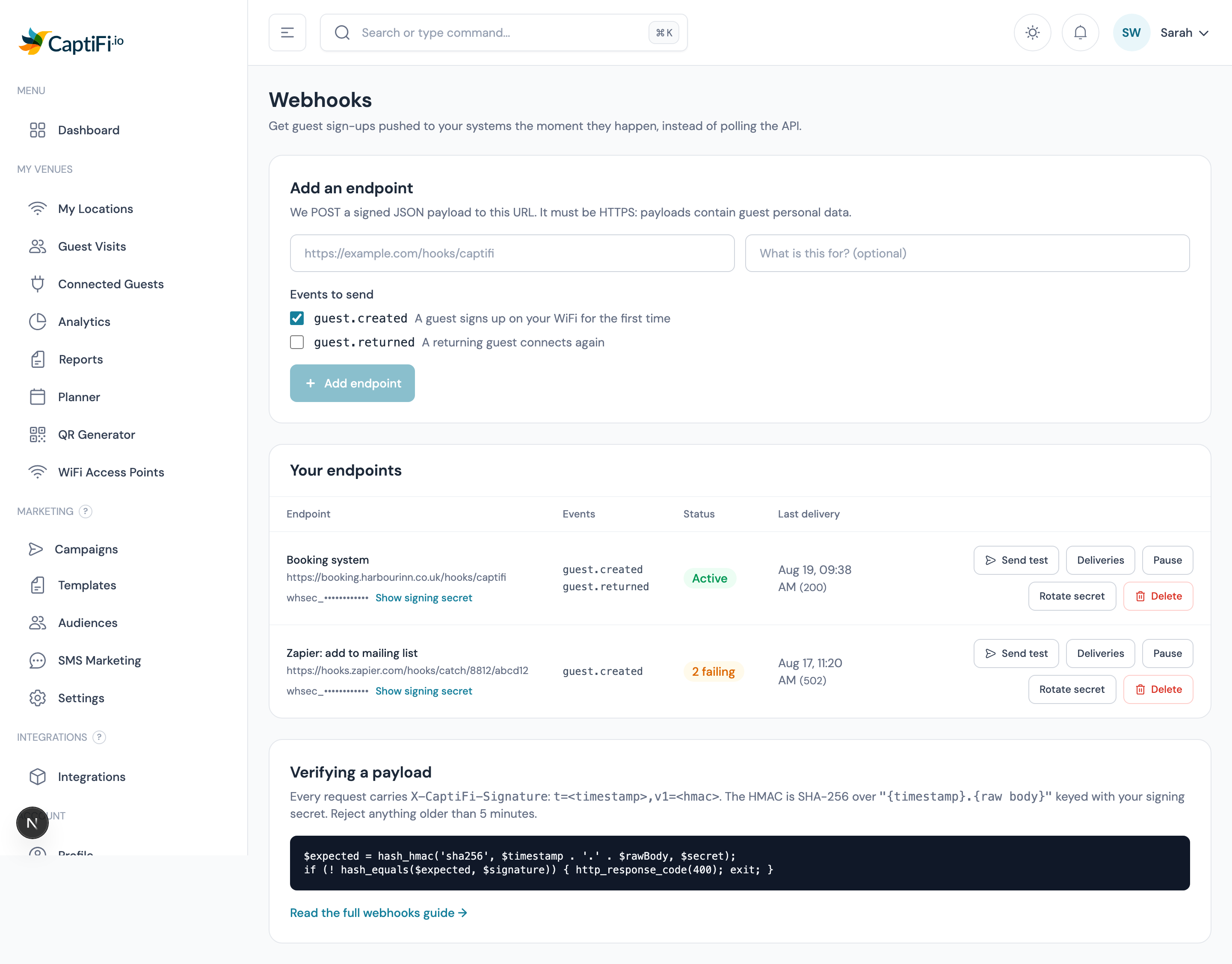
Your URL must be HTTPS. Webhook payloads contain guest personal data, so we will not send them over an unencrypted connection.
You can add up to 5 endpoints, which is handy for sending the same events to a live system and a staging one.
Step 2: verify the signature
Every request carries these headers:
| Header | Contents |
|---|---|
X-CaptiFi-Signature | t=<unix timestamp>,v1=<hmac sha256> |
X-CaptiFi-Event | The event name, e.g. guest.created |
X-CaptiFi-Delivery | The event id, for de-duplication |
The signature is an HMAC SHA-256 of "{timestamp}.{raw request body}", keyed with your endpoint's signing secret (shown on the Webhooks page, starting whsec_).
Always verify before you trust a payload. Anyone can POST to your URL; only CaptiFi can produce a valid signature.
php
// PHP
$payload = file_get_contents('php://input');
$header = $_SERVER['HTTP_X_CAPTIFI_SIGNATURE'] ?? '';

parse_str(str_replace(',', '&', $header), $parts);
$timestamp = (int) ($parts['t'] ?? 0);
$expected = hash_hmac('sha256', $timestamp . '.' . $payload, $secret);

// Reject anything older than 5 minutes, and compare in constant time.
$fresh = abs(time() - $timestamp) <= 300;
if (! $fresh || ! hash_equals($expected, $parts['v1'] ?? '')) {
    http_response_code(400);
    exit;
}
javascript
// Node.js (Express, with the raw body available)
const crypto = require('crypto');

function verify(rawBody, header, secret) {
  const parts = Object.fromEntries(header.split(',').map((p) => p.split('=')));
  const timestamp = Number(parts.t);
  if (!timestamp || Math.abs(Date.now() / 1000 - timestamp) > 300) return false;

  const expected = crypto
    .createHmac('sha256', secret)
    .update(`${timestamp}.${rawBody}`)
    .digest('hex');

  return crypto.timingSafeEqual(Buffer.from(expected), Buffer.from(parts.v1));
}
python
# Python
import hashlib, hmac, time

def verify(raw_body: bytes, header: str, secret: str) -> bool:
    parts = dict(p.split("=", 1) for p in header.split(","))
    timestamp = int(parts.get("t", 0))
    if not timestamp or abs(time.time() - timestamp) > 300:
        return False

    expected = hmac.new(
        secret.encode(), f"{timestamp}.".encode() + raw_body, hashlib.sha256
    ).hexdigest()

    return hmac.compare_digest(expected, parts.get("v1", ""))
Verify against the raw body, exactly as received. Parsing the JSON and re-encoding it changes the bytes and the signature will not match.
Step 3: send a test event
Use Send test on any endpoint. It delivers a sample payload with "test": true so you can confirm your handler works before a real guest arrives, and the delivery appears in the log with whatever your server answered.
Events
| Event | Fires when |
|---|---|
guest.created | A guest signs up on your WiFi for the first time |
guest.returned | A guest who has been before connects again |
Payload
json
{
  "id": "evt_9f2c1e64-2b71-4a2f-9f3f-6b0b8f2a91cc",
  "event": "guest.created",
  "created_at": "2026-08-19T09:41:02+01:00",
  "data": {
    "guest_id": 84213,
    "venue_id": 17110,
    "venue_name": "The Harbour Inn",
    "name": "Sam Fletcher",
    "first_name": "Sam",
    "last_name": "Fletcher",
    "email": "sam@example.com",
    "phone": "+447700900123",
    "marketing_consent": true,
    "is_return_visit": false,
    "visited_at": "2026-08-19T09:41:00+01:00"
  }
}
The guest fields match the API's guest shape, so one parser handles both.
Responding, retries and failures
Answer with any 2xx status as soon as you have accepted the event. Do the slow work afterwards, in your own queue: we wait 10 seconds for a response.
| What happens | What we do |
|---|---|
| You answer 2xx | Delivered, logged as successful |
| You answer 5xx, or time out | Retried up to 3 more times: after 1 minute, 5 minutes, then 15 minutes |
| You answer 4xx (except 408 and 429) | No retry: a wrong URL or a rejected payload will not fix itself |
| Repeated failures | After 15 consecutive failures we switch the endpoint off and show why, so you are not left guessing |
Re-enable a switched-off endpoint with its Active toggle once you have fixed the problem. That clears the failure count.
De-duplicate on the event id
A network hiccup can mean you receive the same event twice. Treat repeats of the same id as one event: record ids you have processed and ignore ones you have seen.
The delivery log
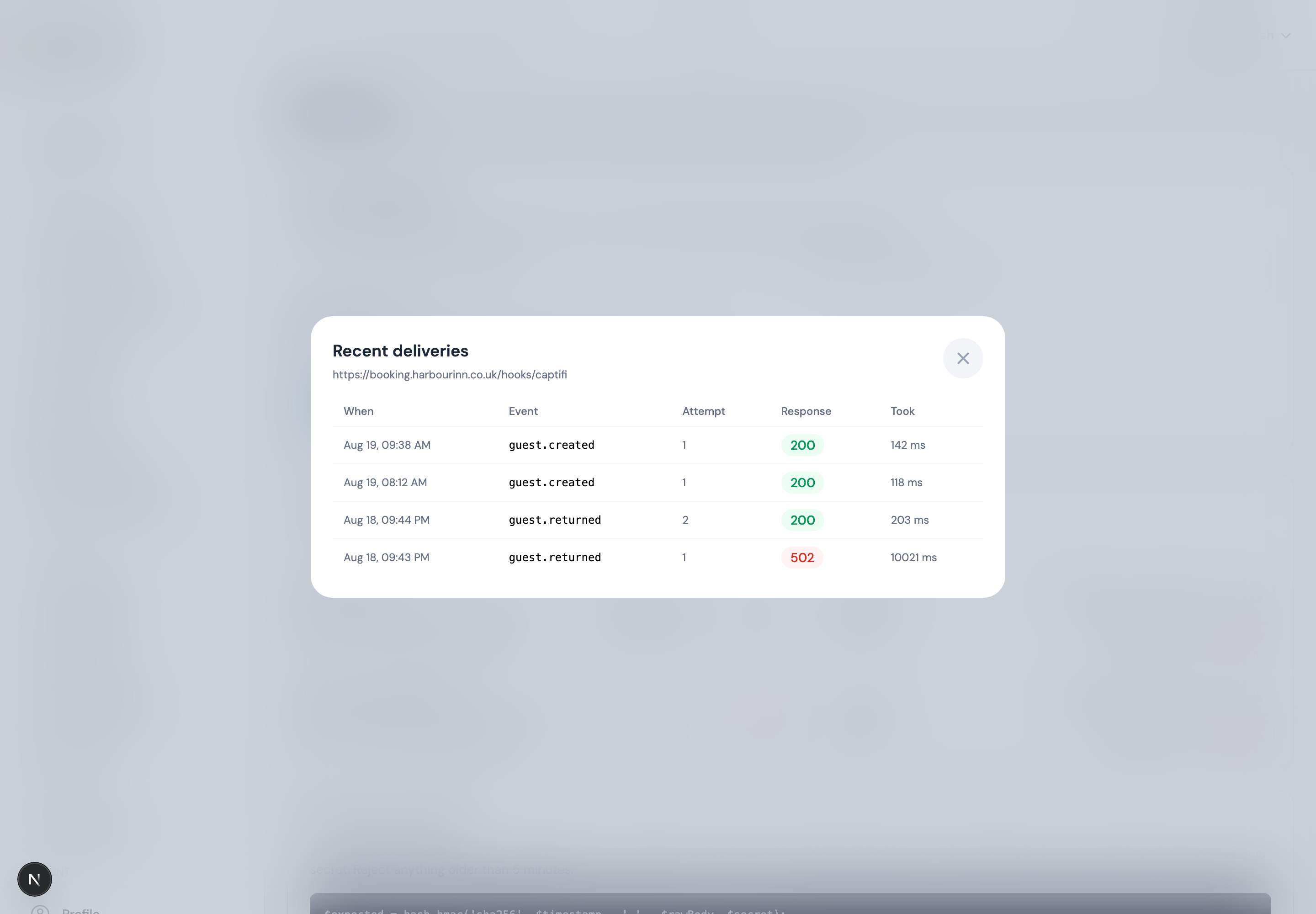
Every attempt is recorded with the response code, how long your server took, and any error. It is the fastest way to answer "did CaptiFi send it, or did my server reject it?". Attempts are kept for 30 days.
Rotating a secret
Rotate secret issues a new signing secret immediately. Anything still using the old one will start failing verification, so change it in your own system first, or rotate during a quiet period.
Common problems
| Symptom | Likely cause |
|---|---|
| Signature never matches | You are verifying re-encoded JSON instead of the raw body |
| Nothing arrives | The endpoint is switched off, the event is not ticked, or your firewall is blocking us |
| Deliveries stop after a while | 15 consecutive failures switched the endpoint off, see the log for the responses |
| Same guest arrives twice | Expected on a retry: de-duplicate on the event id |
| 403 on the Webhooks page | Webhooks need the Growth plan or above |
Your responsibilities under GDPR
Webhook payloads contain guest personal data. Once it reaches your systems you are the controller of that copy: your own retention, security and deletion obligations apply, and deleting a guest in CaptiFi does not delete your copy. See GDPR & Data Protection.
See also
- CaptiFi API: pull the same data on your own schedule
- Plans & Pricing: what each plan includes