
Appearance
Multi-Venue Management
Manage guest WiFi across all your locations from a single CaptiFi dashboard.
Pricing: Every plan includes one venue. Add as many more as you need for £25/month each, on any plan — charged from the day you add the venue (prorated) and removed from your bill when you delete it. The Multi-Site plan adds the multi-venue dashboard, group analytics, and higher guest allowances — see Plans & Pricing.
Overview
If you operate multiple venues — a restaurant group, hotel chain, franchise, or managed portfolio — you can:
- See every venue at a glance from a single login
- Compare guest analytics and performance across locations
- Give each venue its own splash page, or copy one design across all of them
- Run centralised or venue-specific email campaigns
- Manage access points, vouchers, and Paid WiFi per venue
Adding a New Venue
- Log in to my.captifi.io
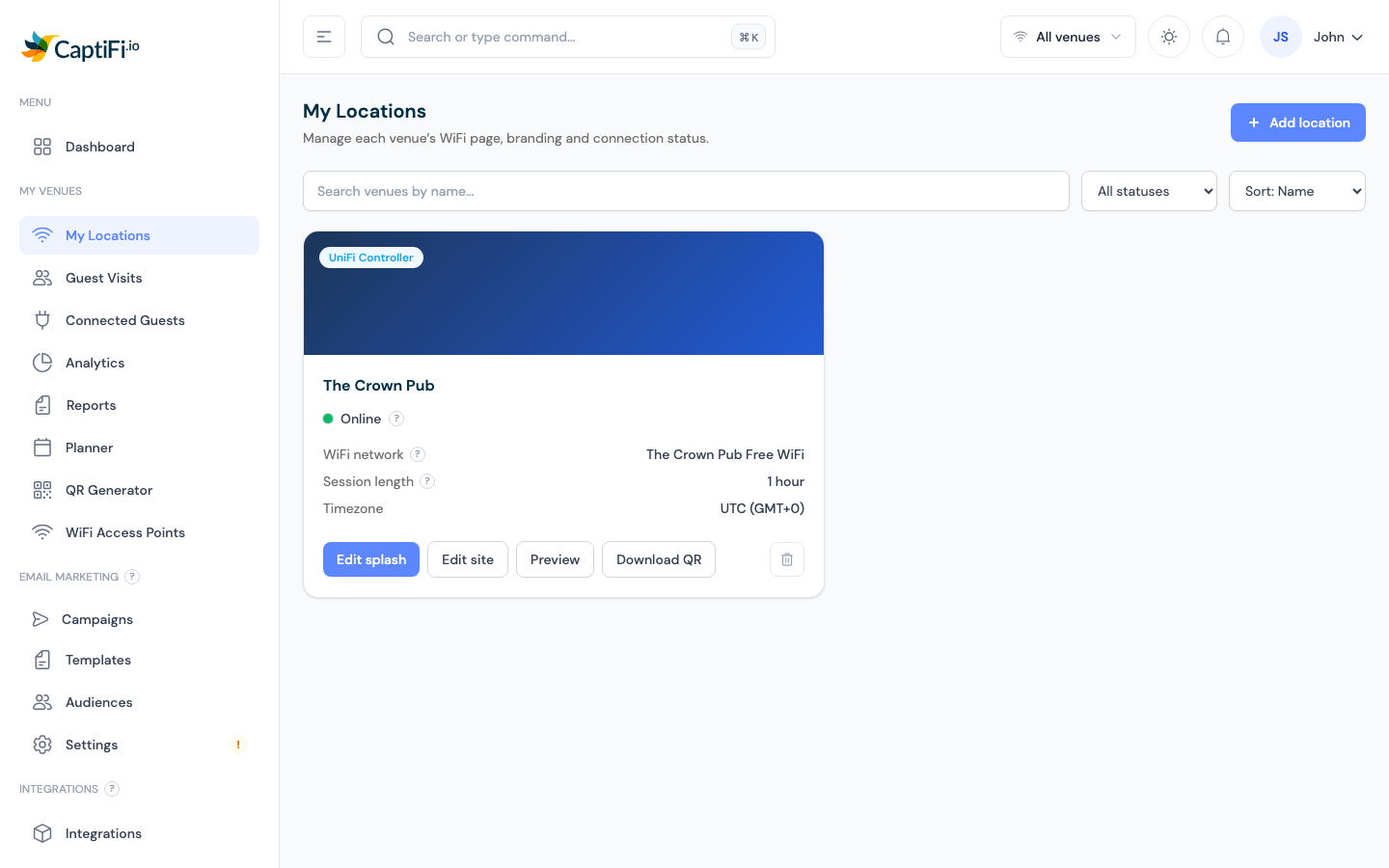
- Go to My Venues → My Locations
- Click Add location (top right)
- The wizard asks:
- What WiFi hardware is at this venue? — CaptiFi Plug & Play, UniFi, TP-Link Omada, Cisco WLC, Aruba Instant On, Ruckus, or Cisco Meraki
- Venue details — name, venue type, and timezone (plus hardware-specific steps, e.g. UniFi connection or device delivery)
- Click Add venue
The wizard shows the billing note before you commit: an additional location beyond the one included in your plan adds £25/month, charged from today and prorated to your billing date.
After creating the venue, set up its hardware (device activation or controller connection), design its splash page, and it's live.
WiFi Settings (Edit site)
Each venue's core WiFi settings live in the Edit site panel. On My Locations, click Edit site on the venue's card, change what you need, then click Save changes.
- WiFi network name (SSID) - the name guests see when they pick a network. By default it is based on your venue name. On plug-and-play devices the change takes effect within about 60 seconds.
- Session length - how long a guest stays online before they see the splash page again. Enter a number and pick a unit (minutes, hours, or days, up to 365 days), or choose Unlimited. This applies to your whole venue, whichever splash design is live; the same setting also appears in the splash builder's Advanced section.
Guest bandwidth limits
Bandwidth limits stop a few heavy users from slowing down everyone else. You can cap each guest's speed, their total data per session, or both.
- Open My Locations → Edit site
- Turn on Limit guest bandwidth
- Set any of the following, then click Save changes:
- Download speed (Mbps) - the fastest each guest can download. Leave blank for no download limit.
- Upload speed (Mbps) - the fastest each guest can upload. Leave blank for no upload limit.
- Data allowance per guest (MB) - the total a guest can use in a single session. Leave blank for unlimited data.
Limits apply per guest, not across the whole venue, so every guest gets the same allowance. The data allowance is per session: it resets when the guest's session expires (based on the session length above) and they reconnect through the splash page.
Sensible starting points
For a busy cafe or pub, 5 to 10 Mbps download and 2 to 5 Mbps upload keeps browsing, maps, and messaging smooth while preventing large downloads from hogging the line. Leave the data allowance blank unless you notice a small number of guests using very large amounts.
Enforcement depends on your WiFi hardware
Bandwidth limits are enforced on:
- UniFi (controller login or local API key)
- CaptiFi plug-and-play devices
- RADIUS-based systems: Aruba Instant On, Cisco, and Ruckus
They are not yet enforced on:
- TP-Link Omada
- Cisco Meraki
- Cloud-only UniFi (Site Manager) setups
On the hardware in the second list your limits are saved but have no effect yet, and the Edit site panel shows a note telling you so. Enforcement for these platforms is on the way.
Classic dashboard
The same WiFi settings, including guest bandwidth limits, are available in the classic dashboard at app.captifi.io under the venue's WiFi settings.
Selling faster WiFi?
If your venue uses Paid WiFi, each pass can carry its own download and upload speed that overrides this venue-wide limit for that guest, so the venue-wide limit becomes your free tier. See Speed Tiers.
Switching Between Venues
Use the venue switcher in the top bar — pick "All venues" for aggregate numbers or a single venue to focus. Every page (dashboard, guests, analytics, access points) follows your selection.
Per-Venue vs Shared
| Setting | How it works |
|---|---|
| Splash page design | Per venue — use Copy design on a venue card to clone one venue's design to another |
| WiFi network name, session length & guest bandwidth limits | Per venue, in My Locations → Edit site |
| Guest data & analytics | Stored per venue; viewable aggregated or filtered |
| Email campaigns | Target all venues or a single venue in the campaign wizard |
| Integrations (Google Reviews, Mailchimp, Twilio, etc.) | Connected once, enabled and configured per venue |
| Vouchers & Paid WiFi | Configured per venue |
| Team members & billing | Account-wide |
Comparing Venues
- The Analytics page includes a Top Venues comparison when you have more than one location
- Compare opt-in rates, new vs returning ratios, and busiest hours to spot which locations need attention
- Reports generates a monthly PDF per venue for stakeholders
Removing a Venue
On My Locations, click the bin icon on the venue's card and confirm. The venue disappears from your dashboard, the £25/month charge stops (unused time is credited to your next invoice), and its guest history is retained — support can restore the venue if needed.
Troubleshooting
| Issue | Possible Cause | Solution |
|---|---|---|
| Venue missing from analytics | No connected hardware yet | Ensure at least one access point is Online and assigned to the venue |
| Guest data under the wrong venue | AP assigned to the wrong venue | Check the AP's venue under WiFi Access Points; contact support to reassign |
| Unexpected charge after adding a venue | Extra-site billing | Each venue beyond your included one is £25/month, prorated — see Plans & Pricing |
| Can't add a venue | Permission or billing issue | Team members need the right permissions; check Billing for any payment problems |
Related Features
- Guest Analytics — per-venue and aggregated views
- Splash Page Builder — per-venue designs
- Plans & Pricing — what's included in each plan