
Appearance
Managing Your Subscription
Everything you need to know about managing your CaptiFi subscription.
The Billing Page
- Log in to my.captifi.io
- Go to Account → Billing in the sidebar
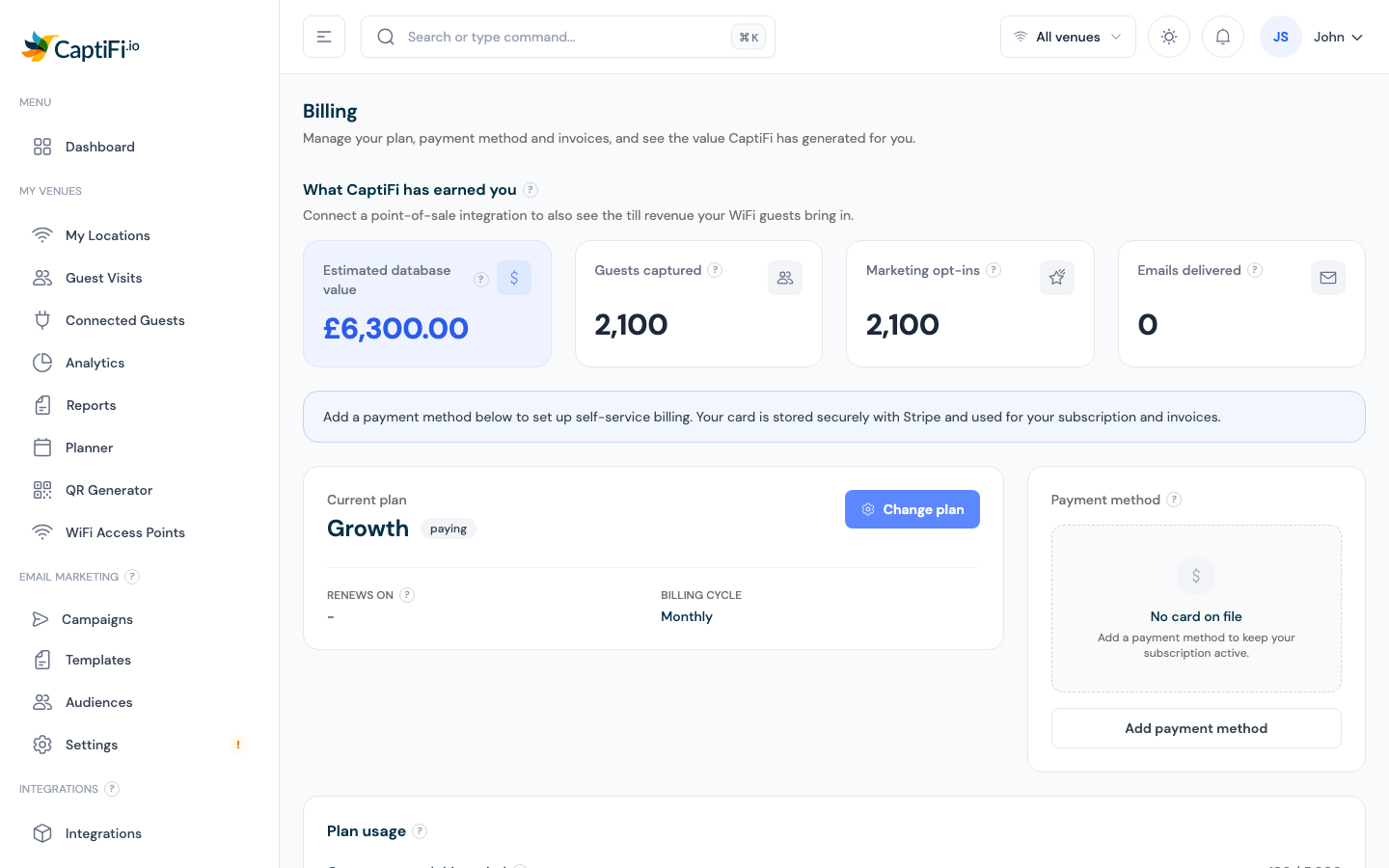
Here you can see:
- What CaptiFi has earned you — attributed revenue, guests captured, opt-ins, and emails delivered
- Current plan — plan name, status, price, and your renewal date
- Payment method — the card on file
- Plan usage — guests captured and marketing emails used this period, with the date your allowances reset
- Invoices — your billing history with PDF downloads
Team members
Billing is only visible to the account owner (and team members granted billing access). Others see "Billing is managed by your account owner".
Changing Your Plan
- On the Billing page, click Change plan
- You're taken to the secure Stripe billing portal to pick your new plan
Upgrades take effect immediately (prorated); downgrades apply at the end of the current billing period. See Plans & Pricing for what's in each plan.
Updating Your Payment Method
- On the Billing page, click Update payment method (or Add payment method)
- Enter the new card in the secure Stripe portal
Card details go straight to Stripe — CaptiFi never stores them.
Viewing Invoices
The Invoices table on the Billing page lists every invoice with its date, amount, and status. Click Download for a PDF, or open the Stripe billing portal to see your complete history.
Adding Extra Venues
Every plan includes one venue. Additional venues are £25/month each and you add them yourself:
- Go to My Venues → My Locations
- Click Add location and follow the wizard
The charge is prorated from the day you add the venue, and removed (with credit for unused time) when you delete it. See Multi-Venue Management.
Guest Allowances
Each plan includes a monthly guest allowance (1,000 on Essentials, 5,000 on Growth, 15,000 on Multi-Site). Track where you are on the Plan usage card.
The allowance is always monthly and resets on your own billing day each month. If you pay annually, that does not change: you still get your monthly allowance back on the same day of every month, and the Allowances reset on date on the Plan usage card shows the next reset. Only unused guest capacity does not roll over.
If you reach your monthly allowance, new guest sign-ins are paused until the allowance resets on your next billing day. Existing guests already connected are not affected. If you are regularly close to the limit, upgrading gets you more headroom plus extra features, and takes effect immediately.
Trial
During your 30-day trial the Billing page shows the days remaining and an Add payment method shortcut. Your subscription starts automatically when the trial ends; cancel before then and you pay nothing.
Card reminder emails
If there is no card on your account yet, CaptiFi emails you before the trial ends so your guest WiFi is never interrupted:
- around two weeks before your trial ends
- around one week before
- a final reminder about two days before
Each email shows your trial end date, the days remaining and the guest contacts you have collected so far, and includes a secure one-click link that takes you straight to Stripe checkout to add your card. No login is needed. The link is personal to you and expires after 14 days; if it has expired, log in and open Billing instead.
You are not charged when you add the card: your first payment is only taken after the trial ends, and you can cancel at any time before then without paying anything. Once a card is on your account, the reminders stop.
If your trial ends before a card is added, your account is paused and the trial-ended email includes the same secure link so you can reactivate in one click.
Cancelling
See Cancellation & Returns — cancellation is self-serve from the Billing page, with no notice period.