
Appearance
Partner Earnings
The Earnings page gives partners a live view of the money side of their CaptiFi business. What it shows follows your partner programme: reseller and white-label partners see their wholesale statement (what CaptiFi bills you, what you charge your clients, and the margin you keep), and referral partners see their referral commission. See Partner Programme Options for how the models compare.
Where to Find It
- Log in to my.captifi.io
- Go to Partner → Earnings in the sidebar (partner accounts only; the view you see follows your programme)
Two Views, One Page
The page has two views and you do not choose between them: the right one follows your partner programme automatically. Reseller and white-label partners get the wholesale view. Referral partners get the referral view.
Your Currency
Your partner account has one currency, set when you join, and the Earnings page and your monthly statements show everything in it. Harbour Networks in the examples below is a GBP partner, so its figures are in pounds; a US partner sees the same page in dollars. If your referred clients pay CaptiFi in other currencies, those commissions are not converted: they appear on the page in their own clearly labelled sections (for example "Earnings in USD"), with the same tiles, chart and per-client breakdown, and they are paid out separately per currency.
The Wholesale View (Resellers and White Label)
The Tiles
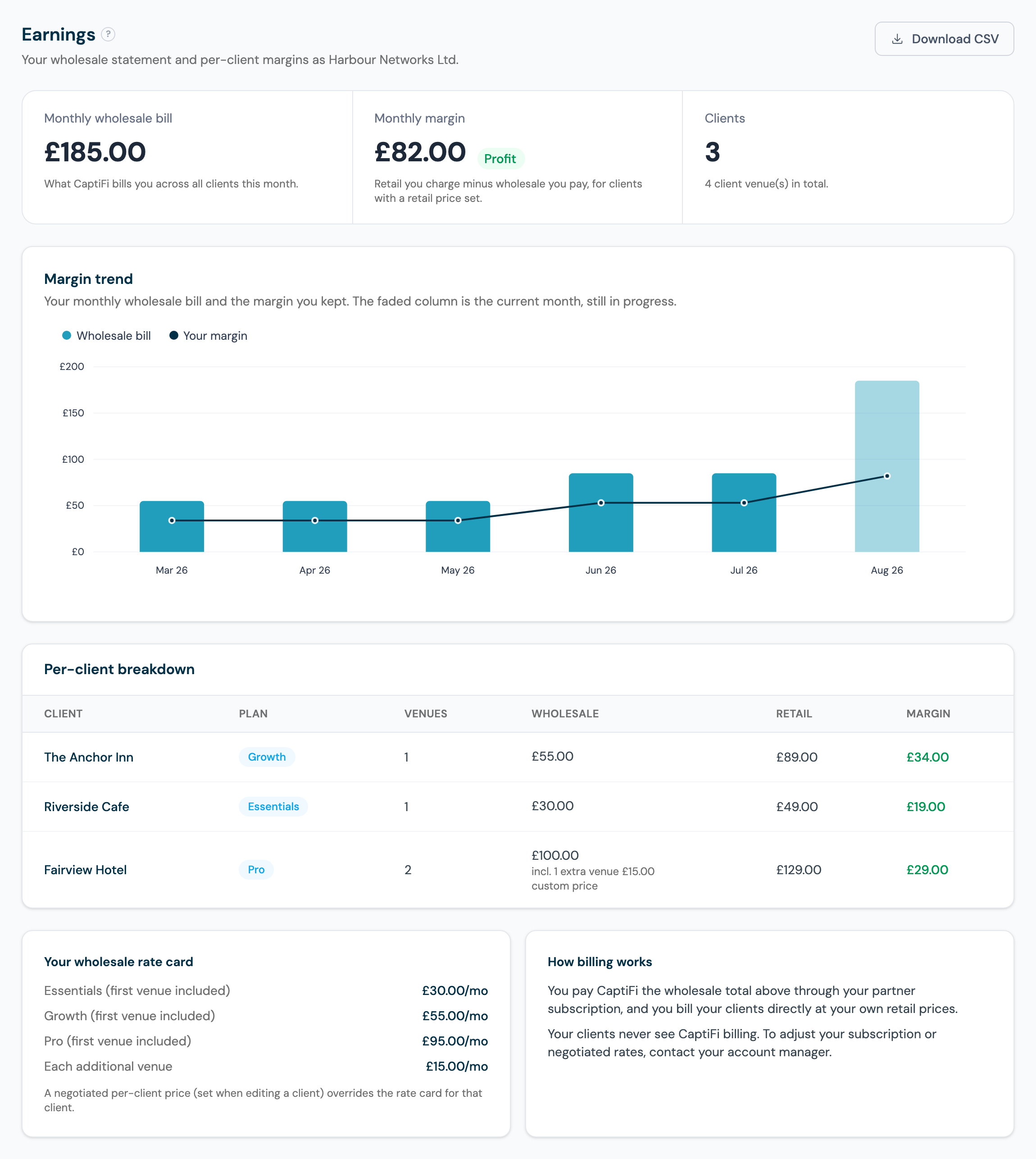
- Monthly wholesale bill: the total CaptiFi bills you across all clients this month. Harbour Networks above owes £185.00 for the month: £55 + £30 + £100 across its three clients. If your partner agreement includes a minimum monthly fee, the total never drops below it.
- Monthly margin: the retail you charge minus the wholesale you pay, across every client with a retail price set, with a profit or loss badge. Harbour Networks keeps £82.00 this month.
- Clients: how many client businesses are on your bill, with the total venue count underneath.
Margin Trend
The chart shows a 12-month history of your wholesale bill (columns) and the margin you kept (line), built from your monthly statements; the faded column is the current month, still in progress. A rising bill with a flat margin line is the chart telling you to revisit your retail prices.
Per-Client Breakdown
One row per client:
- Plan: the CaptiFi plan you have put the client on (Essentials, Growth or Pro).
- Venues: how many locations the client has. Wholesale includes the extra-venue rate for each venue beyond the client's first.
- Wholesale: what CaptiFi bills you for this client. Where a custom price applies, the row says so: Fairview Hotel above shows £100.00 made of a negotiated custom price plus one extra venue at £15.00.
- Retail: the monthly price you have recorded as charging the client, set on the Clients page.
- Margin: retail minus wholesale. The Anchor Inn on Growth shows the standard sums: £55.00 wholesale, £89.00 retail, £34.00 margin. A negative margin shows in red.
Clients with no plan set are flagged so you can price them: set their plan from the Clients page.
Your Rate Card and How Billing Works
The rate card panel shows your standard wholesale prices in your account currency, with the first venue included and a rate for each additional venue: for a GBP partner like Harbour Networks that is Essentials £30, Growth £55, Pro £95 per month and £15 per additional venue. The full rate card for every currency is in Partner Programme Options. If you have agreed a custom price for a client with your account manager, that price overrides the rate card for that client and the row shows a "custom price" marker.
You pay CaptiFi the wholesale total through your partner subscription, and you invoice your clients directly at your own retail prices. Your clients never see CaptiFi billing. To adjust your subscription, minimum fee or negotiated rates, contact your account manager.
The Referral View (Referral Partners)
The Tiles
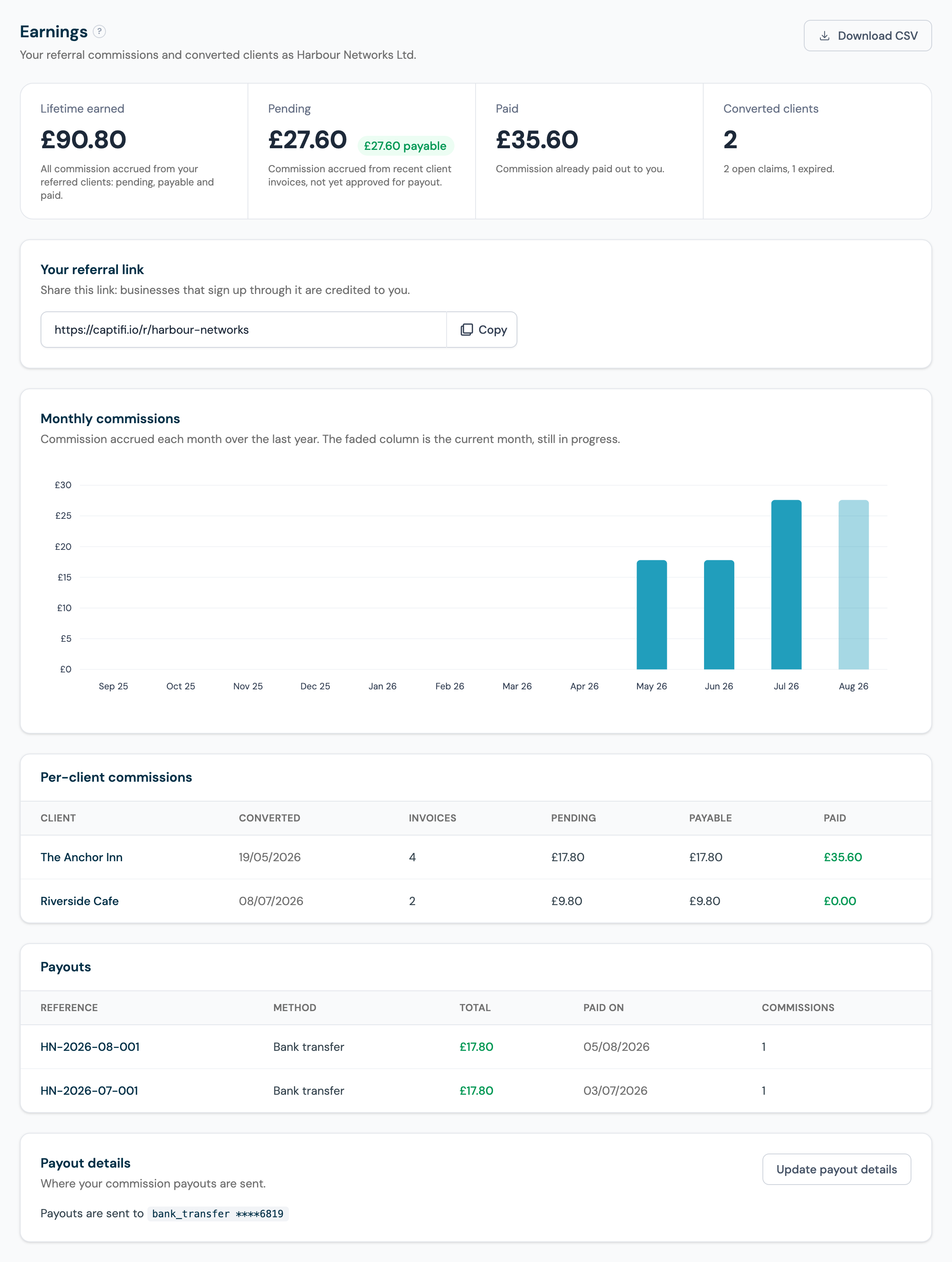
- Lifetime earned: all commission ever accrued from your referred clients, whatever its current stage. Harbour Networks above has earned £90.80 all-time.
- Pending: commission accrued from your clients' recent payments, not yet approved for payout, with a badge showing how much has already been approved (payable). The pending, payable and paid stages are explained in Partner Payouts.
- Paid: commission already paid out to you.
- Converted clients: how many referrals have become paying customers, with your open and expired claims noted underneath. Register and track referrals on the Referrals page.
Monthly Commissions Chart
Commission accrued each month over the last year, so you can watch your recurring income build; the faded column is the current month, still in progress. Because commission is 20% of what your clients pay, the chart steps up every time a referral converts: in the example, Harbour Networks' May and June columns are £17.80 (The Anchor Inn alone at £89 Growth) and July steps up to £27.60 when Riverside Cafe (£49 Essentials, earning £9.80) starts paying too.
Per-Client Commissions
One row per converted client:
- Converted: the date the referral became a customer.
- Invoices: how many of their payments have earned you commission so far.
- Pending, Payable and Paid: that client's commission at each stage of the payout lifecycle. Reading The Anchor Inn's row above: four £89 invoices have earned £17.80 each, of which £35.60 has been paid out, £17.80 is approved and waiting for the next payout, and £17.80 is newly accrued.
Payouts and Payout Details
The bottom of the page lists every payout CaptiFi has recorded, with the reference, method, total, date paid and how many commission entries it settled, followed by the payout details section showing where your money is sent. Both are covered step by step in the Partner Payouts guide.
The Monthly Statement Email
On the 1st of each month CaptiFi emails your partner statement for the month just ended to your support address (or your account email if no support address is set):
- Resellers and white label get the wholesale statement: every client's plan, venues, wholesale, retail and margin, plus your monthly total. It is the same breakdown as this page, so you can invoice your clients without logging in.
- Referral partners get the commission statement: each converted client's commission for the month and any payouts recorded during it, with their references. If your payout details are missing, the statement includes a reminder to add them.
CSV Exports
Download CSV (top right) exports your full statement:
- The referral export lists each converted client with their conversion date, invoice count, and pending, payable and paid commission, plus a totals row: a clean file for your own bookkeeping.
- The wholesale export lists each client's plan, venues, wholesale, extra venue charges, subtotal, retail and margin, with totals, and notes when your minimum monthly fee applied. Attach a client's row to your own invoice to that client, or hand the whole file to your accountant.