
Appearance
Account & Settings
Account settings in the new dashboard live in three places in the sidebar's Account section: Profile (you and your business), Team (colleagues and permissions), and Billing (plan and payments).
Profile
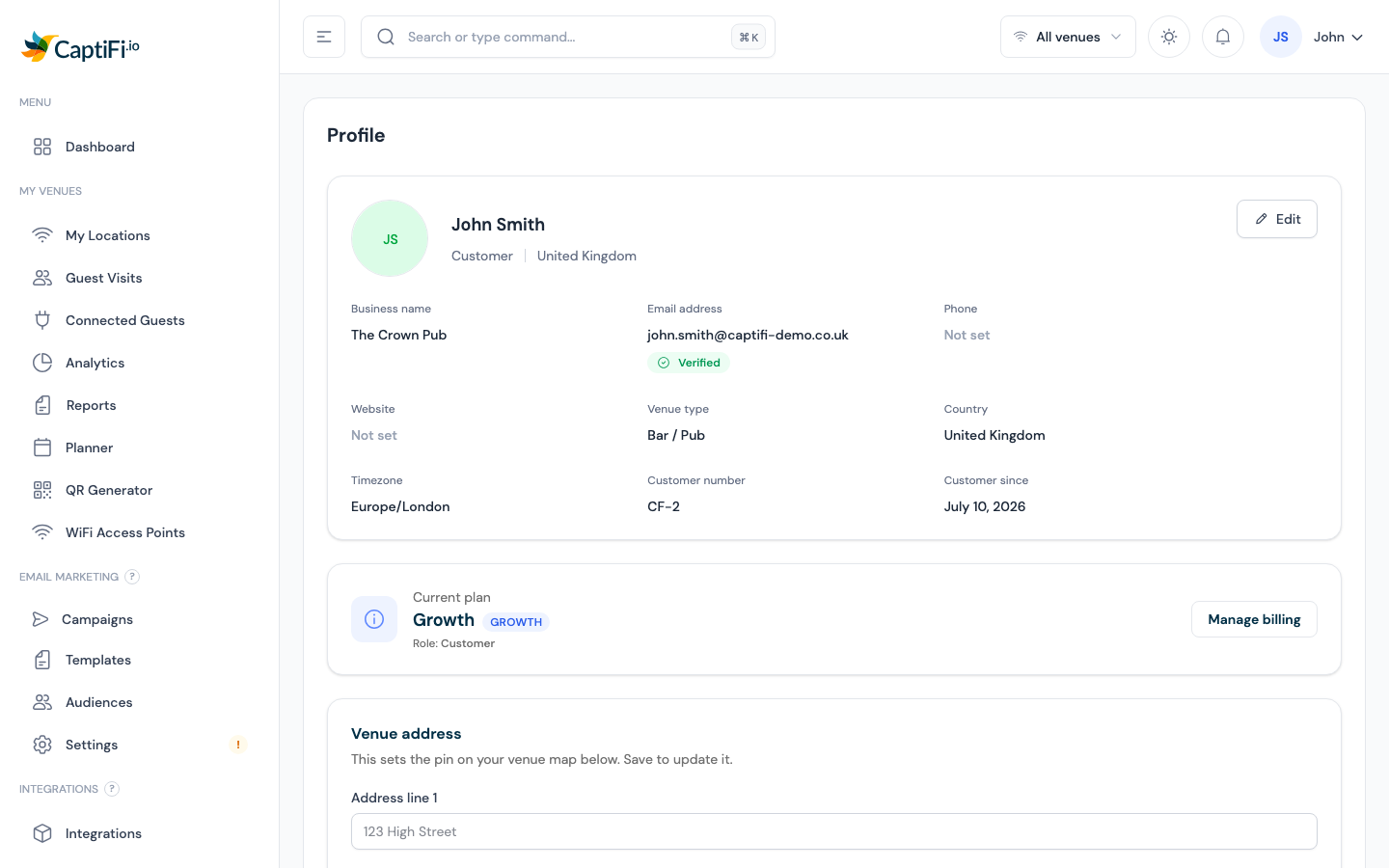
- Log in to my.captifi.io
- Go to Account → Profile in the sidebar
Personal & Business Information
Your profile card shows your business name, email (with a Verified/Unverified badge), phone, website, venue type, country, timezone, and customer number. To change any of it:
- Click Edit on the profile card
- Update any of: Full name, Business name, Email address, Phone, Website, Venue type, Country, Timezone — plus your profile photo
- Click Save changes
Changing your email
Changing your email address sends a verification link to the new address — click it to confirm. You can also hit Resend verification email from the profile card at any time.
Venue Address
The Venue address card sets your venue's location (and map pin). Pick the venue (if you have several), fill in Address line 1/2, City / town, State / region, Postal code, and Country, then click Save address. Your venue's timezone is derived automatically from the address.
Change Password
On the same page, the Change password card asks for your Current password, a New password (minimum 8 characters), and confirmation. Click Update password.
Forgotten your password? Use Forgot password? on the login page to receive a reset link by email.
Two-Factor Authentication (2FA)
Protect your account with an extra layer of security, using any authenticator app (Google Authenticator, Authy, 1Password, Microsoft Authenticator).
Setting Up 2FA
- Go to Account → Profile and find the Two-factor authentication card
- Click Enable 2FA
- Scan the QR code with your authenticator app (or copy the secret manually)
- Enter the 6-digit code from the app and click Verify and activate
- Save your recovery codes — they're shown once. Store them somewhere safe (a password manager or printed copy)
Signing In With 2FA
After entering your password you'll be asked for a 6-digit code. You can tick Trust this device for 30 days to skip the step on a browser you own, and use a recovery code instead if you don't have your phone.
Managing 2FA
- Trusted devices — the 2FA card lists browsers you've trusted; revoke any of them (or all) at any time
- Disable 2FA — requires your current password
- Lost access? — if you lose your authenticator and recovery codes, contact hello@captifi.io and we'll verify your identity to restore access
Notifications
The bell icon in the top bar shows recent events across your venues, campaigns, and reviews. Click View all notifications for the full history with All/Unread/Read tabs and a Mark all read button.
Email and SMS alert preferences
Alert preferences (monthly digest emails, access-point up/down alerts, SMS alerts) are currently managed in the classic dashboard at app.captifi.io under Account Settings → the Notifications tab.
Data & Privacy
Exporting Your Data
- Go to My Venues → Guest Visits
- Pick the venue you want (via the venue switcher)
- Click Export all (CSV) to download the complete guest log
GDPR Tools
From Guest Visits you can select guests and use the bulk actions:
- Anonymise (GDPR) — strips a guest's personal details while keeping the anonymous visit record
- Delete (GDPR) — permanently removes selected guests and their data
Both actions ask you to type a confirmation before running. Marketing consent is captured on your splash page, and every marketing email includes an unsubscribe link automatically. See GDPR Best Practices for detailed guidance.
Related Pages
- Team Members — invite colleagues and control what they can access
- Managing Your Subscription — plan, payment method, and invoices
- Plans & Pricing — compare plans
- Guest Analytics — the data behind your dashboard