
Appearance
Partner Referrals
If your account is on CaptiFi's referral programme, the Referrals page is where you introduce new clients and make sure every one of them is credited to you. It shows your personal referral link and lets you register a prospective client before they sign up, so your claim is protected however they reach us. Commission from converted referrals appears on the Earnings page. For how the referral model compares with reseller and white label, see Partner Programme Options.
Where to Find It
- Log in to my.captifi.io
- Go to Partner → Referrals in the sidebar (referral partner accounts only)
What It Shows
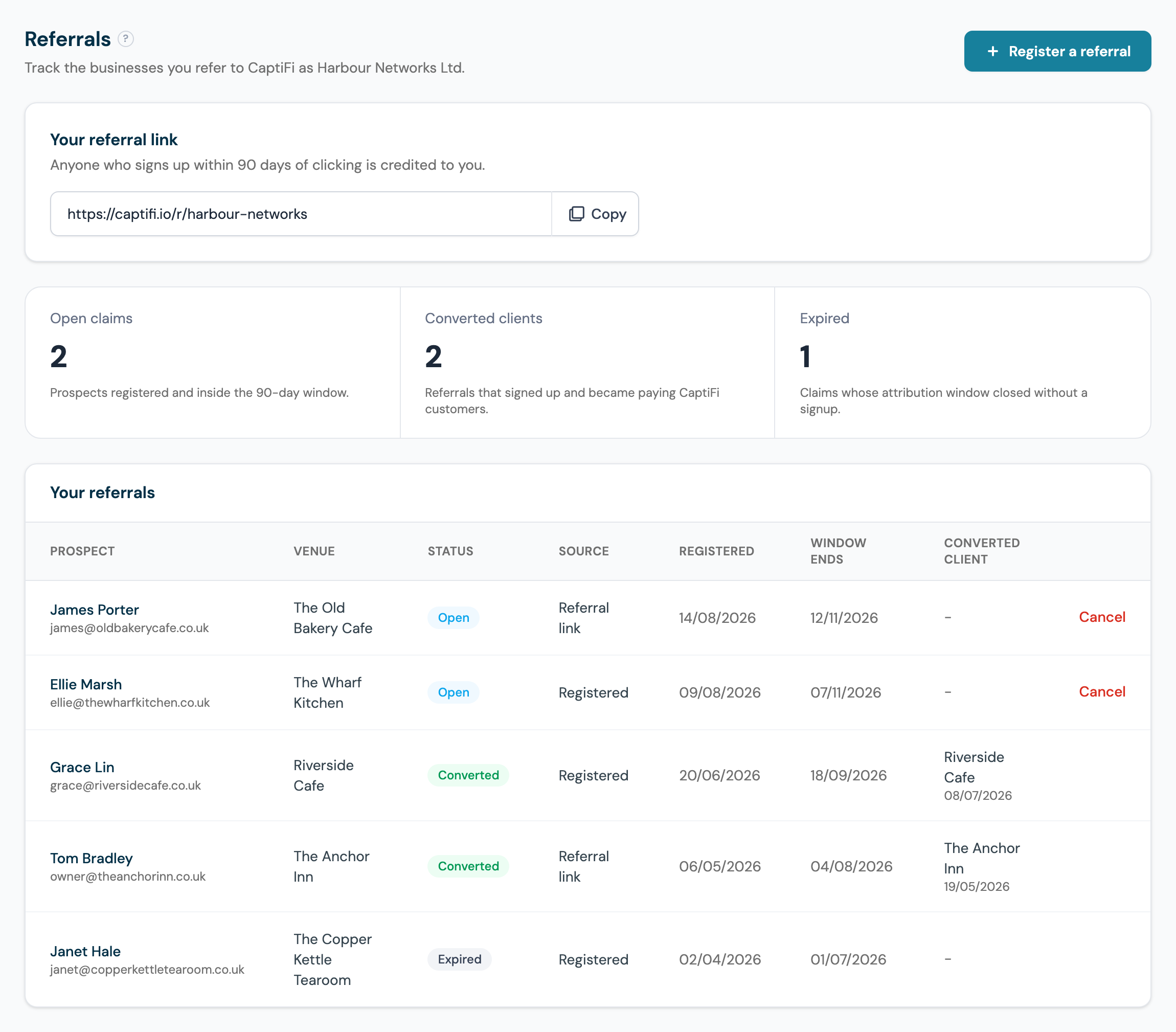
- Your referral link: your personal signup link, such as captifi.io/r/harbour-networks, with a copy button. Anyone who signs up within 90 days of clicking it is credited to you.
- Claim counters: open claims still inside their 90-day window, converted clients now earning you commission, and claims that expired without a signup.
- Your referrals table: every claim with the prospect's name and email, venue, status, how the claim was made (referral link or registered by you), the date registered, when the window ends, and for converted claims the client it became and the conversion date.
In the example above, Harbour Networks has two open claims waiting on signups, two converted clients (The Anchor Inn and Riverside Cafe, both now paying commission every month), and one claim that expired unclaimed.
Your Referral Link
Your link takes prospects to a landing page carrying your name and logo, with a button that starts a CaptiFi signup. Anyone who signs up within 90 days of clicking your link is credited to you, even if they leave the page and subscribe directly on captifi.io later.
Ways partners put the link to work:
- Add it to your email signature, so every conversation carries it passively.
- Put it behind a "Guest WiFi" button on your own website and social profiles.
- Include it in proposals and quotes: a prospect who clicks to read about CaptiFi is already attributed to you.
- Pair it with a splash page demo: send the demo to show the product, and the link to sign up.
The link never expires and there is no limit on how many prospects can use it.
Registering a Referral Before They Sign Up
If you have introduced a client in person or by email, register them before they sign up so the introduction is on record:
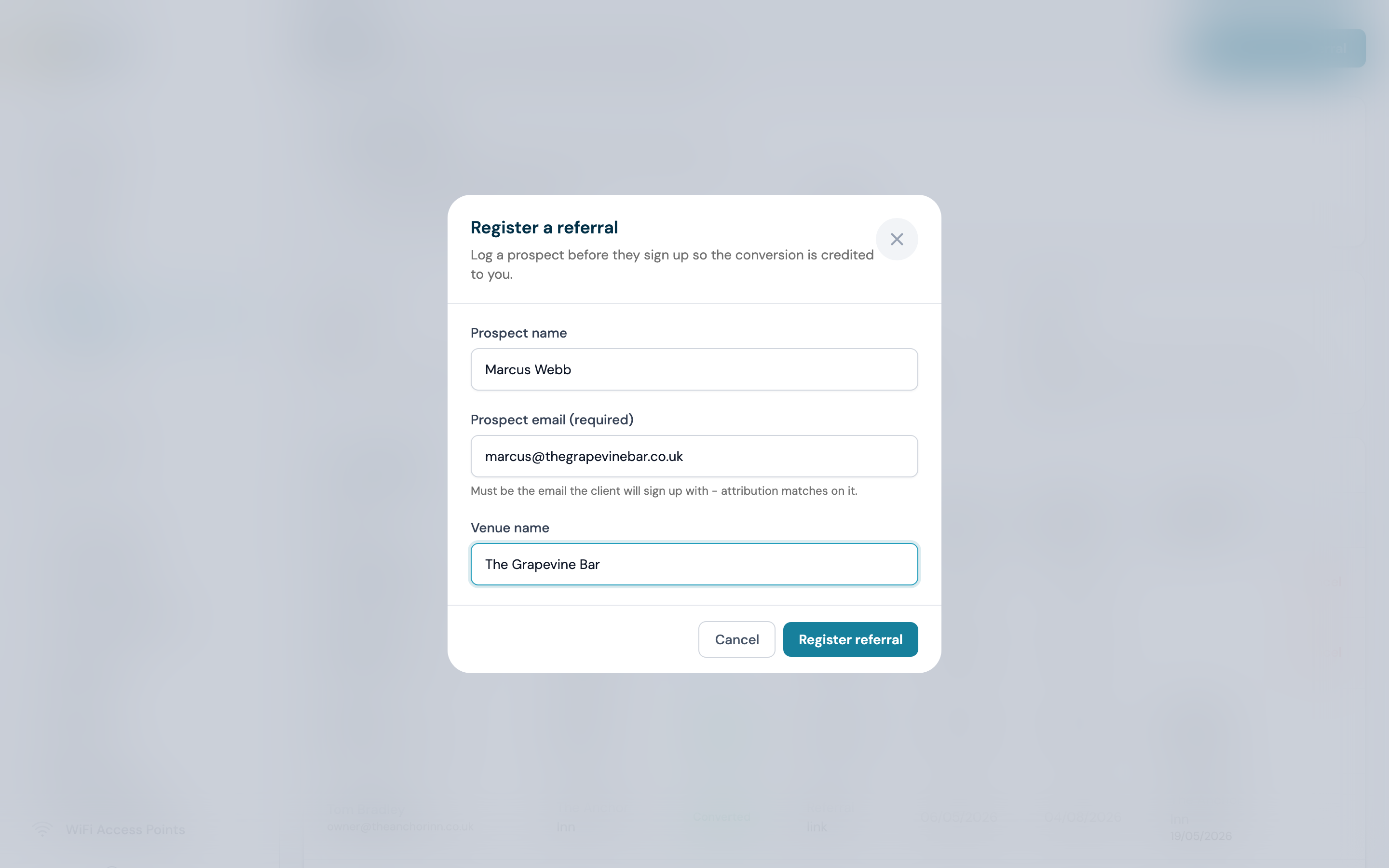
- Click Register a referral
- Enter the prospect's name and email address. The email must be the one the client will use to sign up: it is how CaptiFi matches their signup to your claim
- Optionally add the venue name
- Click Register referral
Registering holds your claim for 90 days. The first registration wins: if another partner has already registered the same email address, your registration is declined (without revealing who holds the claim). A registered referral also takes precedence over link clicks, so registering a prospect protects your claim even if they later reach the signup another way.
How Conversion Works
A claim converts when the person you referred becomes a genuine new CaptiFi customer. In plain words:
- It must be a real signup. The prospect creates their own CaptiFi account and starts as a customer. Nothing else counts: being invited to someone's venue as a team member does not convert a claim, and neither does filling in a marketing form, downloading a report or opening a demo. This protects you too: nobody can burn your claim by submitting your prospect's email somewhere.
- The email has to match. For registered claims, CaptiFi matches the signup email against the email you registered, exactly. For link signups, the click is matched to the account that signs up within the window.
- First registration wins. One email address can only ever be claimed by one partner at a time, and a registered claim beats a later link click.
- The window is 90 days. From the day you register the claim (or the prospect clicks your link) they have 90 days to sign up. The Window ends column shows the exact date for each claim.
- Converted is forever. Once a claim converts, the client is attributed to you for their lifetime as a CaptiFi customer. There is no expiry on a converted claim and no further action needed from you.
Matching runs automatically around the clock, so a conversion normally appears on this page within an hour of the client signing up.
Claim Statuses
- Open: the claim is registered and inside its 90-day window, waiting for the client to sign up.
- Converted: the client signed up and is now attributed to you for their lifetime as a CaptiFi customer.
- Expired: 90 days passed without a signup. The email address becomes free to register again.
- Cancelled: you cancelled the claim before it converted. The email address becomes free to register again.
Cancelling a Claim
Use Cancel on an open claim's row. Only open claims can be cancelled: converted claims are permanent, and expired claims have already been released. Cancel a claim when you registered the wrong email address or the introduction fell through. Cancelling frees the email address, so you can immediately re-register the corrected one.
What Happens on Conversion
When a referral converts, the client is attributed to you for their lifetime as a CaptiFi customer. You earn 20% of every payment they make to CaptiFi from then on, excluding refunds, with payouts made monthly. CaptiFi handles the client's sales, billing and support, so there is nothing for you to run. Your converted clients, commission and payout history are on the Earnings page, and the money side is explained step by step in Partner Payouts.
Taking the converted clients above as an example: The Anchor Inn signed up on the Growth plan at £89 per month, so every Anchor Inn invoice earns Harbour Networks £17.80; Riverside Cafe on Essentials at £49 per month earns £9.80 per invoice.
Troubleshooting: My Referral Has Not Converted
Work through these in order:
- Check the email matches exactly. The single most common cause: the claim says jane@venue.co.uk but the client signed up with jane.smith@gmail.com. The match is on the exact signup email. If the claim has not expired yet, cancel it and re-register with the address the client actually used, and the next matching run picks it up.
- Confirm the client actually signed up. A claim only converts on a real customer signup. If your contact was added to an existing CaptiFi account as a team member, or only filled in a form or opened a demo, there is nothing to convert yet.
- Check the window. Look at the Window ends date on the claim. If the status is Expired, the 90 days ran out before the signup: you can re-register the email if the deal is still alive, but a signup that happened after expiry is not attributed automatically.
- Give it an hour. Matching runs automatically and a fresh signup can take up to an hour to show as Converted.
- Contact support for a manual review. If the client definitely signed up in the window and the claim still shows Open, contact support with the claim email and the client's business name. CaptiFi can trace the signup and correct the attribution where the evidence supports it.