
Appearance
Partner Demo Maker
The Demo Maker lets partners generate a live, branded splash page demo for any prospect straight from the prospect's website. CaptiFi reads the site's logo, colours and business details and builds a shareable demo splash page you can send in your next email or show mid-call. Nothing sells guest WiFi like the prospect seeing their own brand on the login page.
Where to Find It
- Log in to my.captifi.io
- Go to Partner → Demos in the sidebar (partner accounts only)
Generating a Demo
- Click Generate demo
- Paste the prospect's website address
- Optionally set the venue name shown on the splash page
- Click generate. Building the demo usually takes 10 to 30 seconds
When it finishes you get a public demo link to share. If CaptiFi could not find a clear logo or brand colour on the site, the demo is still created and you see tips on what to tweak; you can also ask support to polish a demo before a big pitch.
Managing Your Demos
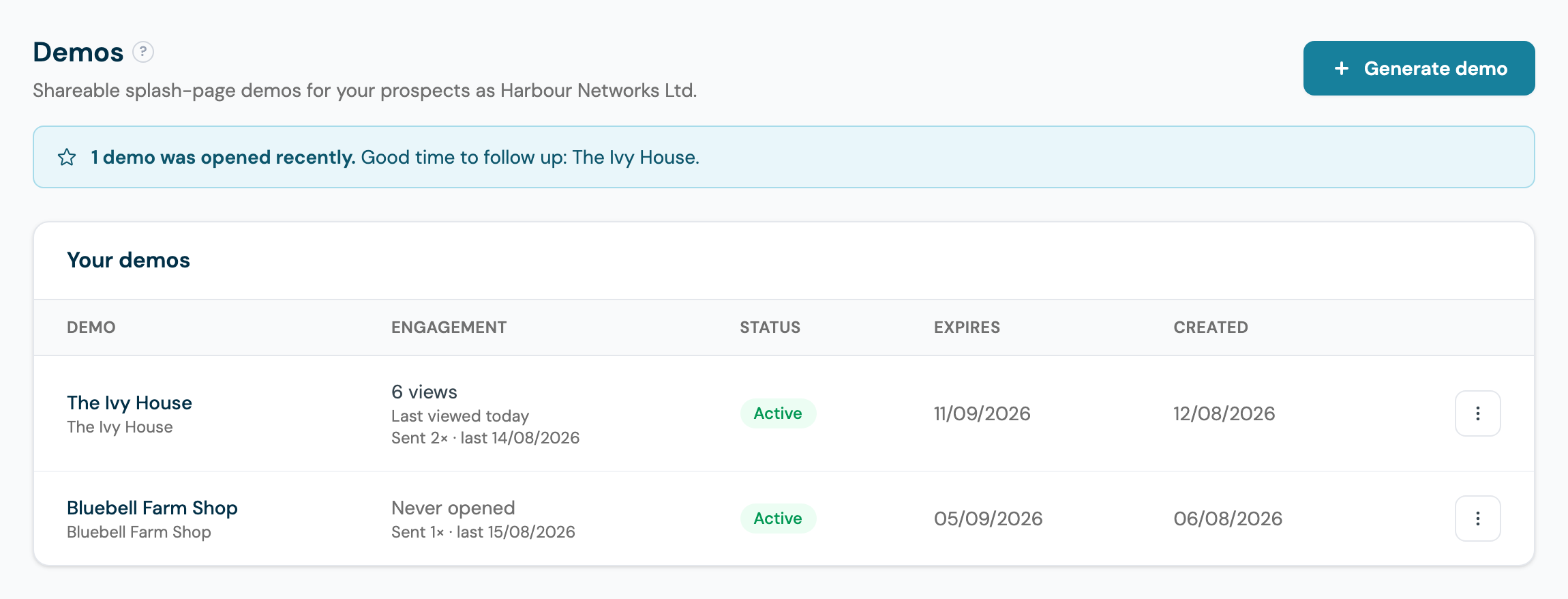
Your demo list shows each demo's views, active status and expiry date. From each demo's actions menu:
- Send by email emails the demo straight to your prospect with an optional personal message. White-label partners' emails carry their own branding
- Open previews the live demo page
- Copy link copies the shareable link
- Edit splash opens the demo in the full splash page builder, so you can tweak the logo, colours, text and layout before sending it to the prospect
- Convert to client turns a won prospect into a real client in one step: the form is prefilled from the demo, the demo's splash design is carried onto the client's first venue, and the demo is taken offline automatically
- Deactivate takes the demo offline while keeping it in your list
- Delete removes the demo permanently; the shared link stops working
Working Demos into Your Pitch
The Demo Maker earns its keep as a sales rhythm, not a one-off trick:
- Generate before the meeting. A demo takes under a minute to build, so make one for every prospect before you speak to them. Opening a call with "this is what your guests would see" on their own branding skips ten minutes of explanation.
- Send it after. Follow up the conversation with Send by email the same day, while the idea is fresh. The email carries the live link, so the prospect can tap it on their phone and experience the splash page exactly as a guest would.
- Follow up on the open. The Engagement column shows views, when the demo was last opened, and how many times you have sent it. The moment a prospect opens a demo for the first time, you get an email, and recently opened demos are highlighted in a banner at the top of the page, as in the screenshot above. An opened demo is a warm lead: that is the day to call, not next week.
- Polish the big ones. For a pitch that matters, use Edit splash first: fix a fuzzy logo, swap the background photo, correct the venue name. Two minutes of tidying reads as care to the prospect.
The 30-Day Expiry
Demos expire 30 days after they are created, and the expiry date shows against each demo in the list. An expired demo's link stops working. That is deliberate: a demo is a sales tool with a shelf life, not a permanent page, and expiry keeps stale branding from circulating. If a deal is still live as the date approaches, generate a fresh demo, which also resets the clock on the engagement signals.
When the Prospect Says Yes
What happens next depends on your programme:
- Resellers and white-label partners: use Convert to client on the demo. The Add client form opens prefilled from the demo, the splash design carries over to the client's first venue, and the demo is retired automatically. You are invoicing your new client minutes after the yes.
- Referral partners: register the referral with the email address the prospect will sign up with, then point them at your referral link. The demo did the selling; the registration makes sure the commission lands with you.
Good to Know
- Demos are watermark-free splash pages using the prospect's own branding, so they look like the finished product.
- Demo pages are public to anyone with the link but are not listed anywhere.
- Demos need no hardware and are unlimited, and they work during and after your partner demo licence.